Section 01
Why a harness beats a better prompt
Most designers try to fix weak agent output by writing a longer prompt. That helps for one session, but it does not create a repeatable way of working. The next task starts from zero again. The agent forgets the product, guesses the visual system, and falls back to common patterns it has seen everywhere else.
A design harness changes the starting point. It gives the agent a small operating environment: what the brand is, what the interface should feel like, which components exist, what not to do, which examples count as good, and which checks must pass before the work can be reviewed. The prompt then only has to carry the part that is genuinely new — the product problem and the judgment this specific screen needs.
The point is not to make the agent creative in the same way a designer is creative. The point is to stop wasting review cycles on preventable mistakes: wrong colors, invented spacing, generic cards, decorative gradients, inaccessible contrast, and layouts that ignore the product task. Every one of those mistakes is something you can encode once instead of correcting forever.
This article walks through the harness pattern in two passes. First, a real one: the harness that produces the site you are reading, file by file, with the actual audit commands and their output. Second, a portable one: the file structure, starter fragments, and prompts you can copy into your own project the same day.
Section 02
What a design harness contains
A useful harness has layers. Each layer answers a different kind of question. Persistent project instructions answer facts the agent should always know. A design-system file answers visual constraints. Skills answer procedures. Examples answer taste. Automated checks answer whether the output is ready for review.
The mistake is putting everything into one giant instruction file. That makes every session heavy and noisy, and the important rules drown in the optional ones. The better pattern is to keep always-loaded instructions short, then move longer workflows and examples into files that load on demand. Anthropic's Claude Code memory documentation makes the same argument from the tool side: persistent project memory should stay lean, while skills and referenced files carry the long material only when a task needs it.
The diagram below shows the five layers and, for each one, the real file that implements it in this site's repository and when that file enters the agent's context.
- Project rules: the smallest set of facts every agent needs before touching the repo.
- Design system: color, typography, spacing, layout, component, motion, voice, and anti-pattern rules.
- Skills: repeatable procedures for tasks such as prototype generation, visual QA, or design critique.
- Examples: screenshots, before-after notes, code snippets, and prompt patterns that teach taste through evidence.
- Checks: build, typecheck, lint, accessibility, visual comparison, and custom design audits.
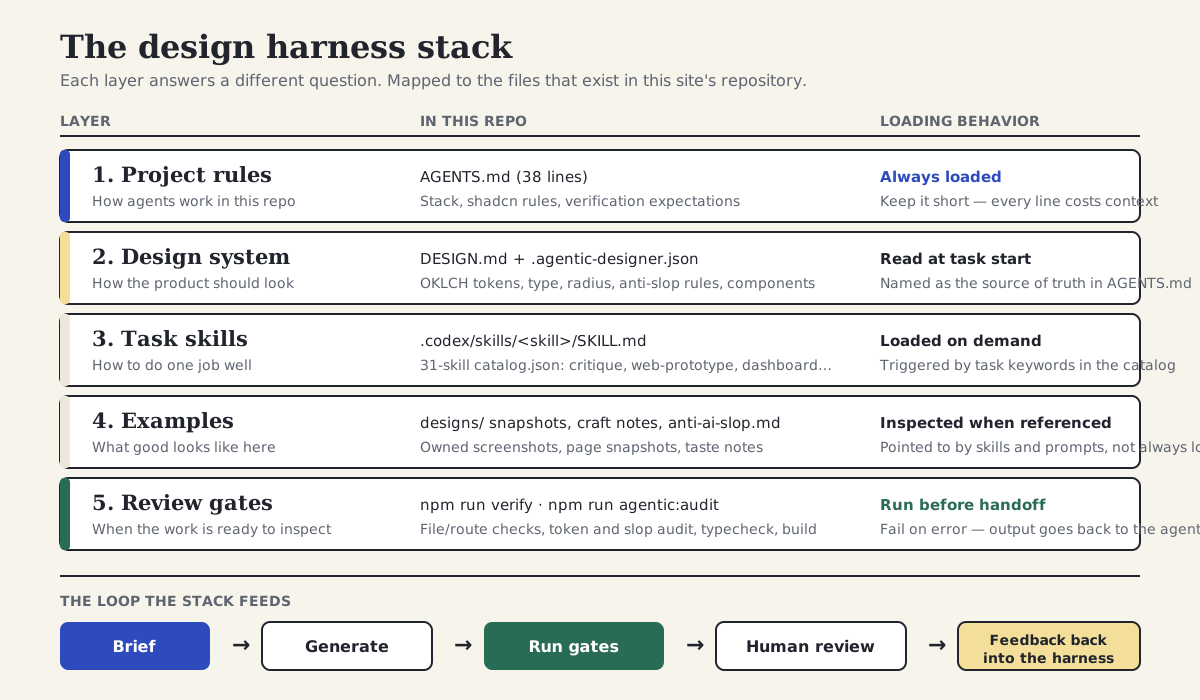
Five layers, the files that implement them in this repository, and when each one loads — feeding a brief, generate, gates, human review, feedback loop.
Section 03
What already exists publicly
This pattern is not a fantasy architecture. Every layer already exists in public tooling and public standards — they are just usually discussed separately: agent instruction files, skill folders, token pipelines, and design-system Markdown. The opportunity for designers is to combine them into one practical harness.
Two of the layers are now backed by stable, vendor-neutral references. AGENTS.md is a de facto open standard for project-level agent instructions, read by a long list of coding agents and documented at agents.md. And the Design Tokens Community Group specification reached its first stable version (2025.10) in October 2025, which means the token data layer of a harness can target a published format rather than a moving draft, with Style Dictionary v5 as the most established pipeline for turning those tokens into CSS variables and platform output.
The design-system-as-Markdown layer has also become a recognized public pattern. Collections such as awesome-design-md and awesome-design-skills gather dozens of DESIGN.md and SKILL.md files written for coding agents — useful as references for structure and tone, even though you should write your own rather than borrow another brand's rules. On the skills side, Anthropic publishes an official skills repository that shows the SKILL.md folder pattern with examples, scripts, and references kept beside a lean entry file. And if your stack is Tailwind plus shadcn/ui, the component library itself now ships agent affordances — an MCP server and published skills — so the components your harness points at are also legible to the agent.
- agents.md documents the AGENTS.md convention: scope, precedence, and the expectation that instructions include verification commands.
- The DTCG specification (stable since version 2025.10) defines the token format the data layer of a harness should target.
- Style Dictionary v5 transforms DTCG-format tokens into CSS variables and other platform outputs.
- awesome-design-md and awesome-design-skills collect public DESIGN.md and SKILL.md files you can study for structure.
- Claude Code's memory and skills documentation describe the layered loading model this article relies on: short persistent files, on-demand skills.
- The anthropics/skills repository is an inspectable set of official SKILL.md folders showing the progressive-disclosure pattern.
Projects to inspect
Section 04
The harness behind this site, file by file
The most honest case study available for this article is the repository that builds the page you are reading. The site runs the full pattern: a DESIGN.md design system, a short AGENTS.md, a small JSON config that names the active component library and brand, a catalog of thirty-one task skills, and two executable review gates wired into npm scripts. None of this is special infrastructure. It is a handful of Markdown files, one JSON file, and two commands.
DESIGN.md is the largest file in the harness, and it earns the space. It opens with identity — name, mood, metaphor — then defines color as OKLCH values mapped to shadcn semantic variables, typography with named font stacks and a numeric scale, spacing rules, an 8px radius ceiling, motion durations, and a component inventory that maps every reusable surface back to a real file in the repo. Crucially, it also contains explicit anti-pattern rules. The excerpt below is taken directly from the file.
Notice what the excerpt does not do. It does not say the design should feel premium or modern. Every line is either a value an agent can copy or a behavior an agent can check. The mood line exists, but it is followed immediately by the concrete decisions that express it.
# Design System: Agentic Design School

## 1. Identity
- **Mood**: clear, instructional, bookish, field-tested
- **Metaphor**: a design studio classroom with pinned diagrams, curriculum boards, and lab notes

## 2. Color
Colors map to shadcn semantic variables in `app/globals.css`.
- **Primary**: `oklch(0.43 0.17 263)` deep school blue for CTAs, active navigation, and system emphasis
- **Secondary**: `oklch(0.92 0.10 87)` warm school yellow for learning bands and badges
- **Accent**: `oklch(0.44 0.08 166)` lab green for workflow and proof-layer cues
- **Background**: `oklch(0.97 0.018 86)` warm paper base
- **Foreground**: `oklch(0.16 0.015 260)` high-contrast ink

## 5. Border Radius
- **Interactive**: 8px
- **Cards and Panels**: 8px maximum unless shadcn source component requires less

## 9. Layout
- **Anti-Slop Rules**: no purple gradients, no decorative blobs, no nested cards,
  no uniform card soup, no hardcoded brand colors in components
Section 05
Project rules: the real AGENTS.md
AGENTS.md in this repository is thirty-eight lines. That is deliberate. Project instructions are loaded into every session, so every line competes with the actual task for attention. The file states the stack, names DESIGN.md as the design source of truth, points the agent at the shared content module instead of letting it duplicate page data, and lists a few component-library rules that are cheap to state and expensive to violate.
The excerpt below is the design-relevant portion of the real file. It does not explain the design system — DESIGN.md does that. It does not contain workflows — skills do that. It contains facts and expectations: what the stack is, where the truth lives, which tokens to use, and what to run before claiming the work is done.
If you maintain both an AGENTS.md and a CLAUDE.md, keep one of them as the source and have the other import or point to it. Duplicated instruction files drift apart within weeks, and an agent reading the stale one will confidently follow rules you abandoned a month ago.
## Project UI Stack

- The application stack is Next.js App Router, Tailwind CSS v4, shadcn/ui New York style, and lucide-react icons.
- `DESIGN.md` is the design source of truth. Keep color, typography, spacing, radius, shadow, and layout decisions aligned to it.
- `.agentic-designer.json` declares the active library and brand for agentic-designer tooling.
- Prefer shared data from `content/site.ts` instead of duplicating navigation, books, tracks, and newsletter details in page code.

## shadcn Rules

- Use shadcn source components from `components/ui` before custom primitives.
- Use semantic Tailwind tokens such as `bg-primary`, `text-muted-foreground`, `border`, and `bg-card`.
- Use `gap-*` for layout spacing; avoid `space-x-*` and `space-y-*`.
- Use `Badge` for labels/status, `Card` composition for content modules, `Button` for actions, `Input` and `Label` for forms, and `Separator` for dividers.
- Icons inside buttons must use `data-icon="inline-start"` or `data-icon="inline-end"`.
Section 06
Skills: a catalog of procedures, loaded only when needed
The third layer is procedures. This repository keeps thirty-one skills under .codex/skills/, indexed by a catalog.json file that lists each skill's name, description, trigger phrases, and what it requires from the design system. When a task matches a trigger — a landing page, a dashboard, a critique — the agent loads that one SKILL.md instead of carrying every workflow in every session.
The most useful skill to study is critique. It defines a five-dimension review — philosophical coherence with the design system, visual hierarchy, typography, color and contrast, and craft details — each scored against a written rubric. The skill tells the agent to read the component, read DESIGN.md, score the five dimensions, and produce a structured report with ordered fixes. That turns a vague request like review this design into a procedure with consistent output.
A skill should not duplicate the design system. The critique skill's frontmatter declares which DESIGN.md sections it needs and which craft references to load, then the body carries only the workflow and the rubrics. Keep the entry file lean and put long reference material in files beside it.
---
name: critique
description: Run 5D critique on an existing component and generate improvement suggestions
when_to_use:
  - "critique"
  - "review component"
  - "design feedback"
ad:
  design_system:
    requires: true
    sections: [color, typography, spacing, radius]
  craft:
    refs: [anti-ai-slop, typography, color]
  outputs:
    primary: critique-report
---

# Component Critique

## Workflow
1. **Read the component.** Load the source file to evaluate.
2. **Read DESIGN.md.** Load the active design system for comparison.
3. **Score 5 dimensions.** Evaluate each dimension using the rubrics below.
4. **Generate report.** Produce a structured critique report with scores, issues, and fixes.
5. **Suggest fixes.** Provide ordered, actionable fix recommendations.
Section 07
Review gates you can actually run
The last layer is the one most harness write-ups skip: executable checks. This repository has two. npm run verify is a plain Node script that confirms required files, routes, and article slugs exist — the structural contract of the site. npm run agentic:audit runs the agentic-designer audit over the app and components directories and fails on any error-level violation, which catches hardcoded colors and a set of common slop patterns.
These are real commands with real exit codes, which matters for two reasons. First, the agent can run them itself before claiming the work is done, so obvious violations never reach you. Second, they make the design rules falsifiable: either the output uses semantic tokens or the audit fails. To show what that looks like, here is the audit run against a deliberately non-compliant scratch component — a card written the way an unharnessed agent tends to write one, with hardcoded hex colors, a gradient wrapper, and nested rounded panels. This is genuine output from this repository's tooling, trimmed only to shorten the file path.
Two things are worth noticing in that output. The gate caught every hardcoded color and refused to pass. But it reported zero slop violations: the gradient wrapper, the nested cards, and the negative letter spacing all sailed through, because this audit's slop rules do not encode them as errors. After rewriting the component with shadcn Card primitives and semantic tokens, the same command reports no violations. An audit only catches what it encodes — which is exactly why the harness keeps a critique skill and a human review step above it.
$ npx @imehr/agentic-designer audit scratch/ --fail-on error

scratch/queue-card.tsx
  L3: [token:color] #7C3AED
    Expected: A CSS variable reference (e.g., var(--color-primary))
  L5: [token:color] #F5F3FF
    Expected: A CSS variable reference (e.g., var(--color-primary))
  L6: [token:color] #111827
    Expected: A CSS variable reference (e.g., var(--color-primary))
  L7: [token:color] #6B7280
    Expected: A CSS variable reference (e.g., var(--color-primary))

Total: 4 violations (0 slop, 4 token)
# exit code 1

# after rewriting with shadcn Card + semantic tokens:
$ npx @imehr/agentic-designer audit scratch/ --fail-on error
No violations found.
# exit code 0
Section 08
Case study: the same brief, with and without the harness
To see what the harness changes in practice, we gave an agent the same small brief twice: build a field-notes section for this site — three cards, each with a title, a one-line summary, a date, and a link. The first run happened in a scratch Next.js and Tailwind project with no DESIGN.md, no AGENTS.md, and no skills. The second run happened in this repository with the full harness loaded. The walkthrough below is an honest reconstruction of those two runs; the audit results quoted are real output from this repository's tooling, and the iteration counts describe these specific runs, not a benchmark.
Run one, without the harness, started from a forty-word prompt. The first output was competent and wrong: a decorative gradient hero announcing Field Notes, three identical rounded-corner cards with soft shadows, hardcoded gray and indigo hex values, tight negative letter spacing on the headings, and an invented Read more pill on each card. Iteration two asked for the school's colors and got a guessed approximation. Iteration three asked for less decoration and more density, which removed the hero but kept the card soup. Iteration four finally looked plausible, but it still used hardcoded colors — the same class of violations the audit excerpt above flags — and none of it matched the site's existing components. Total: four rounds, roughly fifty minutes, and the output would still need to be rebuilt to ship.
Run two, with the harness, used a sixty-word prompt that pointed at DESIGN.md, AGENTS.md, and the existing card components instead of describing the visual system. The first output reused the AccentCard pattern with its color stripe, the SchoolBadge, the SectionHeading layout, and semantic tokens throughout — it looked like it belonged on the site because it was assembled from the site. One fix round was still needed: the agent had placed the section as a floating card instead of a full-width band, and it had invented a date prop that the field-note content type does not have. Total: two rounds, roughly fifteen minutes, and the audit passed on the first try.
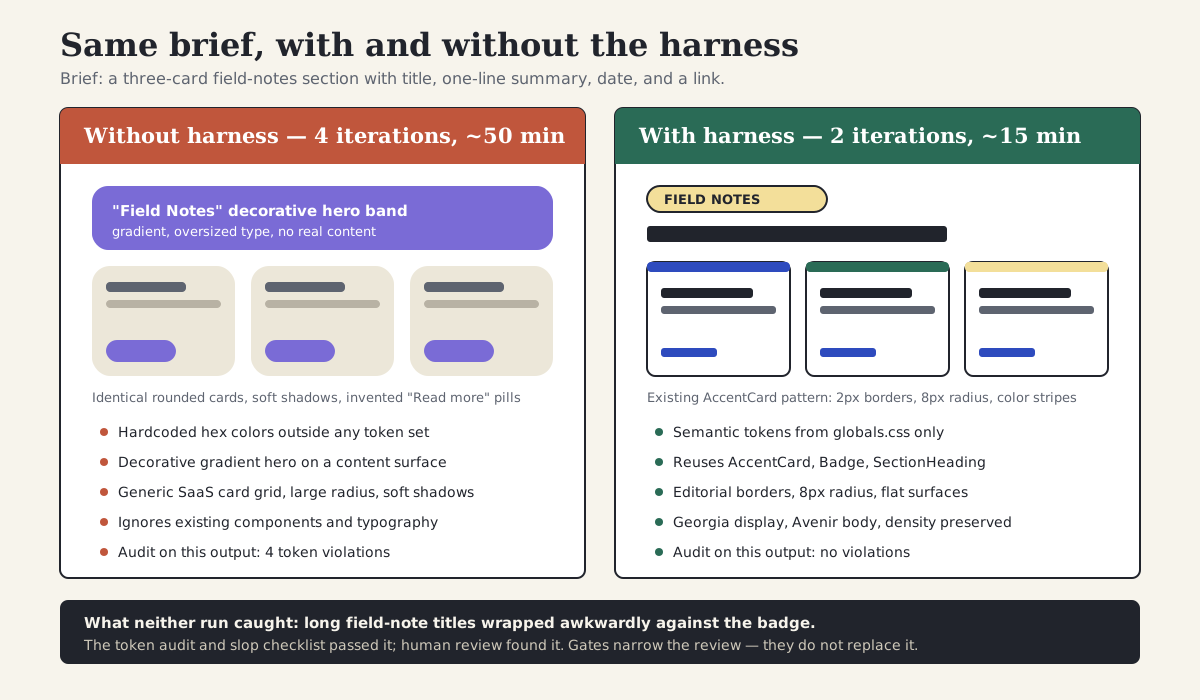
The harnessed run is not just prettier. It reuses the existing component system, passes the token audit, and converges in two rounds instead of four.
Section 09
What the run cost, and what it missed
The honest accounting matters more than the win. The harness did not make the agent a designer. It removed the predictable failure modes — invented colors, ignored components, marketing styling on a content surface — and that is what cut the run from four iterations to two. The remaining iteration in the harnessed run was about things no static file could know: where the section sits in the page composition and what fields the content model actually exposes.
Both runs also shared a miss. Long field-note titles wrapped awkwardly against the badge, pushing the metadata line into an ugly position. The token audit passed it, the slop checklist passed it, and the skill's checklist did not mention it. A human caught it in review, and the fix was small. The right response is not to feel betrayed by the harness; it is to decide whether this failure is frequent enough to encode — a line in DESIGN.md about title length behavior, or a check in the critique skill — or rare enough to leave to review. Most teams over-encode after the first miss and end up with a harness nobody maintains.
There is also a setup cost worth naming. Writing the first DESIGN.md for this site took a working session, and the skills catalog came from an existing open-source tool rather than being written from scratch. The harness pays that cost back across every subsequent task, but only if someone owns keeping it current. A stale harness is worse than none, because the agent will follow it confidently.
Section 10
Project file structure for your own harness
A reader should be able to open the project and understand where the agent should look. Do not scatter design instructions across random docs, old prompts, and issue comments. Put the stable contract in predictable files.
The exact folders can change by tool, but the ownership should stay clear. DESIGN.md explains how the product should look and behave. AGENTS.md explains how agents should work in this repository. CLAUDE.md can import or point to the shared rules when Claude Code needs tool-specific guidance. SKILL.md files hold longer workflows that should load only when relevant. Token JSON holds exact values, and scripts hold the checks.
my-product/
├── DESIGN.md                  # design system: tokens, components, anti-patterns
├── AGENTS.md                  # repository-wide agent rules, kept short
├── CLAUDE.md                  # tool-specific notes or a pointer to AGENTS.md
├── src/
│   ├── components/
│   │   ├── ui/                # library primitives (e.g. shadcn source components)
│   │   └── product/           # product surfaces composed from primitives
│   ├── styles/
│   │   └── tokens.css         # runtime CSS custom properties
│   └── tokens/
│       ├── primitives.tokens.json
│       ├── semantic.tokens.json
│       └── component.tokens.json
├── examples/
│   ├── screenshots/           # owned good and bad references
│   ├── prompts/               # briefs that worked, kept as files
│   └── notes/                 # taste notes explaining why examples matter
├── .claude/skills/            # or .codex/skills/ — one folder per procedure
│   └── product-surface-prototype/
│       ├── SKILL.md
│       ├── references/
│       └── templates/
└── scripts/
    ├── verify-design-system.js
└── capture-screenshots.jsHuman-readable design system, visual behavior, token names, anti-patterns, component rules
Repository-wide agent behavior, stack, commands, verification expectations, public/private boundaries
Claude-specific imports, tool preferences, local conventions, or a pointer back to AGENTS.md
Task workflow, steps, examples to load, scripts to run, and acceptance criteria for one capability
Structured primitives, semantic tokens, component tokens, and theme values for transforms
Owned screenshots, prompts, anti-examples, and taste notes the agent can inspect
Repeatable checks that turn visual and design-system rules into executable gates
Each file should have one clear job. Ambiguous ownership is what turns a harness into another messy documentation folder.
Section 11
Step 1: write a machine-readable design system
Start with a design-system file that an agent can read without translation. Markdown works well because it is readable by humans and agents. Keep it concrete. Avoid abstract brand adjectives unless you translate them into visible behavior — the way this site's DESIGN.md follows its mood line with exact OKLCH values, a radius ceiling, and named components.
The most important section is often the anti-pattern section. Agents are good at following examples, but they also inherit common UI habits from the web. If your product should not use nested cards, decorative gradient backgrounds, or large hero sections, say that directly. Vague positives produce vague output; explicit negatives prevent specific failures.
If you are starting from nothing, the starter below is enough for a first session. Replace the values with yours, then grow the file only when a real generation goes wrong in a way a rule could have prevented.
# Design System

## Color
- Primary: var(--primary)
- Background: var(--background)
- Surface: var(--card)
- Text: var(--foreground)
- Muted text: var(--muted-foreground)
- Status colors: use semantic tokens only

## Typography
- Display: Georgia, serif
- Body: Avenir Next, system sans-serif
- Mono: JetBrains Mono, ui-monospace
- No negative letter spacing

## Spacing
- Use the 4px base scale
- Dense tool surfaces use smaller gaps
- Page sections use larger vertical rhythm

## Components
- Use existing library components before custom primitives
- Cards are for repeated items, not page sections
- Buttons use icons only when the action is familiar

## Anti-patterns
- No generic SaaS hero for operational tools
- No decorative gradient blobs
- No nested cards
- No invented colors outside the token system
- No text that overlaps or resizes unpredictably
Section 12
Where design tokens should live
DESIGN.md is the explanation layer. Token JSON is the data layer. CSS variables are the runtime layer. Do not force one file to do all three jobs.
The data layer now has a stable target. The Design Tokens Community Group specification reached its first stable version, 2025.10, in late October 2025, covering groups, aliases, theming, and modern color spaces, and Style Dictionary v5 reads that format and transforms it into CSS custom properties and other platform outputs. A good harness lets the agent read the design intent in Markdown, then use the structured token files when exact values matter — especially when tokens need to sync with a design tool, generate themes, or ship to multiple platforms.
- Use DESIGN.md for naming the design philosophy, rules, anti-patterns, and how tokens should be used.
- Use primitives.tokens.json for raw values such as blue-600, spacing-4, radius-2, and font-size-3.
- Use semantic.tokens.json for meaning such as color.background, color.text, color.danger, and space.page.
- Use component.tokens.json for component-level decisions such as button.padding.x or card.border.radius.
- Use tokens.css or globals.css for the final CSS custom properties consumed by the application.
- Use Figma variables or Tokens Studio when the design team needs version-controlled, reviewable token diffs.
// src/tokens/primitives.tokens.json
{
  "color": {
    "blue": {
      "600": { "$type": "color", "$value": "#2454D8" }
    }
  },
  "space": {
    "4": { "$type": "dimension", "$value": "16px" }
  }
}

// src/tokens/semantic.tokens.json
{
  "color": {
    "action": { "$type": "color", "$value": "{color.blue.600}" },
    "background": { "$type": "color", "$value": "#FBF8EF" }
  },
  "space": {
    "page": { "$type": "dimension", "$value": "{space.4}" }
  }
}

/* src/styles/tokens.css — generated by Style Dictionary */
:root {
  --color-action: #2454D8;
  --color-background: #FBF8EF;
  --space-page: 16px;
}
Section 13
Good vs bad harness instructions
Bad harness instructions sound reasonable but cannot be verified. They ask for quality without defining what quality means in this product. Good instructions are specific enough that an agent can inspect its own output and say whether it followed them.
The test is simple: if two agents would interpret the instruction in opposite ways, rewrite it. Replace adjectives with observable behavior, file paths, token names, component names, and pass-fail checks.
Good: use the existing shadcn components, 8px radius maximum, no gradient backgrounds, and preserve table density
Good: read DESIGN.md, use only semantic Tailwind tokens, and do not invent colors outside globals.css
Good: keep the triage queue above summary panels on mobile and preserve at least eight visible rows on desktop
Good: check labels, focus states, contrast, keyboard order, and error message recovery before completion
Good: compare against examples/screenshots/dashboard-good.png and avoid the patterns in dashboard-bad.png
A harness should reduce interpretation. The right column gives the agent a concrete action and a way to check itself.
Section 14
Teach taste with examples
Rules prevent obvious mistakes, but examples teach taste. A design system can say compact, but a screenshot shows what compact means in practice. A prompt can say restrained, but a before-after example shows which details were removed and why.
Create a small example pack for each recurring workflow. For a dense operations surface, the pack might include a good table screenshot, a bad generic dashboard screenshot, a status tag reference, a mobile task-order example, and a short note explaining why each one matters. This site keeps its equivalents in the designs folder — full-page snapshots of every key page — plus a written anti-slop checklist the skills reference.
- Use owned screenshots or original generated examples so rights are clear.
- Caption each example with the design behavior it demonstrates.
- Include anti-examples. Agents benefit from seeing what not to repeat.
- Keep examples close to the task. A beautiful landing page reference will not help a dense operations dashboard.
- Update examples when the product design system changes — stale examples teach stale taste.
Shows row height, alignment, and scan rhythm
Shows patterns to avoid
Shows semantic color and label style
Shows what must stay above the fold
Shows recovery path and useful copy
Examples should be selected for the behavior they teach, not because they look impressive.
Section 15
A complete prompt that uses the harness
Once the harness exists, prompts become shorter and more powerful. The prompt no longer needs to carry the whole design system. It can point the agent to the harness and focus on the specific task — exactly the difference between the forty-word prompt that took four rounds and the sixty-word prompt that took two in the case study above.
This is the main payoff. The designer spends less time repeating global standards and more time describing the product problem, the user job, and the judgment needed for this screen.
Use the project design harness before building.

Task: add a field-notes section to the home page.
User job: a returning reader wants to scan the three latest field notes and open one.
Priority: editorial density and reuse of existing components, not a new visual treatment.
Inputs: DESIGN.md, AGENTS.md, components/school-cards.tsx, content/site.ts.
Output: implementation plan first, then code after approval.
Review: run npm run verify and npm run agentic:audit, capture desktop and mobile screenshots,
compare against the harness checklist, and report any remaining design risks.
Section 16
Limits, anti-patterns, and what a harness costs
A harness is not free, and it is not always the right tool. For a one-off throwaway exploration — a moodboard, a quick what-if mock you will delete tomorrow — writing DESIGN.md first is procrastination. Use a single good prompt and move on. The harness pays off when the same product, brand, or component system will be touched repeatedly.
Persistent files have a context cost. Everything in AGENTS.md and CLAUDE.md is loaded into every session, which is why tool documentation consistently recommends keeping those files short and moving long material into on-demand skills and references. A five-hundred-line instruction file does not make the agent five times more obedient; it buries the rules that matter under the ones that do not.
Harnesses drift. Tokens change, components get renamed, the example screenshots stop matching the shipped product, and the agent keeps following the old truth with full confidence. Give the harness an owner and a review cadence, the same way you would a design system. And remember what the audit excerpt earlier showed: an automated gate only catches what it encodes. This repository's audit caught every hardcoded color and missed the gradient and the nested cards entirely. Treat gates as a way to narrow human review, never as a substitute for it.
Finally, a harness does not supply product judgment or taste. It encodes decisions you have already made so they stop being remade badly. The decisions themselves — what this screen is for, what to cut, what good means here — remain design work, and they remain yours.
- Skip the harness for throwaway explorations; build it for products you will touch repeatedly.
- Keep always-loaded files short; move procedures and references into on-demand skills.
- Assign an owner; review the harness when the design system changes, not when someone notices drift.
- Do not trust a passing audit as a design review — it only checks what it encodes.
- Do not encode every miss; encode the failures that recur.
Section 17
A starter checklist you can apply today
Use this checklist when a project keeps producing agent output that feels generic. The problem is usually not the model alone. It is the lack of a clear operating environment.
A good harness does not remove the designer from the loop. It makes the loop sharper. The agent handles repeatable constraints. The designer reviews product judgment, taste, and trade-offs. Start small — a one-page DESIGN.md, a short AGENTS.md, and one executable check — and grow each layer only when a real failure shows it is missing.
# Harness pre-flight

## Design system
- [ ] DESIGN.md exists, with concrete tokens (color, type, spacing, radius)
- [ ] Anti-pattern rules name the failures we keep seeing
- [ ] Component inventory maps to real files in the repo

## Project rules
- [ ] AGENTS.md (or CLAUDE.md) is under ~100 lines
- [ ] It names the stack, the design source of truth, and the verification commands
- [ ] Tool-specific files import or point to the shared rules (no duplicates)

## Skills
- [ ] Recurring procedures live in SKILL.md folders, not in the always-loaded files
- [ ] Each skill states when to use it and what done means

## Examples
- [ ] At least one good and one bad owned example per recurring surface
- [ ] Each example has a caption explaining the behavior it teaches

## Review gates
- [ ] At least one executable check exists (build, lint, token audit, route check)
- [ ] The agent is told to run it before reporting completion
- [ ] Human review still covers hierarchy, density, copy, and taste
Can the agent read concrete tokens and anti-patterns?
Are stack, components, and checks clear?
Is the procedure reusable and task-specific?
Do screenshots teach the desired behavior?
Can the agent prove the work is ready to inspect?
If one of these pieces is missing, the agent will invent more of the design than you intended.
Sources
Sources & further reading
- agents.md
The open AGENTS.md convention for project-level agent instructions, adopted across many coding agents.
- Design Tokens specification reaches first stable version (DTCG, 2025.10)
Announcement of the first stable Design Tokens Community Group specification.
- Design Tokens Community Group
Specification repository for the DTCG design token format.
- Style Dictionary
Token transform pipeline; v5 supports the DTCG 2025.10 format, including structured colors and dimensions.
- Claude Code memory documentation
Official documentation for CLAUDE.md hierarchy, path-scoped rules, and keeping persistent instructions short.
- Claude Code skills documentation
Official documentation for SKILL.md folders, supporting files, and on-demand loading.
- anthropics/skills
Anthropic's public repository of SKILL.md examples showing the progressive-disclosure pattern.
- VoltAgent/awesome-design-md
A public collection of DESIGN.md files written for AI coding agents.
- bergside/awesome-design-skills
A curated collection of design-focused agent skills and DESIGN.md files across multiple tools.
- shadcn/ui MCP server documentation
Official documentation for the shadcn MCP server, which makes the component registry legible to agents.


