Section 01
The mistake is using more agents too early
Multi-agent design sounds attractive because it promises speed. One agent can research, another can prototype, another can review screenshots, and another can write production code. In the right situation, that works. In the wrong situation, it creates more coordination work than design progress, and you spend the saved time reading three half-compatible proposals instead of one good one.
The practical rule is simple: use multiple agents only when the work can be split into cleanly bounded tasks. If the output depends on constant taste decisions across one small surface, a single well-briefed agent is usually faster. If the work has independent regions, independent stages, or independent skill sets, a multi-agent workflow can help. The tool vendors now say roughly the same thing in their own documentation: sequential tasks, same-file edits, and tightly coupled work belong in a single session, and parallel agents only pay off when each one owns a different set of files.
A designer should think less like a prompt writer and more like a design lead. The job is not to throw agents at a task. The job is to decide the boundaries, define the shared constraints, assign the right work, and merge the results without losing the product intent.
This article covers the decision: how to tell whether a task should be one agent or several, what artifacts make a split safe, and what the split actually costs. To keep that honest, it includes a deliberately small orchestration run executed for this article — the real briefs, the real outputs, the real merge log, and the one conflict that surfaced. Running and managing larger multi-agent design teams — decomposition strategies, agent-team tooling in depth, multi-surface case studies, and full cost accounting — is a different job, and it gets its own upcoming article on orchestration. Read this one to decide whether to split at all.
Section 02
The decision map
Before spawning more agents, ask whether the work is separable. A landing-page hero refinement is usually not separable. A full dashboard with navigation, table behavior, filters, charts, empty states, and mobile QA often is. The decision is not based on how impressive the task sounds. It is based on boundary quality. The clearer the boundary, the safer the delegation. The blurrier the boundary, the more likely the merge step will destroy the benefit.
Three questions settle most cases. First, can you describe each worker's ownership boundary in one sentence? If you cannot, you do not have a decomposition; you have a wish. Second, do the slices share files, components, or one tightly coupled taste loop? Two agents editing the same component, or two agents whose decisions only make sense together, will produce a merge that is harder than the original task. Third, is the task valuable enough to pay the coordination and token cost? Multi-agent runs are not free, and the bill arrives whether or not the split helped.
Notice that every exit on the single-agent side of the map is a good outcome. Staying with one agent is the default, not a consolation prize. You can always escalate later if the task grows real boundaries — and because the escalation artifacts are just files (a parent brief, worker briefs, a merge log), nothing about starting single-agent locks you in.
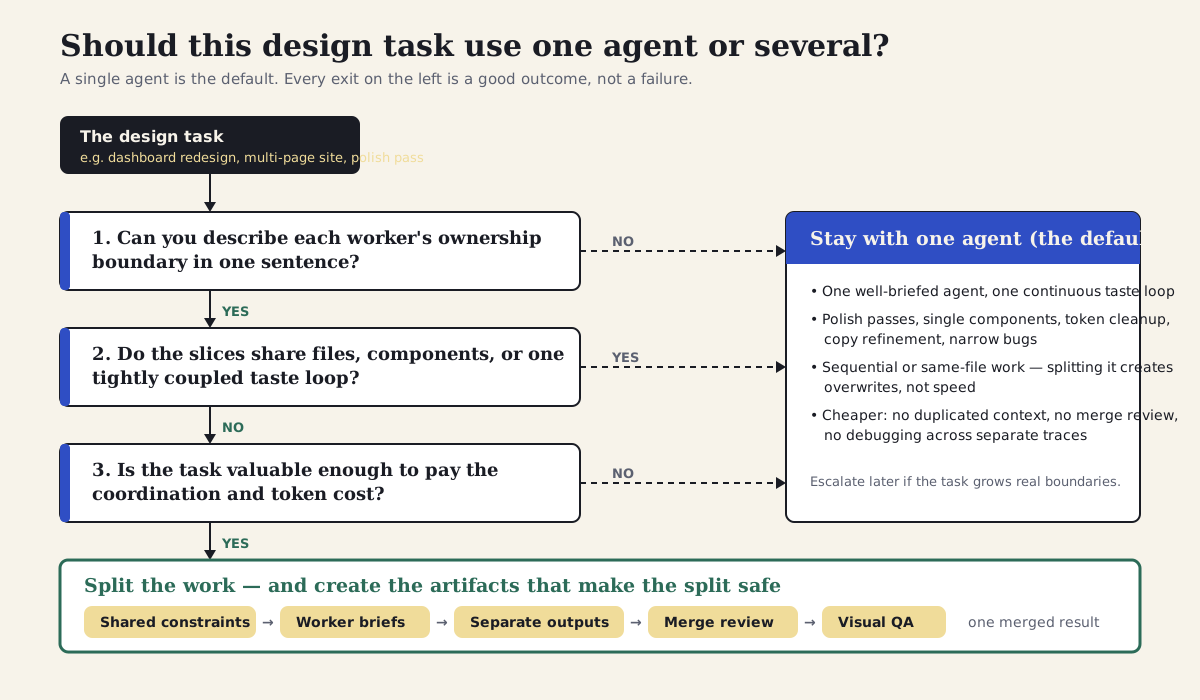
Use multiple agents only when the task has clear boundaries, shared constraints, and a mergeable output. A single agent is the default.
Section 03
What current tools already support (as verified June 2026)
The multi-agent pattern now shows up in every major agent platform, but each tool expresses it differently, and the differences matter less than the operating model they share. Claude Code has two distinct surfaces. Subagents are the stable one: bounded workers with their own context window and tool restrictions, defined per project under .claude/agents/, that do a task and report back to the calling session. Agent Teams are the newer, experimental one — disabled by default behind an opt-in environment flag — where a team lead coordinates separate full sessions through a shared task list and messaging, with plan-approval gates. Anthropic's own documentation is blunt about when not to use teams: sequential work, same-file edits, and dependency-heavy tasks are better served by a single session or subagents, and teammates should own different sets of files so they do not overwrite each other.
Codex expresses parallelism three ways: subagent workflows inside the CLI, local parallel sessions that practitioners typically isolate with git worktrees, and cloud tasks that run in hosted environments so several attempts or several tasks can proceed in the background. OpenCode makes agent roles part of the project: primary agents and subagents are defined in opencode.json or .opencode/agents/, each with its own permissions for editing, shell access, and which subagents it may invoke. Google Antigravity centers its multi-agent story on the Agent Manager — a surface for spawning and monitoring multiple asynchronous agents across workspaces — alongside Projects, rules, and subagents. OpenPencil is the design-native expression of the same idea: concurrent agent teams working on different regions of a vector canvas, coordinated by an orchestrator.
For designers, the important lesson is not the tool name. It is the operating model. A useful multi-agent workflow needs a shared project contract, small worker briefs, separate output areas, and a merge protocol. Without those, the team of agents becomes a team of guesses. Platform choice has its own article; orchestration mechanics have their own upcoming article. What follows here is the part that transfers across all of them: deciding whether to split, and producing the artifacts that make a split reviewable.
- Claude Code subagents are stable, in-session workers that report back; Agent Teams are experimental, opt-in, and run as separate coordinated sessions.
- Anthropic's Agent Teams docs recommend a single session or subagents for sequential or same-file work, and file-level ownership per teammate.
- Codex supports subagent workflows in the CLI, worktree-based local parallelism, and cloud tasks for background or parallel runs.
- OpenCode defines primary agents and subagents in project config, with per-agent edit, shell, and task-invocation permissions.
- Antigravity's Agent Manager is the surface for spawning and monitoring multiple asynchronous agents across workspaces.
- OpenPencil's concurrent agent teams split a canvas into regions — the spatial version of the same decomposition question.
- DESIGN.md and agent-workflows/ keep the workflow portable; AGENTS.md, CLAUDE.md, .claude/, opencode.json, .opencode/agents/, and .agents/ add tool-specific behavior.
- A design harness still matters. More agents without shared constraints creates more inconsistent output.
Projects to inspect
Stable bounded workers with their own context that report back to the caller
Experimental, opt-in coordinated sessions with a shared task list and plan approval
Subagent workflows, worktree-based local parallelism, hosted background tasks
Primary and subagent roles in project config with edit, shell, and task permissions
Spawning and monitoring multiple asynchronous agents across workspaces
DESIGN.md and agent-workflows/ hold portable context; tool folders hold runtime behavior
Use repo files, worker briefs, outputs, screenshots, and merge logs as cross-tool artifacts
Agent tools are most useful to designers when they support roles, permissions, artifacts, and reviewable handoffs.
Section 04
A small trace, actually run: two workers, one conflict
Templates are easy to write and easy to distrust, so this article includes a real run at the smallest scale that still exercises every artifact the decision produces. The task: write two specification documents for a field-notes section on this site's home page — one spec for the repeated field-note card, one spec for the section frame around it. The slices are genuinely separable, they share one constraint surface (this repository's DESIGN.md), and the briefs deliberately left one decision open to both workers — how a recently reviewed note is marked — so a real conflict would surface at merge time.
How it was executed, honestly: one orchestrating session wrote the orchestration brief and the two worker briefs as real files in a scratch folder. The two worker outputs were then produced as bounded passes — each pass given only its own brief plus DESIGN.md — rather than as two separate parallel subagent processes, because this drafting environment could not spawn parallel workers. The artifacts, the conflict, and the merge review below are real and quoted from the run; the parallelism is the one thing this trace does not demonstrate, and the timing numbers later in the article are labeled accordingly. The scratch folder was deleted after the excerpts were captured, which is itself part of the point: the durable value of a run like this is the briefs and the merge log, not the scratch output.
The orchestration brief is the parent contract. It states the user job, the shared constraints every worker must read, each worker's ownership boundary in one sentence, the overlap the orchestrator expects to resolve, and the merge gates. This is the actual brief from the run, unedited except for trimming the header.
# Field-Notes Section Specs — Orchestration Brief

User job: a returning reader wants to scan recent field notes on the home page,
see which ones were reviewed recently, and open one.

Deliverable: two Markdown specs that a later implementation pass can follow
without re-deciding structure. No production code is written in this run.

Shared constraints (all workers):
- Read DESIGN.md before proposing anything. Use its token names, not raw values.
- Editorial density: bordered panels, 8px radius maximum, no decorative gradients,
  no nested cards, no marketing hero treatment.
- Reuse existing component names from DESIGN.md (AccentCard, SchoolBadge,
  SectionHeading, ArrowLink) instead of inventing new primitives.
- Each worker writes exactly one file in outputs/ and edits nothing else.

Ownership boundaries:
- Worker 1 owns the field-note card: content fields, hierarchy, density,
  and card-level states (default, hover, long title, missing summary).
- Worker 2 owns the section frame: heading, supporting line, the "recently
  reviewed" treatment, and how the three cards sit in the band.

Known overlap (deliberate): both workers need a position on how a recently
reviewed note is marked. Both may propose one; the orchestrator resolves it
at merge.

Merge gates:
1. Read both outputs in full before accepting anything.
2. List agreements, conflicts, and gaps in merge-log.md.
3. Resolve conflicts against DESIGN.md and the user job, not against
   whichever worker wrote more.
4. Record rejected options and the reason.
5. Note open questions for human review.
Section 05
Worker briefs should feel almost small
A worker brief should have one owner, one output, and a clear acceptance test. If a worker needs to redesign everything to complete its task, the decomposition is wrong. The card worker in this run was not allowed to specify the section heading; the frame worker was not allowed to specify the card's internal anatomy; neither was allowed to write code. Those exclusions are not bureaucracy — they are the only thing that makes the merge tractable, because the orchestrator knows in advance which worker is authoritative for which decision.
The brief below is Worker 1's, verbatim from the run. Notice how much of it is scope and acceptance criteria rather than instructions about how to design. The shared taste lives in DESIGN.md, which both workers read; the brief only has to carry the boundary and the deliverable. That keeps the briefs cheap to write — the orchestration brief and both worker briefs together took about nine minutes — which matters, because if briefing is expensive you will skip it exactly when you need it most.
The same shape works for any worker role: a visual-QA worker gets a read-only scope and a findings file as its output; a responsive-behavior worker gets the breakpoints and the screens it owns; a research worker gets the questions and the sources. The brief changes; the anatomy does not.
# Worker 1: Field-Note Card Spec

Scope:
- The repeated field-note card only. Do not specify the section heading,
  band background, or page placement. Do not write code.

Inputs:
- DESIGN.md (component system, color, typography, spacing, anti-patterns)
- The shared constraints in ../orchestration-brief.md

Task:
Specify the field-note card: which fields it shows, in what order, with what
emphasis, and how it behaves with a long title or a missing summary.

Output:
Write outputs/01-field-note-card-spec.md with: fields, hierarchy, spacing and
border treatment, states, and anything the implementation pass must not do.

Acceptance criteria:
- Token and component names come from DESIGN.md, not invented.
- No new colors, no nested cards, radius stays within the 8px ceiling.
- Long-title behavior is explicit.
Section 06
What the workers returned, and where they collided
Both workers stayed inside their boundaries for structure. Worker 1 specified the card on the AccentCard pattern: title, two-line summary, then a meta row with date and topic; long titles wrap rather than truncate; a missing summary is omitted rather than padded. Worker 2 specified the frame as a full-width paper band with a SectionHeading, a right-side supporting line, three cards in a row on desktop stacking to one column on mobile, and an ArrowLink to the full index — explicitly not a floating page-section card, because DESIGN.md forbids those.
The deliberate overlap did exactly what it was designed to do. Worker 1 marked recently reviewed notes with a school-yellow badge in the card's meta row. Worker 2 marked them by switching the card's accent stripe to lab green and appending an 'Updated this month' line to the section's supporting copy. Both are reasonable in isolation. Together they would ship two competing freshness signals, one of which quietly reaches across the ownership boundary into the other worker's surface — the frame worker changing the card's stripe color is precisely the kind of decision that looks harmless in a proposal and becomes an argument in a pull request.
This is the texture of multi-agent design work in general: the failures are rarely broken output, they are plausible local decisions that conflict globally. A single agent holding both specs in one context would probably not have produced the contradiction — which is part of the cost-benefit math, not a reason to panic. The split surfaced the disagreement explicitly and early, in two short Markdown files, where it cost a few minutes to resolve instead of surfacing later in implemented code.
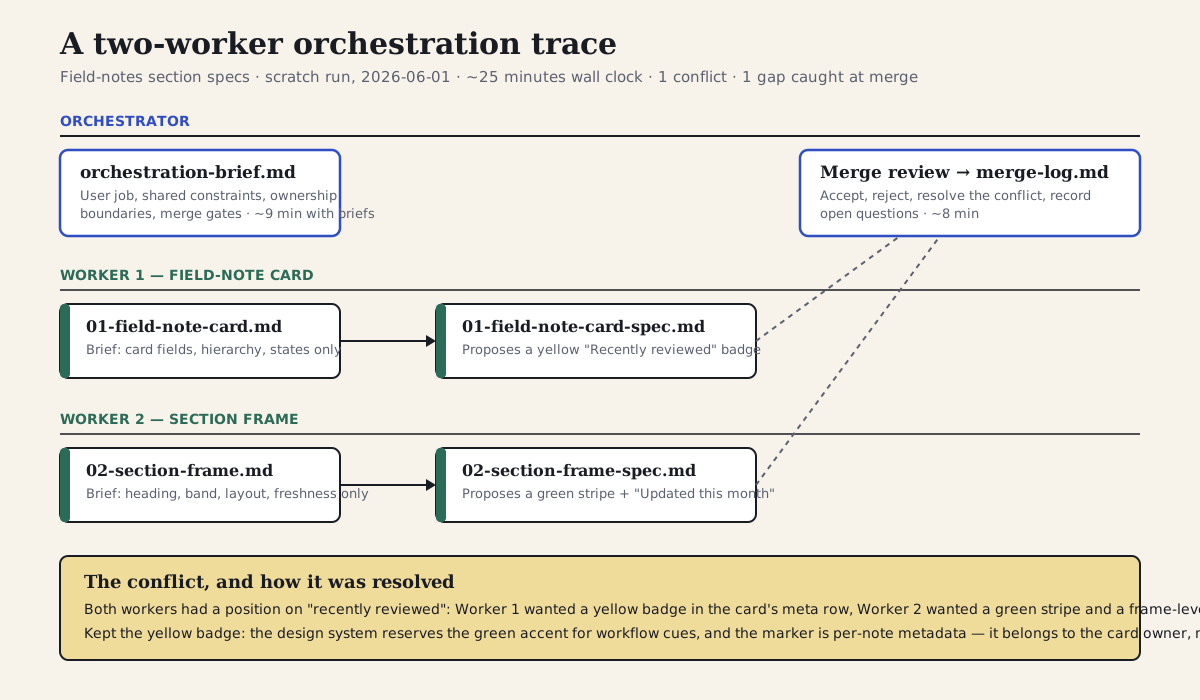
The run as a board: one orchestrator lane, two worker lanes, and the conflict that surfaced where the briefs deliberately overlapped.
Section 07
The merge was the real design review
The merge step is where multi-agent design succeeds or fails. It is not enough to concatenate outputs. The orchestrator has to read every proposal, compare them against the shared constraints and the user job, resolve conflicting assumptions, and decide which changes become one coherent result. In this run that took about eight minutes — roughly a third of the total — and it produced the most useful artifact of the whole exercise: a merge log that records not just what was accepted but what was rejected and why.
The conflict was resolved against the design system rather than against either worker. DESIGN.md assigns the warm yellow secondary to badges and reserves the lab-green accent for workflow and proof-layer cues, so the yellow badge won on token semantics. It also won on ownership: freshness is per-note metadata, which makes it the card owner's decision, and the frame worker's stripe change crossed that boundary. Recording the rejected option matters as much as recording the decision — the next agent or human who wonders why recently reviewed notes are not green can read the answer instead of reopening the debate.
The merge also caught a gap neither worker owned: what the section does when fewer than three field notes exist. Neither brief assigned the empty state, so neither output covered it. That is a decomposition error, not a worker error, and the honest move is to log it as an open question rather than have the orchestrator quietly invent an answer during the merge. Gaps at the seams are the most common defect in split work; the merge review is the only place they become visible.
- Read every worker output before touching anything downstream of the merge.
- Resolve conflicts against the design system and the user job, not against whichever worker wrote more.
- Record rejected options and the reason — the merge log is the design decision record.
- Look for gaps at the seams: decisions no brief assigned are decisions nobody made.
- Keep open questions open; the orchestrator should not invent answers during the merge.
## Field-notes spec merge log

Accepted from Worker 1:
- AccentCard base, blue stripe, flat bordered panel, 8px radius.
- Field order title → summary (two-line clamp) → meta row.
- Long titles wrap instead of truncating; missing summary is omitted, not padded.

Accepted from Worker 2:
- SectionBand in paper tone, full width; SectionHeading with right-side
  supporting line; ArrowLink to the field-notes index; explicit mobile order.

Conflict (the deliberate overlap):
- Worker 1 marks recently reviewed notes with a secondary school-yellow
  SchoolBadge in the card's meta row.
- Worker 2 marks them by switching the card stripe to the lab-green accent
  variant and appending "Updated this month" to the supporting line.
- Decision: keep Worker 1's yellow badge. DESIGN.md reserves the lab-green
  accent for workflow and proof-layer cues and assigns the warm yellow
  secondary to badges; freshness is per-note metadata, so it belongs to the
  card owner, not the frame owner. Worker 2's stripe change also reaches
  inside Worker 1's surface, which breaks the ownership boundary.
- Rejected: lab-green stripe variant (token semantics + boundary), and the
  "Updated this month" suffix (frame-level claim about card-level data).

Gap found at merge:
- Neither worker specified the empty state (fewer than three published notes).
  Logged as an open question instead of guessed.

Open questions for human review:
- Should "Recently reviewed" appear on the home page at all, or only on the
  article page header where the date already exists?
- Empty-state copy if fewer than three field notes are published.
Section 08
What multiple agents cost
Start with this run's own numbers, which are small and honestly scoped. Wall clock: roughly 25 minutes — about 9 for the orchestration and worker briefs, 4 each for the worker outputs, and 8 for the merge review and merge log. Iterations: each worker output was accepted on the first pass for structure; the conflict and the empty-state gap were caught only at merge. Cost: precise per-worker token counts were not measurable in this environment, but the orchestration overhead — the briefs plus the merge review — roughly doubled the text written for what amounts to two short specs, and a single well-briefed agent would likely have produced both in 10 to 15 minutes. As a one-off, this split did not pay for itself in speed. What it bought was the conflict surfacing as two comparable proposals, a written decision record, and briefs that can be reused the next time the same surfaces change. That is the honest shape of the trade at small scale.
The public numbers at larger scale point the same direction, more sharply. Anthropic's engineering write-up of its multi-agent research system reports such systems using around fifteen times the tokens of a single chat interaction, and frames the economics plainly: the task has to be valuable enough to pay for the increased performance. That figure describes research workloads, not design work, so treat it as an order-of-magnitude warning rather than a benchmark — but the direction is not in dispute. Cognition's widely cited 'Don't Build Multi-Agents' essay argues the counter-position for write-heavy work: parallel workers that cannot see each other's decisions make conflicting assumptions, which is exactly what this run's two workers did on the freshness marker. LangChain's follow-up reconciles the two views around the same separability test this article teaches — read-heavy, parallelizable work benefits from multiple agents; write-heavy, tightly coupled work usually does not. Practitioner write-ups on running parallel agents in git worktrees, and early datasets on merge conflicts in agent-authored pull requests, document the merge pain that arrives when the boundary discipline is skipped.
So the complexity tax is real, sourced, and mostly predictable: orchestration setup, duplicated context in every worker, multiplied tokens, a merge review that cannot be skipped, and debugging that now spans separate histories. The benefit side is also real: wall-clock parallelism on genuinely separable slices, isolation so one worker's wrong turn does not pollute the others, and specialization so review, implementation, and QA each get a focused context. The decision map exists to make sure you only pay the tax when the benefit column is actually available. The full cost accounting at multi-surface scale — agents against hours against tokens against defects — belongs to the upcoming orchestration article; the table below is the version you need for the decision.
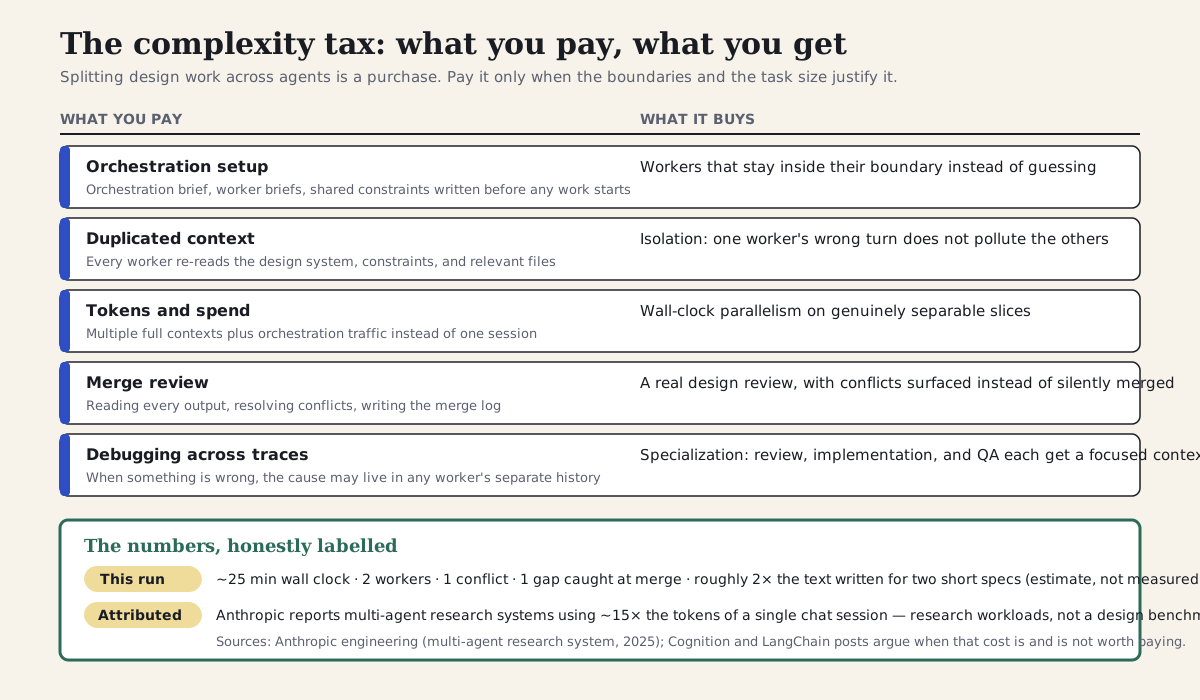
What a multi-agent split costs and what it buys — with this run's numbers and one attributed external figure, each labeled for what it is.
Section 09
Generalizing the trace: project structure for multi-agent work
The trace above used a scratch folder because its outputs were disposable. In a real product repository, the same artifacts should live inside the project so a future run — or a future human — can inspect what each worker owned and how the merge was reviewed. Multi-agent work needs more structure than single-agent work because each worker needs a clear slice of the same project reality: shared design rules, worker briefs, output folders, screenshots, and a merge log.
The structure below generalizes the pattern to a larger task — an operations dashboard redesign with five workers — without changing the anatomy: one orchestration brief, one shared-constraints file, one brief and one output file per worker, evidence screenshots, and one merge log. The worker count changes; the artifacts do not. If your decomposition cannot be expressed in a structure like this, with one owner per file, that is usually the decision map telling you the task is not separable yet.
my-product/
├── DESIGN.md                         # Design rules shared by all agents
├── AGENTS.md                         # Codex project instructions and portable agent rules
├── CLAUDE.md                         # Claude Code project memory
├── opencode.json                     # OpenCode project config and permissions
├── .claude/agents/visual-qa.md       # Tool-specific worker definitions
├── .opencode/agents/                 # design-orchestrator.md, visual-qa.md, table-density.md
├── .agents/rules/                    # Antigravity workspace rules
├── src/
│   ├── app/dashboard/                # The production surfaces being changed
│   └── styles/tokens.css
├── agent-workflows/
│   └── dashboard-redesign/
│       ├── orchestration-brief.md
│       ├── shared-constraints.md
│       ├── worker-briefs/
│       │   ├── 01-navigation.md
│       │   ├── 02-queue-table.md
│       │   ├── 03-filter-rail.md
│       │   ├── 04-mobile-order.md
│       │   └── 05-visual-qa.md
│       ├── outputs/
│       │   ├── navigation-plan.md
│       │   ├── table-density-notes.md
│       │   ├── filter-state-spec.md
│       │   ├── mobile-order-plan.md
│       │   └── visual-qa-findings.md
│       ├── screenshots/
│       │   ├── before-desktop.png
│       │   └── after-desktop.png
│       └── merge-log.md
└── scripts/
    └── verify-dashboard-design.js
Section 10
OpenCode pattern: permissioned design subagents
OpenCode is useful for design workflows because the agent roles can be expressed as project configuration. You can create a primary orchestrator and restrict which subagents it can call. You can also deny edits for review agents, ask before edits for implementation agents, and cap iteration steps so a subagent does not wander through the whole codebase.
For designers, this means the multi-agent split can become part of the repository instead of an improvised chat convention. A visual-QA agent can be read-only. An implementation worker can propose changes with limited edit permissions. The orchestrator can call only approved design subagents. The configuration below shows the shape; treat it as decision support, not a tutorial — the platform article covers choosing between tools, and the orchestration article will cover running these configurations at scale.
{
  "$schema": "https://opencode.ai/config.json",
  "agent": {
    "design-orchestrator": {
      "mode": "primary",
      "prompt": "{file:./agent-workflows/dashboard-redesign/orchestration-brief.md}",
      "permission": {
        "edit": "ask",
        "bash": "ask",
        "task": {
          "*": "deny",
          "visual-qa": "allow",
          "table-density": "allow"
        }
      }
    },
    "visual-qa": {
      "description": "Read-only design QA against screenshots and DESIGN.md",
      "mode": "subagent",
      "prompt": "{file:./agent-workflows/dashboard-redesign/worker-briefs/05-visual-qa.md}",
      "permission": {
        "edit": "deny",
        "bash": "deny"
      },
      "steps": 8
    },
    "table-density": {
      "description": "Proposes compact queue table changes",
      "mode": "subagent",
      "prompt": "{file:./agent-workflows/dashboard-redesign/worker-briefs/02-queue-table.md}",
      "permission": {
        "edit": "ask",
        "bash": "ask"
      },
      "steps": 12
    }
  }
}
Section 11
Antigravity pattern: asynchronous agent runs
Antigravity organizes multi-agent work around the Agent Manager — a surface for spawning and monitoring multiple asynchronous agents — plus Projects, scoped permissions, and workspace rules. For design work, the important move is the same as everywhere else: keep Antigravity-specific rules in the workspace customization area and keep the actual work packets in ordinary project folders.
A workspace rule can point Antigravity agents to DESIGN.md, the orchestration brief, worker briefs, screenshots, and the merge log. It should not become a separate shadow project folder. The reusable workflow stays in agent-workflows/ so Claude Code, Codex, OpenCode, and Antigravity can all inspect the same artifacts — which is what makes the decision in this article portable across whichever platform you end up running.
# Dashboard Redesign Rule

Use when the task involves the operations dashboard, dashboard navigation, queue density, filters, mobile task order, or visual QA.

Read these project artifacts first:
- DESIGN.md
- AGENTS.md
- agent-workflows/dashboard-redesign/orchestration-brief.md
- agent-workflows/dashboard-redesign/shared-constraints.md
- agent-workflows/dashboard-redesign/worker-briefs/*.md

Background-agent guidance:
- Keep research, table-density, mobile-order, and visual-QA work in separate outputs/ files.
- Do not auto-merge worker outputs.
- Do not publish screenshots without review.
- Do not edit shared production files until the merge plan is approved.
- Every background agent must leave a written artifact in agent-workflows/dashboard-redesign/outputs/.
Section 12
Good vs bad delegation
Bad delegation asks agents to work in parallel without boundaries. Good delegation gives each agent a slice, a context packet, an output file, and a definition of done. The difference matters because design work is spatial and systemic. Two agents can both make reasonable local decisions and still create a bad merged interface if their assumptions conflict — the trace's freshness-marker collision is the small, cheap version of exactly that failure.
The pattern in the table below is the same one the run followed: ownership stated per worker, success defined in observable terms, proposals before production edits, shared constraints read before proposing, and findings reported before fixes are applied.
Good: Agent A owns navigation, Agent B owns table density, Agent C owns filter states
Good: preserve queue-first hierarchy and show eight rows above the fold
Good: write proposal files first; the orchestrator owns the production merge
Good: read DESIGN.md, shared constraints, and approved screenshots before proposing changes
Good: report findings first, then implement only approved fixes
Good: name the overlap in the orchestration brief so the merge expects the conflict
Delegation quality determines whether parallel work speeds up design or creates a harder merge.
Section 13
When a single agent is better
A single agent is better when the task is small, the design judgment is tightly coupled, or the output must be refined through one continuous taste loop. A button variant, one settings panel, a type scale adjustment, or a visual polish pass usually does not need multiple agents. This is also where the strongest published counter-position lands: for write-heavy work where every decision depends on the decisions around it, parallel workers that cannot see each other's reasoning will make conflicting assumptions, and a single-threaded agent with full context simply does better.
Multi-agent work has a complexity tax — orchestration, duplicated context, multiplied tokens, merge review, and debugging across separate traces — and the previous section put numbers and sources against it. That tax is worth paying only when the task is large enough or separable enough to benefit from parallel work, and when the boundaries are clean enough that the merge stays a review rather than a rescue.
- Use one agent for a single component, one page refinement, token cleanup, copy polish, or a narrow bug.
- Consider multiple agents for a full workflow, dashboard, multi-page site, large component library, or cross-tool migration.
- Use multiple agents when research, implementation, and QA can run independently without editing the same files.
- Avoid multiple agents when you cannot describe ownership boundaries in one sentence per worker.
- Avoid multiple agents when the budget or timeline cannot absorb a multiplied token bill and a mandatory merge review.
Section 14
A counterexample: do not split a tight polish pass
Imagine a product detail page needs a final polish pass before a stakeholder review. The work is mostly hierarchy, spacing rhythm, copy tone, and a few mobile adjustments. Multiple agents would add overhead without improving the result.
One agent should hold the taste loop because the decisions are tightly coupled. If one worker adjusts spacing, another rewrites copy, and another changes mobile order, the merge may feel less coherent than the original. Parallelism is useful when slices are separable. Polish is often not separable — and unlike the field-notes trace, there is no clean overlap to name in advance, because everything overlaps with everything.
Final polish for one product detail page
Workers optimize local details and weaken the whole rhythm
Duplicated context, merge review, conflicting spacing choices
One agent runs visual critique, applies approved fixes, captures screenshots
Some design work gets worse when split because the judgment needs one continuous loop.
Section 15
Use a merge checklist
The merge is the point where parallel work becomes design work again. Before applying worker output, the orchestrator should check ownership, conflicts, evidence, and the original user job. A checklist prevents the orchestrator from accepting every local improvement; a worker proposal can be correct in isolation and wrong for the final interface.
Two items earn their place from the executed trace: checking for decisions that no brief assigned (the empty state nobody owned), and recording rejected options with reasons (the green stripe that was reasonable but wrong for this design system).
Before merging worker outputs:

1. Did every worker stay inside its ownership boundary?
2. Did any two workers propose changes to the same file, component, token, or route?
3. Do proposals conflict on hierarchy, density, responsive order, or accessibility?
4. Are there decisions no brief assigned — gaps at the seams nobody owns?
5. Which findings are evidence-backed and which are subjective?
6. Which proposed changes are rejected, and why? Record the reason in the merge log.
7. What is the single final implementation plan?
8. Which screenshots prove the merged result works?
9. Which remaining questions need human design approval?
Section 16
Reusable multi-agent design prompt
Use this prompt when you want the agent to propose a multi-agent plan before doing the work. The approval gate matters. The agent should not spawn or delegate until the boundaries are clear — and it should be explicitly allowed to answer that a single agent is the better plan, because on most tasks it is.
Evaluate whether this design task should use one agent or multiple agents.

Task: [describe the design work]
User job: [what the user needs to accomplish]
Files/routes: [relevant files, pages, screenshots]
Design constraints: read DESIGN.md, AGENTS.md, and existing components before proposing work.

First, decide whether the task is separable. If single-agent is better, explain why and propose a single workflow. If multi-agent is better, produce:
1. decomposition pattern: spatial, functional, or pipeline
2. worker list with ownership boundaries (one sentence each)
3. input packet for each worker
4. expected output file for each worker
5. deliberate overlaps the merge should expect to resolve
6. merge risks and merge gates
7. final visual QA plan

Wait for approval before delegating or editing production files.
Section 17
A simple operating rule
Start with one agent. Escalate to multiple agents only when the work has separable boundaries, shared constraints, and a clear merge path — and when the task is worth the multiplied cost. That rule keeps multi-agent design from becoming theatre.
When the split is right, multi-agent work gives designers leverage. It lets one agent explore structure, another inspect details, another test the implementation, and an orchestrator hold the product intent — with briefs, outputs, and a merge log that survive the run. When the split is wrong, the designer becomes a cleanup crew for disconnected outputs. The small trace in this article is the smallest honest version of the right case: real briefs, real outputs, one real conflict, and a merge log that recorded the decision.
Once you have decided to split, the next questions are about execution: how to choose a decomposition pattern, how to run agent teams and concurrent canvases at multi-surface scale, and how the cost accounting looks when the run is five workers instead of two. Those belong to the upcoming orchestration article. This one ends where the decision ends: you know whether this task should be one agent or several, and you know which artifacts to create if you split it.
Brief
Decompose
Delegate
Collect outputs
Merge plan
Implement
Visual QA
feeds next cycleA healthy multi-agent workflow moves from brief to bounded delegation to merge review, then back through visual QA.
Sources
Sources & further reading
- Claude Code subagents documentation
Official documentation for bounded subagents with their own context windows that report back to the calling session.
- Claude Code Agent Teams documentation
The experimental, opt-in team surface, including its own guidance on when single sessions or subagents are the better choice.
- Claude Code git worktrees documentation
Running parallel sessions in separate worktrees so concurrent agents never share a checkout.
- Codex CLI features
Current Codex CLI capabilities, including subagent workflows for parallelizing larger tasks.
- Codex cloud tasks
Hosted background and parallel Codex task execution.
- OpenCode agents documentation
Primary agents, subagents, and per-agent permissions including control over which subagents may be invoked.
- Antigravity Agent Manager documentation
Google's surface for spawning and monitoring multiple asynchronous agents across workspaces.
- OpenPencil
MIT-licensed AI-native vector design tool with concurrent agent teams over canvas regions.
- Anthropic: How we built our multi-agent research system
Engineering write-up reporting multi-agent research systems using roughly fifteen times the tokens of a single chat, with the economics framing used in this article.
- Cognition: Don't Build Multi-Agents
The strongest published counter-position: parallel workers without shared context make conflicting assumptions on write-heavy work.
- LangChain: How and when to build multi-agent systems
Reconciles the two positions around read-heavy vs write-heavy decomposability — the same separability test this article uses.


