Section 01
What you will have at the end of the hour
This is the on-ramp piece. The rest of this site assumes you already have an agent running and argues about how to direct it well — harnesses, instruction files, prompt craft, review gates. This field note assumes nothing: no terminal habit, no Claude Code installed, no project folder. The promise is narrow and testable: in one sitting of roughly an hour, you go from nothing installed to a real prototype — a single hero.html file you can open in any browser, send to a colleague, and keep iterating on tomorrow.
Two things before you start. First, Claude Code requires either a paid Claude plan or API access through the developer Console; the current tiers, what they cost, and how usage is metered are covered in the companion field note on pricing and plan selection, because those numbers move too fast to repeat here. Second, a method note: the prototype walkthrough in this article was executed for real in a scratch folder — the first-pass output, the things it got wrong, and the correction round are taken from actual files, not imagined — while the install and login steps are quoted from the official quickstart as it read on June 1, 2026. That page is a JavaScript-rendered app and Anthropic ships changes to Claude Code several times a week, so verify every command against the official quickstart before running it.
Projects to inspect
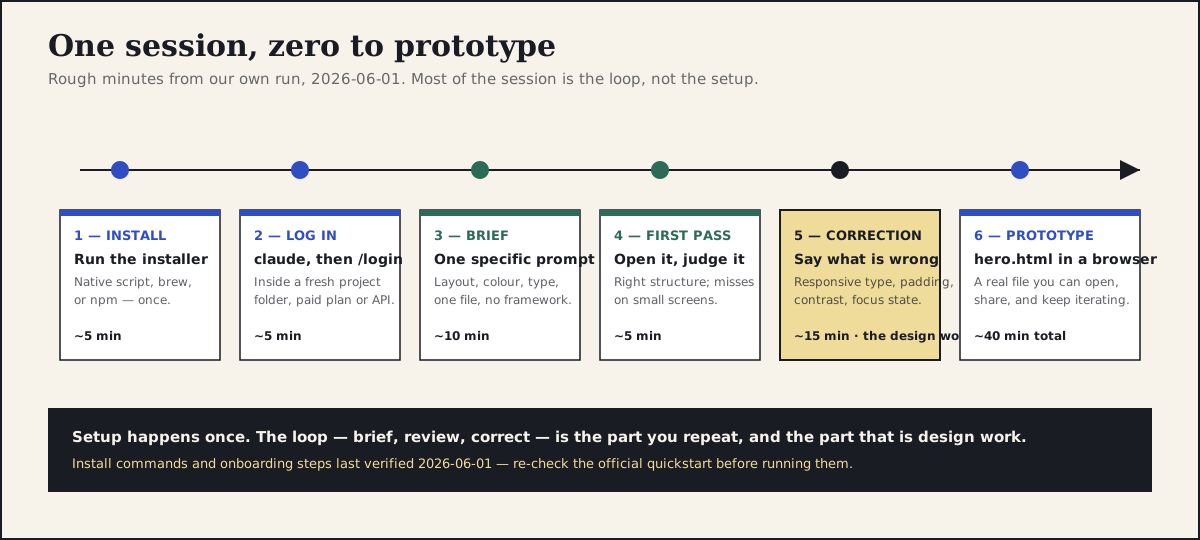
The six steps of the session with rough minutes from our own run. Setup happens once; the brief–review–correct loop is the part you repeat, and the part that is design work.
Section 02
Pick your surface: desktop app, IDE extension, or terminal
Claude Code is the same agent behind several surfaces, and the right one for a first session is whichever has the least friction for you, not the one that looks most professional. The desktop app gives you a file browser, visual diff review, and a preview pane, which makes it the gentlest entry point for designers who have never lived in a terminal. The VS Code and JetBrains extensions sit in the middle: the agent runs inside an editor you may already use for inspecting handed-off code, and you can see the files it writes appear in the sidebar. The terminal is the most direct surface and the one this walkthrough uses for its commands, because terminal steps can be written down exactly and reproduced.
Do not let the surface choice become a blocker. The loop you are about to learn — describe, review, refine — is identical everywhere, and the project folder you create today opens unchanged in any of the three. Surface names, download locations, and what each app bundles have shifted more than once during 2025 and 2026, so check the official download and setup pages for the current state rather than trusting any screenshot-heavy tutorial, including a hypothetical future version of this one. If a step in this article disagrees with the official docs, the docs win.
Section 03
Install and first run
On macOS and Linux, the documented install path as of June 1, 2026 is the native installer script, run once in a terminal. Homebrew and npm installs remain documented alternatives if your machine is already managed that way; on Windows, the quickstart documents a PowerShell equivalent. The commands below are quoted as recorded from the quickstart on that date — and because the docs page is JavaScript-rendered and updated frequently, verify them against the official quickstart before running anything.
Once installed, the onboarding is three small moves: make a project folder, start the agent inside it, and log in. Claude Code works on whatever folder you start it in — that folder is its world — so giving the experiment its own empty directory keeps the blast radius at zero. Authentication happens through the /login command, which opens a browser window and accepts either a Claude account on a paid plan or a Console account billed by the token. If you get stuck, /help lists the available commands, and claude doctor checks the installation; both are easier than re-reading a tutorial.
Projects to inspect
# Install — macOS / Linux (native installer)
curl -fsSL https://claude.ai/install.sh | bash

# Alternatives, if you prefer a package manager
brew install --cask claude-code        # Homebrew
npm install -g @anthropic-ai/claude-code  # npm

# A clean folder for the experiment
mkdir first-prototype
cd first-prototype

# Start Claude Code and log in
claude
/login

# Useful while you find your feet
/help        # list commands
claude doctor  # check the installation
Section 04
The first prompt is a brief, not a wish
The single highest-leverage decision in the session is what you type first. A vague wish — make me a nice landing page hero — produces a generic answer, because the agent fills every unspecified decision with the most statistically average choice available. A brief produces a prototype you can actually judge, because it states the decisions a designer would state: layout, colour, type, behaviour, and constraints. The full argument, with side-by-side outputs, lives in the vague-versus-specific article on this site; for the first session you only need the conclusion — write the prompt the way you would brief a capable contractor who has never met you.
This is the brief we used for the executed walkthrough, for a fictional research-repository product called Fieldnote. Steal the structure, not the words: a one-line product context, a single-file constraint so there is nothing to install or build, and then the visual decisions stated plainly.
The single-file constraint matters more than it looks. Asking for one self-contained hero.html with inline CSS means no framework, no npm, no build step, and no dependency on anything else going right — the output either renders when you double-click it or it does not. That keeps the first session about design judgement rather than tooling archaeology, and it gives you an artefact you can email to someone who has never heard of any of this.
Projects to inspect
Create a single self-contained file called hero.html — inline CSS, no frameworks,
no external assets — for the hero section of a product called Fieldnote, a research
repository for design teams.

Layout: full-viewport section, content vertically and horizontally centred,
max content width around 720px.
Background: a subtle gradient from dark navy to slate blue.
Type: system font stack. Large white heading ("Research, organised at last"),
a lighter supporting line beneath it, comfortable line height.
Call to action: one button-styled link ("Start a free trial"), white background,
dark text, rounded corners, with a visible hover state.
Keep the markup semantic and the CSS readable — I will be editing it by hand.
Section 05
The loop: what the first pass got wrong, and the correction round
The first pass arrived in under a minute: a complete hero.html, roughly fifty lines, that did almost everything the brief asked. Opened in a browser at laptop width it looked close to intent — gradient, centred content, white heading, supporting line, a button with a hover state. This is the moment the session turns back into design work, because the question is no longer can the agent produce it but is this any good, and that question is yours.
Judged with design eyes and a narrow window, the first pass had real problems. The heading was a fixed 56 pixels with no responsive scaling, so at phone widths it wrapped awkwardly and crowded the edges of the screen, and the section's 24 pixels of padding gave the text no breathing room. The supporting line's grey sat close enough to the gradient that contrast was marginal in the lighter corner. The hover state was a barely perceptible colour shift, there was no visible focus state for keyboard users at all, and the section sat directly in the body with no landmark element around it. None of these are exotic failures — they are exactly the defaults a competent but uninvested contractor would ship — and none of them are visible unless you actually open the file and resize the window, which is why the review step is a step and not a formality.
The correction round is one message that names the problems specifically, in the same register as the brief. We asked for fluid type with a sensible minimum and maximum instead of fixed pixel sizes, more generous vertical padding, a lighter supporting-text colour for contrast against the darker end of the gradient, a hover state that visibly responds plus a visible keyboard focus outline, and a main landmark around the section. The second pass addressed all of it — clamp-based type, increased padding, the contrast and focus fixes, the landmark — and that file is the prototype: two prompts, one correction round, roughly forty minutes including the reading and the resizing. A third round is where we would normally push on small-screen behaviour explicitly (does it still hold at 360 pixels wide?), and you should expect real projects to take two or three correction rounds, not zero.
Good structure — now fix these specific issues:

1. The heading is a fixed 56px and breaks awkwardly on small screens.
   Use fluid type (clamp) with a sensible minimum around 34px, and give the
   supporting line a fluid size and a max-width so lines do not run long.
2. Increase the section's vertical padding — the text feels cramped.
3. The supporting text is low-contrast against the lighter end of the gradient;
   lighten it so it reads clearly everywhere.
4. The button hover is barely visible. Make the hover state obvious, and add a
   visible keyboard focus outline.
5. Wrap the section in a <main> landmark.

Keep everything else as it is.
Section 06
Where this goes next — and what not to expect
Be honest with yourself about what you have at the end of the hour. A one-session prototype is a sketch with working CSS: good enough to test a message, judge a direction, or put something concrete in front of a stakeholder tomorrow morning; not a design system, not production code, and not evidence that the agent understands your brand. It used the agent's taste defaults plus your one brief, and it will drift back toward generic the moment your instructions stop being specific. The failure list from our first pass — fixed type, thin padding, marginal contrast, missing focus state — is what those defaults look like, and you should expect to keep catching them until you write your standards down somewhere the agent always reads.
That is exactly what the next two articles are for. The harness article covers what to set up once this stops being a toy: a DESIGN.md, tokens, examples, and review gates that make every future session start from your standards instead of from zero. The instruction-hierarchy article covers the mechanics underneath — CLAUDE.md, AGENTS.md, and skills, and what belongs in which layer so the context cost stays sane. Read them in that order; the one-session loop you just ran is the same loop they assume, just with better scaffolding around it. And before you point any of this at client work, check your organisation's policy on what can be pasted into an AI tool — a scratch-folder hero for a fictional product is the right first project precisely because nothing about it is confidential.
- Do expect: a real, browser-openable artefact, a feel for the brief–review–correct loop, and a clear sense of the agent's defaults.
- Do not expect: production-ready code, brand fidelity, or accessibility you have not explicitly asked for and checked.
- Next session: add a DESIGN.md and project instructions so your corrections become standing rules instead of repeated prompts.
- Re-verify: install commands and onboarding steps were last checked 2026-06-01 and are re-verified through this site's tool-watch loop.
Projects to inspect
Sources
Sources & further reading
- Claude Code quickstart
Official install and onboarding steps; the source for the commands quoted in this field note (recorded 2026-06-01).
- Claude Code setup
Install options across platforms, including the Homebrew and npm alternatives.
- Claude Code changelog
Release history; the reason this walkthrough date-stamps its commands and stays surface-agnostic where it can.
- Claude pricing
The official plan page — the prerequisite for Claude Code access; figures live in the pricing field note, not here.


