Section 01
Your configuration files are part of the design system now
Most designers meet coding agents through the prompt box. You describe a screen, the agent builds something, you correct it, and after enough corrections the result is acceptable. The corrections feel like part of the job, but most of them are not design decisions. They are the same facts being re-typed every session: the brand uses a 4px spacing scale, body text never drops below 14px, buttons come from the existing component library, do not invent new colors.
Every serious agent platform now has a place to write those facts down once. Claude Code reads CLAUDE.md, Codex CLI and OpenCode read AGENTS.md, Gemini CLI reads GEMINI.md, and all four can load skills that package whole procedures and only enter context when they are needed. Together these files form an instruction hierarchy, and that hierarchy is where a design system either becomes enforceable or stays a PDF nobody opens.
This article maps the hierarchy as it actually behaves as of June 2026, verified against the official documentation for each tool: what loads when, what it costs in context, what belongs at each level, how to keep one source of truth across four different CLIs, and how much output quality changes when the layers are in place. It is the mechanical companion to the design harness article, which covers the strategy; this one covers the files.
Section 02
The three tiers, and what each one costs
There are three distinct mechanisms for teaching an agent how your team designs, and they differ in one practical dimension: when the content enters the model's context window.
Configuration files are always loaded. Every line of CLAUDE.md or AGENTS.md is read at the start of every session whether or not it is relevant to the task, so this tier should hold only the facts that apply to almost every task. Skills are loaded on demand. A SKILL.md file announces itself through a short name and description, and the full procedure is only pulled into context when the task matches, which makes skills close to free until they are used. Auto memory is written by the agent itself: notes about your project that accumulate across sessions, with an index file loaded at startup and detail files read when needed.
One nuance that surprises people when they first restructure their files: imports do not change the economics. Claude Code lets a CLAUDE.md pull in other files with an @path reference (up to four hops deep, with a one-time approval for files outside the project), which is great for keeping a single source of truth, but the imported content still loads in full every session. Splitting a long config into imported fragments tidies the repository; it does not save a single token. The only mechanisms that genuinely defer cost are path-scoped rules and skills.
A useful way to hold the three tiers in your head: configuration is long-term memory, skills are the reference library, and auto memory is the agent's own notebook. Designers tend to over-invest in the first tier because it is the most visible, and the result is a 500-line CLAUDE.md that costs context on every session and still fails to encode the procedures that actually drive quality.
- Configuration files (CLAUDE.md, AGENTS.md, GEMINI.md): loaded at session start, full content every time, project or user scope. Keep them short and factual.
- Path-scoped rules (.claude/rules/*.md with a paths frontmatter): loaded when the agent touches matching files, so CSS rules only cost context when CSS is being edited. Claude Code-specific.
- Skills (SKILL.md): name and description visible up front, full body loaded only when invoked or matched. The right home for procedures, checklists, and multi-step workflows.
- Auto memory (Claude Code, when enabled): the agent maintains its own MEMORY.md and topic files; the index loads at startup (first 200 lines or 25KB) and details load on demand.
- @path imports organize the files but do not reduce context cost; imported files still load fully each session.
Projects to inspect
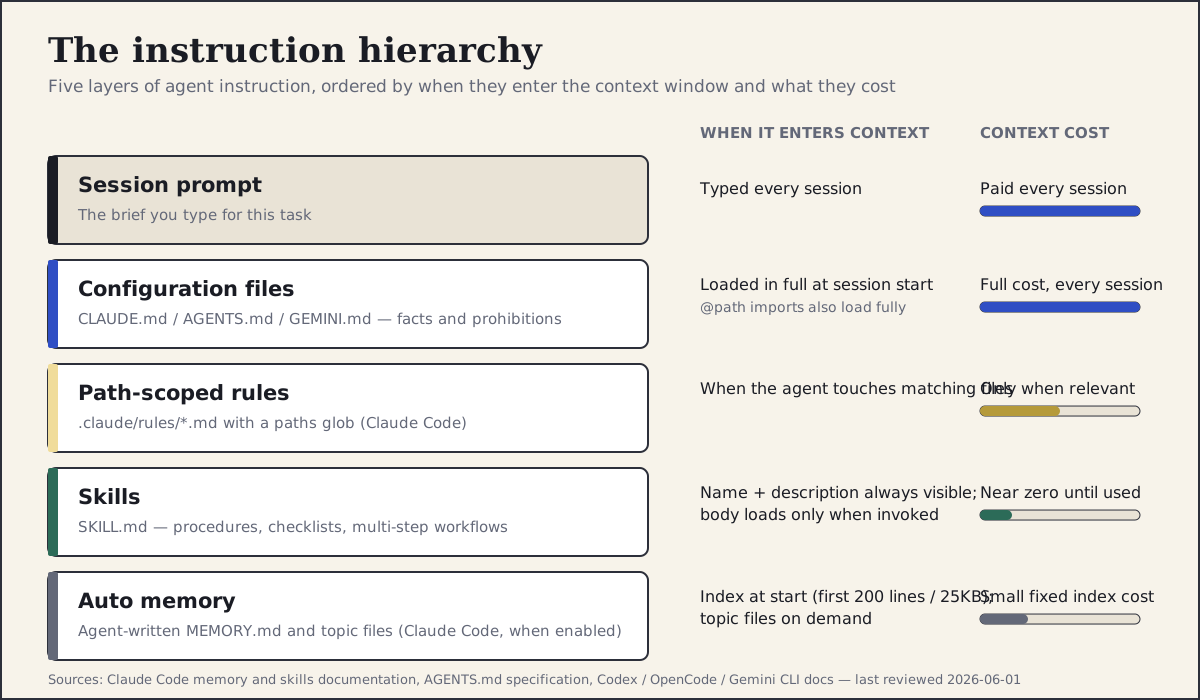
The layers of agent instruction, ordered by when they enter context: the session prompt, always-loaded configuration files, file-triggered rules, on-demand skills, and agent-written memory.
Section 03
Configuration files: facts, not procedures
A configuration file works best as a page of facts the agent should never have to ask about. Brand colors and where the tokens live, the type scale, the spacing base, the component library and how to import from it, the accessibility floor, the framework, and the handful of hard prohibitions that define your taste more than any mood board does.
Claude Code reads CLAUDE.md from several locations and merges them from broadest to most specific: a user-level file in your home directory for personal preferences, the project file in the repository root for team standards, an optional CLAUDE.local.md for personal project notes that stay out of version control, and subdirectory files that load when the agent works in that part of the tree. The official guidance is to keep the file focused and move anything procedural into rules or skills; in practice, a page or so — well under a couple hundred lines — is a good discipline. If a fact does not earn its place on every task, it belongs in a rule or a skill instead.
AGENTS.md does the same job as an open spec. It is plain Markdown with no required schema, the most deeply nested file wins when instructions conflict, and since December 2025 the format is stewarded by the Agentic AI Foundation under the Linux Foundation, with adoption claimed across tens of thousands of open-source projects and native support in Codex CLI, Cursor, GitHub Copilot, Gemini CLI, OpenCode, VS Code, and others. Claude Code does not read AGENTS.md automatically, but a one-line @AGENTS.md import or a symlink closes the gap, which means a single source of truth can serve every agent your team runs. Remember the cost caveat from the previous section, though: importing AGENTS.md into CLAUDE.md avoids duplication, it does not avoid the context cost.
Projects to inspect
# AGENTS.md

## Project
Next.js 15, Tailwind CSS v4, shadcn/ui components in components/ui.
Design tokens live in styles/tokens.css. Never hard-code colors or font sizes.

## Visual standards
- Spacing: 4px base scale only (4, 8, 12, 16, 24, 32, 48, 64).
- Type: Inter; body 16px/1.5; small text never below 14px; max two weights per screen.
- Color: use the semantic tokens (--surface, --ink, --accent). No new hues without approval.
- Density: this is a work tool. Prefer compact layouts over marketing-style hero sections.

## Accessibility floor
- WCAG 2.2 AA contrast. Visible focus states. Hit targets 44px minimum on touch.

## Prohibitions
- No decorative gradients, no emoji in UI copy, no placeholder lorem ipsum in deliverables.

## Checks
Run before declaring any UI task complete:
- npm run lint
- npm run verify
Section 04
Path-scoped rules: constraints that follow the file type
Some constraints only matter for some files. Rules about CSS custom properties are noise when the agent is editing a markdown document; rules about image alt text are noise when it is writing a build script. Path-scoped rules solve this by attaching a small instruction file to a glob pattern, so the constraint is only loaded when the agent touches a matching file.
In Claude Code these live in .claude/rules/ as Markdown files with a paths field in the frontmatter. They keep the main configuration file short while making the constraints stricter exactly where they apply, which is the combination you want: a designer reviewing agent output should be able to point at the rule that was violated, not at a vague preference buried in a long config.
One portability warning before you move everything into rules: path scoping is a Claude Code feature. Codex, OpenCode, and Gemini CLI will not read .claude/rules/, so on a mixed-tool team the constraints that must hold everywhere belong in AGENTS.md or in a skill, with path-scoped rules used as a Claude Code-specific optimization on top.
---
paths:
  - "**/*.css"
  - "app/**/*.tsx"
---

# Styling rules

- Use CSS custom properties from styles/tokens.css. Never write raw hex values.
- Spacing utilities must resolve to the 4px scale. No arbitrary values like p-[13px].
- Every interactive element needs a visible :focus-visible state.
- Dark mode is handled by tokens; do not add manual dark: overrides for color.
Section 05
Skills: procedures the agent loads when it needs them
A skill is a folder with a SKILL.md file inside it. The frontmatter carries a name and a description; the body carries the procedure, the quality bar, and any supporting files. The agent sees the name and description at all times, but the body only enters context when the task matches, which is what makes skills the right place for anything long: a prototype workflow, a critique rubric, a slide-generation pipeline, a brand asset protocol.
Skills became an ecosystem standard rather than a single-vendor feature over the past year. The Agent Skills specification, published as an open standard in late 2025, defines the minimal format, and it is now read by dozens of tools. Claude Code discovers skills from .claude/skills/ at the project and user level. Codex CLI documents repository skill discovery from .agents/skills/, walking from the working directory up to the repository root, alongside user and system locations and an official catalog. OpenCode reads .opencode/skills/, .claude/skills/, and .agents/skills/. Gemini CLI now supports Agent Skills natively as well, discovering workspace skills from .gemini/skills/ or .agents/skills/ and loading the body when a skill is activated.
The practical consequence for design teams is that a procedure written once — a design review checklist, for instance — can travel across whichever agent each teammate prefers. The neutral home that three of the four CLIs share is .agents/skills/; Claude Code is the holdout that reads .claude/skills/ instead, so teams that mix tools typically keep the skill in one folder and symlink the other. Stay close to the core fields (name, description, body) and treat vendor-specific frontmatter such as forked execution contexts or tool allow-lists as optional extras.
The most useful skill trick for design work is dynamic context injection: in Claude Code a skill can embed a shell command whose output is inserted at load time, so a design review skill can pull the current contents of the token file rather than a stale copy pasted months ago.
Projects to inspect
---
name: design-review
description: Review a screen or component against the project design standards and produce a prioritized findings list. Use when asked to review, critique, or QA UI work.
---

# Design review

Current design tokens:
!`cat styles/tokens.css`

## Procedure
1. Capture the implementation (screenshot or running route) and the reference if one exists.
2. Check, in order: layout and hierarchy, spacing scale compliance, type scale, color token usage,
   interaction states, accessibility (contrast, focus, labels, hit targets), responsive behavior.
3. Report findings as P0 (blocks ship), P1 (fix before review), P2 (polish), P3 (note).
4. For every finding, name the rule it violates and the smallest change that fixes it.
5. Do not redesign. Reviews produce findings, not new layouts.
Section 06
Auto memory: the notebook you did not write
Claude Code can also keep its own notes. With auto memory enabled (the autoMemoryEnabled setting controls it), the agent records project facts it discovers — where the token file lives, which component is the canonical button, what broke last time — into a memory folder, and loads the index of those notes at the start of each session. The index is capped at the first 200 lines or 25KB, with detail files read on demand.
For designers this tier is mostly free value, with one caveat: the agent's notes are not your standards. Memory captures what the agent observed, not what the team decided, and observations can fossilize mistakes. Review what has accumulated occasionally, promote anything that deserves to be a real standard into the configuration file or a skill, and clear notes that encode a workaround you have since fixed.
Section 07
What each platform actually reads in 2026
The hierarchy is conceptually the same everywhere, but the file names and defaults differ, and the differences matter when a team mixes tools. Everything below was checked against the official documentation for each tool on 2026-06-01; this is exactly the kind of section that goes stale, so trust the linked docs over this summary if they disagree.
If your team uses more than one agent, the lowest-friction setup is to treat AGENTS.md as the canonical fact file, import or symlink it into CLAUDE.md for Claude Code, point Gemini CLI's context file setting at it, and keep shared procedures in .agents/skills/ where Codex, OpenCode, and Gemini CLI all discover them, with a symlink or copy in .claude/skills/ for Claude Code. The goal is one source of truth with thin adapters, not four files that drift apart. And to repeat the economics once more: the import trick gives you a single file to maintain, but the imported content still loads in full each session — only rules and skills defer cost.
- Claude Code: CLAUDE.md hierarchy (user, project, local, subdirectory), path-scoped rules in .claude/rules/, skills in .claude/skills/, auto memory available behind the autoMemoryEnabled setting. Reads AGENTS.md only via an @AGENTS.md import or symlink, and imported files still cost full context.
- Codex CLI: AGENTS.md merged from repository root down to the working directory, deeper files win, programmatic checks listed there are expected to run. Agent Skills discovered from .agents/skills/ (working directory up to the repo root) plus user and system locations, with an official catalog at openai/skills.
- OpenCode: AGENTS.md first, automatic fallback to CLAUDE.md when no AGENTS.md exists, additional instruction files configurable in opencode.json, skills discovered from .opencode/skills/, .claude/skills/, and .agents/skills/.
- Gemini CLI: GEMINI.md by default with the same global, project, subdirectory layering; AGENTS.md works by changing context.fileName in .gemini/settings.json. Agent Skills are supported natively, with workspace skills in .gemini/skills/ or .agents/skills/ and skill bodies loaded on activation.
Projects to inspect
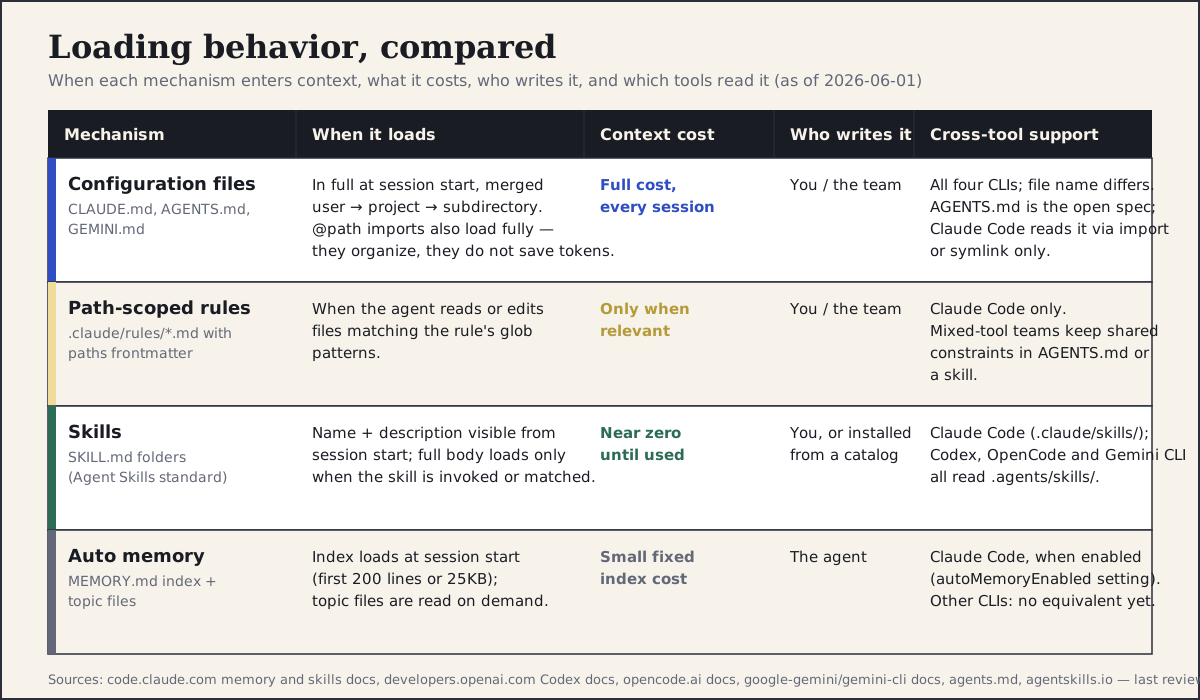
The mechanisms compared by when content enters context, what it costs, who writes it, and which tools read it.
Section 08
Case study: the same prompt against four configurations
The fastest way to feel the value of the hierarchy is to hold the prompt constant and vary the configuration. The setup traced here is deliberately small: a one-page marketing section for a fictional analytics product called Vantage, generated in a fresh Next.js 15 and Tailwind v4 project with a small styles/tokens.css file and a handful of shadcn/ui components installed, using Claude Code with the same one-paragraph prompt each time. The only thing that changes between runs is which instruction files exist. An honesty note before the numbers: this comparison reproduces a workflow I have run many times while building design harnesses; the trace below was reconstructed for this article from that working setup rather than re-executed from a fresh install on publication day, each configuration was observed once (n=1), and the correction counts depend on the model, the tool version, and what you accept as done. Read it as an illustrative trace, not a benchmark. The acceptance bar was written down before the first run: every color from the token file, spacing on the 4px scale, type on the documented scale, visible focus states, and AA contrast.
Run one starts bare: no configuration at all. The first pass is the familiar generic result — an oversized hero, a three-card feature grid, an off-palette purple-to-blue gradient, four font sizes that belong to no scale, and raw hex values throughout. Reaching the acceptance bar took six correction rounds, and almost every correction was a fact the project already knew: where the tokens live, what the spacing scale is, which button component to use. Run two adds the one-page AGENTS.md shown earlier (imported into CLAUDE.md with a single @AGENTS.md line), facts only. The palette and type scale land mostly right on the first pass, the gradient is gone, and the three correction rounds that remained were closer to actual design feedback: tightening hierarchy, cutting a redundant subheading, fixing two arbitrary spacing values. Run three adds the path-scoped styling rule, which is what finally removes the arbitrary spacing values and the missing focus states that survived run two; one correction round was needed, mostly copy tone. Run four adds the design-review skill and a line asking the agent to run it before presenting. The self-review caught a contrast failure on muted text and an undersized tap target on the secondary link before a human ever looked at the screen, and the run needed one human correction round.
The residual failure is worth dwelling on, because it is the honest limit of the whole approach. Even in run four, with every layer in place, the first pass still opened with a tall, marketing-style hero despite the configuration explicitly stating that the product is a work tool and compact layouts are preferred. The agent followed every checkable rule and still made a judgment call that did not fit the audience; that correction had to come from a person. Configuration reliably fixes the mechanical layer — tokens, scales, states, contrast — and reliably does not supply taste.
For context beyond this single trace: in the informal testing I have done repeatedly across roughly twenty sessions of this kind, the pattern has been consistent — a bare agent typically needs five to eight correction rounds to reach brand-consistent output, basic configuration cuts that to two or three, path-scoped rules to one or two, and a full harness with a review skill to zero or one. Treat those figures as one practitioner's informal benchmark rather than a controlled study. The setup cost is real but bounded, roughly thirty to sixty minutes for a small project, and it is paid once rather than every session.
Build the marketing section for Vantage, an analytics tool for product designers.
It needs a headline, a one-sentence value proposition, three concrete capability blocks,
and one call to action. Audience is design leads evaluating tools for their team.
Use the existing project setup and components. Before presenting, review your own output
against the project design standards and list anything you fixed.
No configuration: generic layout, off-palette gradient, raw hex values, no usable scale — 6 correction rounds
AGENTS.md facts (imported into CLAUDE.md): tokens and type scale mostly right, two arbitrary spacing values, weak hierarchy — 3 rounds
Plus .claude/rules/styles.md: spacing and focus states correct on first pass, copy tone needed work — 1 round
Plus design-review skill: self-caught a contrast failure and an undersized tap target; still defaulted to a marketing-style hero against the density rule — 1 round
An illustrative evidence board of the same prompt under four configurations: what the first pass got wrong and how many correction rounds were needed to reach the pre-agreed acceptance bar (single observation per configuration, reconstructed rather than captured live).
Section 09
Good and bad instruction files
The difference between a configuration file that improves output and one that gets ignored is almost always specificity and length. Agents follow rules they can check; they drift past vibes.
Bad instruction files read like brand decks: we value simplicity, the design should feel premium, keep it clean and modern. None of those sentences can be verified against an artifact, so they change nothing. Good instruction files read like acceptance criteria: spacing resolves to the 4px scale, body text is at least 14px, every color is a named token, every interactive element has a visible focus state. Each line is checkable, which also means each line can be cited in a review.
Length cuts the same way. A 500-line configuration file costs context on every session, buries the rules that matter, and tempts the agent to skim. If a section only applies to some tasks, it is a skill or a path-scoped rule. If a section explains history or rationale at length, it belongs in documentation that the agent can be pointed to when needed.
- Bad: "Make it feel premium and modern." Good: "Generous whitespace: section padding 64px or more on desktop, no more than two accent uses per viewport."
- Bad: "Follow our design system." Good: "Import components from components/ui; if a needed component is missing, propose it in the plan instead of building a one-off."
- Bad: a 500-line CLAUDE.md mixing brand history, code style, deployment notes, and design rules. Good: a one-page fact file, two path-scoped rules, and three skills.
- Bad: pasting the full design system PDF into the config. Good: a DESIGN.md or token file the agent reads on demand, referenced from the config.
## Bad — vibes the agent cannot verify
- Keep the design clean, modern and premium.
- Be consistent with our brand.
- Use whitespace thoughtfully.
- Make sure it is accessible.

## Good — acceptance criteria the agent (and a reviewer) can check
- Every color comes from styles/tokens.css; raw hex values fail review.
- Spacing resolves to the 4px scale: 4, 8, 12, 16, 24, 32, 48, 64. No arbitrary values.
- Body text is 16px/1.5; nothing rendered below 14px.
- Section padding is 64px+ on desktop; at most two accent-color uses per viewport.
- Every interactive element has a visible :focus-visible state and a 44px touch target.
- Text contrast meets WCAG 2.2 AA; check muted text on tinted surfaces explicitly.
Section 10
Where the design system itself lives
The instruction hierarchy answers when guidance is loaded; it still needs the design system content to point at. Two patterns have emerged for that content. The first is keeping tokens as the source of truth — a tokens file in the repository, referenced by the configuration and injected into skills, so the agent always reads current values. The second is a dedicated DESIGN.md: a single Markdown file that describes the visual identity, tokens in structured frontmatter plus prose about hierarchy, density, and tone, written for an agent rather than for a human onboarding deck. Google Labs published a spec for this format, currently in alpha, with a validator and exporters, and community collections now maintain DESIGN.md files modeled on well-known product design systems. Treat the format as promising but young: useful as a structured brief for agents today, not yet something to bet a design system's source of truth on.
Whichever pattern you choose, the division of labor stays the same: the configuration file states facts and points to sources of truth, rules constrain specific file types, skills encode procedures, and the design system content lives in files the agent can read rather than paragraphs it has to remember.
Section 11
Limits and failure modes
Configuration is leverage, not magic, and it fails in predictable ways. Instructions conflict when the user-level file says one thing and the project file says another, and the agent resolves the conflict silently; keep personal preferences out of shared files and audit the merged result occasionally. Instructions go stale when the token file moves or the component library changes and nobody updates the config; stale rules are worse than no rules because the agent follows them confidently. Vendor lock-in creeps in quietly: path-scoped rules only exist in Claude Code, dynamic context injection is not part of the minimal skills standard, and vendor-specific frontmatter stops working the moment a teammate runs a different tool — keep the portable core in AGENTS.md and plain SKILL.md bodies, and treat the extensions as per-tool optimizations.
There are also failure modes inside the mechanisms themselves. Skills only fire when the task matches their description, so a vaguely described skill simply never loads; write descriptions with the trigger words people actually use. A bloated config does not fail loudly, it just dilutes attention until the important rules get skimmed past. Auto memory can fossilize an observation that was true once — a workaround, a temporary file location — and repeat it long after it stopped being true. And restructuring files with imports feels like an optimization but is not one: the content still loads, so the only real fixes for context cost are deleting, demoting to a rule, or demoting to a skill.
The deeper limit is taste. A harness raises the floor — it stops the agent from shipping off-palette gradients and 13px body text — but it does not supply judgment about whether this screen should exist, whether the hierarchy serves the user's actual task, or whether the work is good enough for the audience it faces. The case study's residual failure, a marketing-style hero on a product that explicitly calls itself a work tool, is the shape of that limit. Those calls stay with the designer, which is exactly why it is worth automating everything below them.
- Do not put procedures in the always-loaded config; that is what skills are for.
- Do not rely on .claude/rules/ for constraints that must hold on a mixed-tool team; keep them in AGENTS.md or a skill.
- Do not assume @path imports save context; they only save duplication.
- Do not let auto memory become de facto policy; promote or prune it on a schedule.
- Do not expect any layer of the hierarchy to make judgment calls about audience, hierarchy, or whether the work is good enough.
Section 12
A starter instruction-hierarchy checklist
Setting up the hierarchy for an existing project is an afternoon of work, and most of it is writing down decisions the team has already made. Run through this list once, then re-run a recent task and compare the first pass against what you got before the setup — that before-and-after pair is the most persuasive artifact you will have when rolling the setup out to the team.
- Audit your corrections: collect what you fixed in agent output over the last few sessions. Anything you have typed twice is a candidate for the fact file.
- Write the fact file: one page of AGENTS.md (or CLAUDE.md) covering stack, token location, type and spacing scales, component library, accessibility floor, and prohibitions. Run the agent's init command first if the project has none, then edit it down hard.
- Wire cross-tool reading: add @AGENTS.md to CLAUDE.md for Claude Code (or symlink), and point Gemini CLI's context.fileName at AGENTS.md if anyone on the team uses it.
- Add one path-scoped rule (.claude/rules/styles.md) for your styling files with the constraints that get violated most often — and keep a copy of those constraints in the shared file if the team mixes tools.
- Move your longest procedure into a skill: a design review checklist is the highest-value first skill for most teams. Put it in .agents/skills/ for Codex, OpenCode, and Gemini CLI, and in .claude/skills/ for Claude Code.
- Decide on auto memory: enable it if you want the agent's own notes, and put a recurring reminder in place to review, promote, or prune what accumulates.
- Define the acceptance bar in writing (tokens, scales, states, contrast) so you can count correction rounds honestly before and after.
- Re-verify quarterly: the cross-tool details in this article were checked on 2026-06-01 and will drift; the linked official docs are the source of truth.
Sources
Sources & further reading
- Claude Code memory documentation
CLAUDE.md hierarchy, CLAUDE.local.md, path-scoped rules, @path imports, and auto memory limits.
- Claude Code skills documentation
SKILL.md frontmatter, on-demand loading, and dynamic context injection.
- AGENTS.md open specification
The open instruction-file format and the tools that read it natively.
- Linux Foundation: Agentic AI Foundation announcement
Stewardship of AGENTS.md and related agentic standards under the Linux Foundation.
- Codex CLI AGENTS.md guide
Codex's root-to-working-directory merge behavior and programmatic checks.
- Codex CLI skills documentation
Agent Skills in Codex, including discovery from .agents/skills/.
- openai/skills
The official Codex skills catalog.
- OpenCode rules and skills documentation
AGENTS.md precedence, CLAUDE.md fallback, and skill discovery folders.
- Gemini CLI skills documentation
Native Agent Skills support in Gemini CLI, including .agents/skills/ discovery.
- Agent Skills specification
The open SKILL.md standard shared across agent tools.
- Anthropic public skills repository
Reference skills such as frontend-design and brand-guidelines.
- DESIGN.md specification (Google Labs)
Alpha-status format for describing a visual identity to coding agents.
- awesome-design-md
Community collection of DESIGN.md files modeled on well-known design systems.


