Section 01
Why a teardown, not a prompt dump
Designers keep asking us to just give them the prompts, so this field note does — with two honesty notes attached. First, every prompt below is one we have already published on this site, quoted verbatim from the deep article that covers it properly; nothing here is new material, and nothing is borrowed from someone else's library. Second, consistently work means something specific and modest: these are the prompts we keep reusing, and the evidence behind them is the traced runs published in those articles — two of the five have an executed run with iteration counts and audit output behind them, the rest are published patterns we use on our own work. That is experience plus a small number of traces, not a benchmark, and we are not going to dress it up as one.
What makes the five worth tearing down rather than just listing is that they share one mechanic. None of them is a clever phrasing. Each one is a small process change disguised as text: it forces a decision or a check to happen before generation instead of after. Name the decision criteria, surface the assumptions, approve the plan, point at the harness, say what a reference image is for. The agent is rarely the thing that fails; what fails is asking it to generate before anyone has decided what good looks like.
For each prompt: the verbatim text, what it does, why it works, and when it is the wrong tool. The table below is the short version.
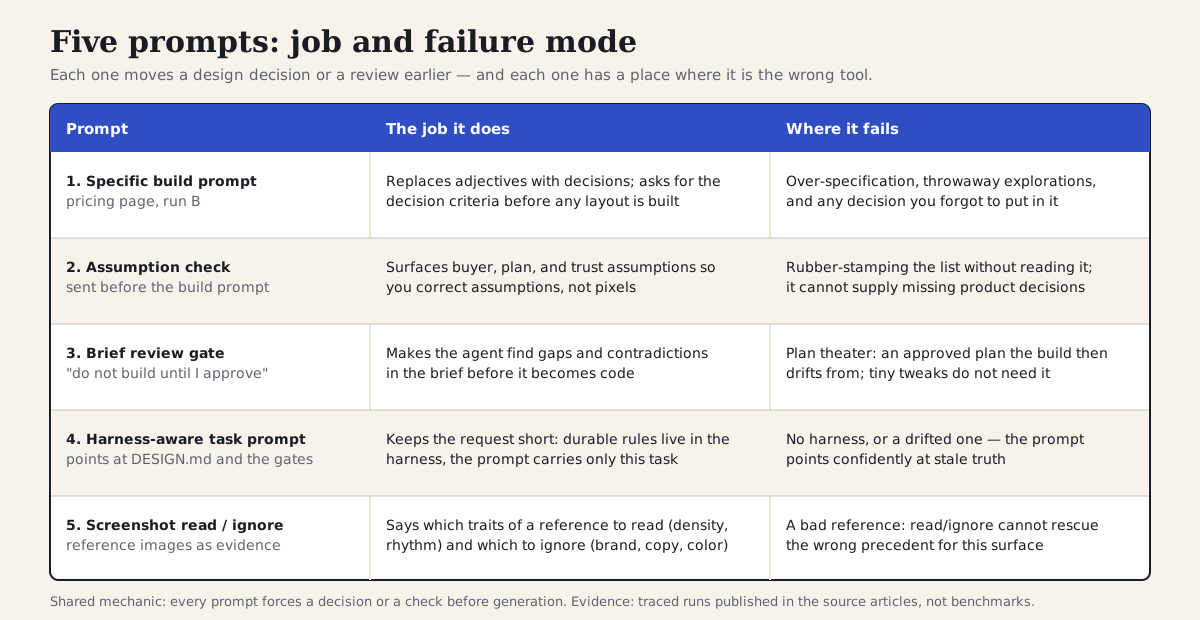
Each prompt moves a design decision or a review earlier — and each has a place where it fails.
Section 02
1. The specific build prompt: decision criteria before layout
This is the prompt from the vague-versus-specific case study — the one that was executed verbatim against a scratch target alongside its weak twin. In that traced run it reached a presentable pricing page in two iterations with a clean token audit, while the vague version took three iterations and failed the same audit with 33 hardcoded-color violations. Those numbers describe that run, not a law of nature, but the shape of the result is what we see every time we use the pattern.
Why it works: it replaces taste adjectives with decisions an agent can act on. It names the buyer segments, defines the job the page performs, sets the hierarchy (comparison clarity over marketing drama), bans the predictable filler, and — the highest-leverage line in the whole prompt — asks the agent to list the decision criteria before building. In the traced run, the layout followed the criteria the agent had just written down. The prompt is not longer because detail is virtuous; it is longer because it carries the decisions this specific surface needs.
Where it fails: when you pin every decision, you have written a spec and thrown away the explorations the agent might have done well; when the surface is a throwaway moodboard, the ceremony costs more than a generic answer would; and whatever you leave out, the agent still resolves with a default — the traced run's mobile comparison behavior went unspecified and therefore unhandled. The full teardown, including the residual failures, is in the source article.
Projects to inspect
Create a pricing page for a design workflow product used by solo designers, small studios, and product teams. The page should help a visitor choose a plan in under 60 seconds. Use three tiers, but make the middle plan the recommended path for small teams. Prioritize comparison clarity over marketing drama. Use compact feature rows, clear limits, accessible contrast, and short plan descriptions. Avoid a giant hero, decorative gradients, vague AI claims, and repeated feature copy. Before building, list the decision criteria the page must make visible.
Section 03
2. The assumption check: correct assumptions, not pixels
Sent before the build prompt, this one asks the agent to expose the assumptions it is about to design from. For decision-heavy surfaces — pricing, onboarding, dashboards, checkout — the visible layout is downstream of product assumptions, and if those are wrong the page can be polished and still guide the wrong person to the wrong choice.
Why it works: it moves the correction to the cheapest possible point. Reading seven assumptions takes a minute; correcting one of them costs a sentence. Correcting the same mistake after generation costs a revision round, and usually gets misdiagnosed as a styling problem. The numbered list also acts as a coverage check on your own thinking — when the agent's mobile comparison strategy line comes back empty or generic, that is usually because nobody on the team has decided it either.
Where it fails: when you skim the list and reply looks good, the prompt becomes ritual rather than review, and you have spent tokens to feel rigorous. It also cannot create product decisions that do not exist; an agent's assumption about plan differentiation is a guess for you to confirm or replace, not an answer. Use it on surfaces where assumptions genuinely vary; for a settings form, it is overhead.
Before designing the pricing page, list your assumptions.

Return:
1. buyer segments
2. main decision each buyer is making
3. plan differentiation strategy
4. information that must be visible before signup
5. trust risks
6. mobile comparison strategy
7. design-system components you plan to use

Then ask up to three questions only if a missing answer would materially change the layout.
Section 04
3. The brief review gate: do not build until I approve
This prompt comes from the briefing article, where it sits at the end of the briefing canvas: before the agent builds anything, it has to review the brief and report what is clear, what is missing, and what contradicts itself. In the briefing article's traced run, this step caught a real conflict — a section briefed as compact and, in the same breath, as detailed enough to explain a whole workflow — and resolving it cost one sentence instead of a rebuilt section.
Why it works: it makes the agent's reading of your brief visible before that reading becomes code. The numbered deliverables matter — restating the user job, naming underspecified states, listing likely failure modes — because they force engagement with the brief's content rather than a polite summary of it. The closing line is the actual gate: do not build until I approve. On every major platform this pairs naturally with plan mode, where the agent can read the project but not change it, so the review costs essentially nothing.
Where it fails: plan theater. A plan can be plausible, approved, and still drift from the implementation that follows it — the briefing article's own run drifted from a component API the plan had named. The gate previews judgment; it does not bind the code, so you still need the executable checks and the human look at the rendered result. And for a one-line tweak in a well-harnessed repository, demanding a six-part brief review is procrastination with extra steps.
Projects to inspect
Review this brief before building.

Return:
1. What user job you think this screen serves.
2. The design decisions that are clear.
3. The design decisions that are missing or contradictory.
4. The states that are underspecified.
5. The likely failure modes.
6. The implementation plan you would follow.

Do not build until I approve or revise the brief.
Section 05
4. The harness-aware task prompt: short on purpose
The fourth prompt is the shortest per unit of work, and that is the point. It comes from the harness article and is built around this site's own repository: the durable rules — tokens, components, anti-patterns, verification commands — live in DESIGN.md and AGENTS.md, so the prompt only has to carry what is specific to this task: the user job, the priority, the inputs, the output shape, and the review steps.
Why it works: it respects the division of labor between the layers. Everything you would otherwise paste into every prompt has been moved somewhere persistent that the agent reads automatically, which leaves the prompt free to describe the product problem instead of the design system. The structure is doing quiet work too — naming the inputs by file path stops the agent guessing where truth lives, asking for a plan first builds in the same gate as prompt three, and ending with the verification commands tells the agent what done has to survive.
Where it fails: without a harness, this prompt is an empty gesture — use the project design harness before building points at nothing, and the agent fills the gap with defaults. With a drifted harness it is worse than nothing, because the agent follows stale rules with full confidence. The corollary is the most useful habit in this whole note: when the same line keeps appearing in your prompts, it is telling you it wants to move into the harness. The prompt should shrink over time; the harness should grow.
Projects to inspect
Use the project design harness before building.

Task: add a field-notes section to the home page.
User job: a returning reader wants to scan the three latest field notes and open one.
Priority: editorial density and reuse of existing components, not a new visual treatment.
Inputs: DESIGN.md, AGENTS.md, components/school-cards.tsx, content/site.ts.
Output: implementation plan first, then code after approval.
Review: run npm run verify and npm run agentic:audit, capture desktop and mobile screenshots,
compare against the harness checklist, and report any remaining design risks.
Section 06
5. The screenshot read/ignore instruction: references as evidence
The last prompt is the smallest and the most frequently mangled in the wild. Reference screenshots improve agent output when the prompt says what the screenshot is evidence of; without that, the agent copies whatever is most visually salient — usually the palette and the card styling — when the useful reference was the table density or the way filters collapse on mobile.
Why it works: it splits the reference into traits to read and traits to ignore, and states both explicitly. Density, rhythm, and hierarchy are usually safe to borrow; brand, copy, icons, and color almost never are. The closing sentence gives the agent a behavioral target — let users compare many rows without feeling crowded — instead of a lookalike target, which is the difference between learning from a precedent and laundering one.
Where it fails: it cannot rescue a bad reference. If the screenshot is the wrong precedent for this surface — a marketing page used as a reference for an operations dashboard — no amount of read/ignore framing helps, because the traits worth reading are not there. It also adds nothing when there is no genuine reference; pulling a random competitor screenshot just to have an attachment gives the agent a precedent you did not actually choose.
Use the attached screenshot only as a reference for information density and table rhythm. Do not copy its colors, brand, icons, or copy. Match the way it lets users compare many rows without feeling crowded.
Section 07
Storing them: a library, and a graduation rule
Five prompts are only a library if they live somewhere the team and the agent can both read. We keep ours in the repository, next to the outputs and critique notes from the runs that shaped them — the folder structure is published in the prompting article, and the pattern matters more than the exact layout: weak version, rewritten version, what came out, and what the review said. Over time that becomes the team's taste memory, and it is the first thing worth showing a new collaborator, human or agent.
The companion habit is the graduation rule from prompt four: a line that appears in every prompt is not a prompt line, it is a project rule, and it should move into DESIGN.md, AGENTS.md, or a skill so the prompts can stay short. The library is where prompts are kept; the harness is where they go to retire.
If you want the deeper treatments: the prompting article covers prompt craft and the traced pricing-page runs, the briefing article covers the canvas and the plan gate, and the harness article covers everything that should stop being a prompt at all. The external guidance below is what we lean on when teaching the rewrite muscle itself.
- Keep the library in the repo, organized by surface, with outputs and critiques alongside the prompts.
- Quote your own prompts verbatim and date them; paraphrase and attribute anything external.
- Apply the graduation rule: recurring prompt lines move into the harness.
- Re-run a library prompt on a fresh surface occasionally — a prompt that only ever worked once is a memory, not a tool.
Projects to inspect
Sources
Sources & further reading
- Claude prompting best practices
Anthropic's guidance on explicit tasks, audiences, and done-criteria — the principles the five prompts apply to design work.
- Claude Code best practices
Plan-then-implement and specific instructions for important work; the agent-level version of prompts 3 and 4.
- Anthropic interactive prompt engineering tutorial
A free hands-on tutorial for practicing the rewrite muscle these prompts depend on.
- Lovable prompting best practices
A UI-generator vendor's version of the same advice: state intent explicitly, one concern at a time.
- How to prompt v0
Vercel's guidance on naming components, real data, and states instead of placeholders.
- claude-code-ui-agents
A community collection of UI-focused agent prompts — a public example of the prompt-library pattern.


