Section 01
Why the brief is the design surface
When designers start working with agents, the first instinct is usually to ask for an artifact: make a landing page, redesign this dashboard, create a pricing section, audit this component. The agent answers by producing something visible, but the visible artifact is often generic because the real design work never reached the model.
The brief is where design intent becomes executable. It tells the agent what the work is for, what kind of judgment to apply, which constraints are real, and what kind of output is useful. If that information is missing, the agent fills the gaps with patterns it has seen before: oversized hero sections, rounded cards, vague SaaS copy, low-contrast badges, and layouts that look polished until you try to use them.
A strong brief does not turn the agent into a senior designer. It turns the agent into a better collaborator. It narrows the space of possible outputs so that the first draft is close enough to critique instead of so vague that the designer has to start over.
This article does three things. It gives you a briefing canvas and the prompts that go with it. It shows where the plan-before-build step now lives as a first-class feature in Claude Code, Codex CLI, OpenCode, and Gemini CLI, with links to the documentation. And it traces one small, real brief end to end on this site's own field-notes page — the weak version, the full version, the plans both produced, what each run cost, and the one thing the good plan still failed to prevent.
Section 02
A working mental model
Treat the agent like a fast design partner with weak taste memory. It can move quickly, inspect files, generate code, compare screenshots, and propose alternatives. It cannot reliably infer the product's politics, the reason a screen exists, the level of polish needed for a stakeholder review, or the difference between a tasteful constraint and a random preference.
That is why a useful brief has two jobs. First, it gives the agent the facts it needs to work inside the project. Second, it gives the agent the standards it must use when judging its own output.
The loop below is the shape this article teaches. The brief carries intent and constraints. The agent answers with a plan, not code, while it is still in a read-only planning mode. The designer reviews the plan against the brief — that review is the cheapest correction point in the whole loop, because nothing has been built yet. Only an approved plan becomes an artifact, and the artifact then runs through critique, executable checks, and human review before feedback returns to the brief.
- Facts include audience, product context, user task, stack, files, components, tokens, and business constraints.
- Standards include hierarchy, density, accessibility, brand tone, interaction quality, and what counts as a bad answer.
- The best brief asks the agent to restate the task before building. That one step catches misunderstandings early.
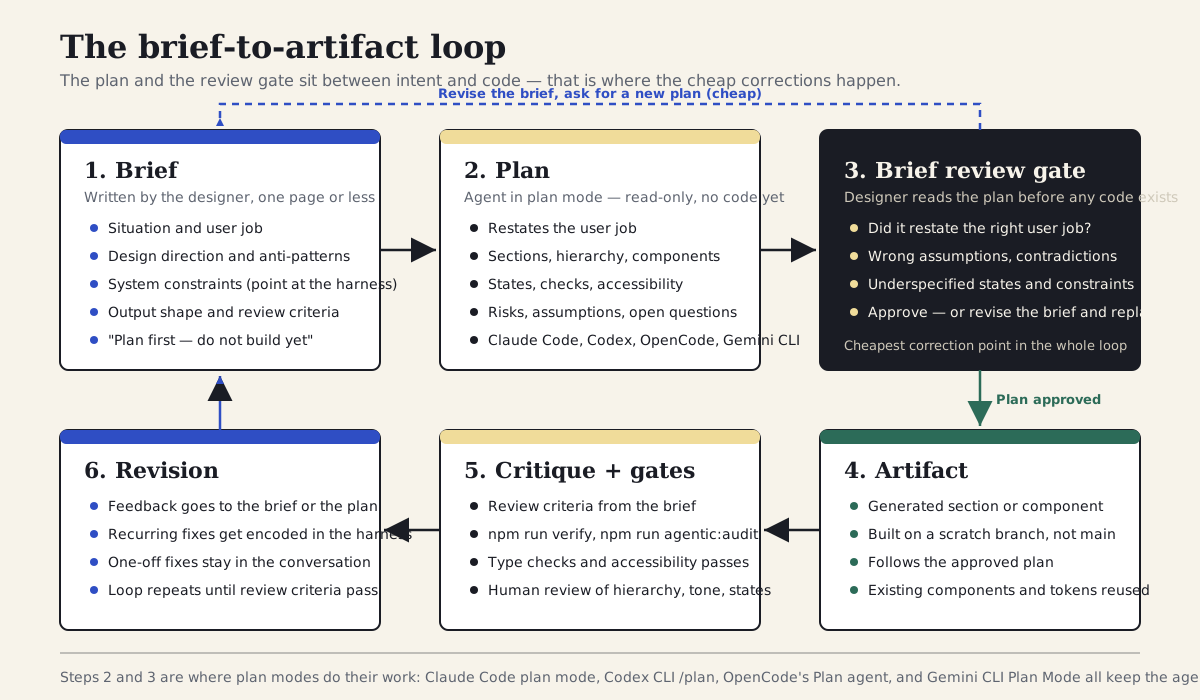
A useful design-agent loop starts with intent, routes through a plan and a brief review gate, and only then produces a reviewable artifact. Steps two and three are where plan modes do their work.
Section 03
The briefing canvas
Use this canvas before asking an agent to build anything substantial. For a small component, each line can be one sentence. For a product page, each line may need examples, screenshots, and acceptance criteria.
The point is not to make the prompt impressive. The point is to make the task reviewable. A prompt that cannot be reviewed before generation usually creates output that is hard to review after generation.
If this structure looks familiar, that is because the wider engineering world arrived at the same place. Spec-driven development tools such as GitHub's spec-kit formalize a spec, then a plan, then tasks, then implementation, with templates that work across dozens of coding agents. Addy Osmani's guidance on writing specs for agents recommends the same spine: state the intent, the constraints, concrete examples, and acceptance criteria, and avoid vague adjectives. The design brief in this article is the lighter, design-flavored version of that pattern — one page for a screen-level task instead of a multi-file specification for a feature.
Borrow the discipline, not the weight. Full spec-driven development earns its overhead on multi-week features with many contributors. For a section, a component, or a page redesign, the seven lines below are usually enough — as long as every line would actually change what the agent builds.
- Situation: what product, screen, or workflow is being changed.
- User job: what the user needs to accomplish on this screen.
- Audience and context: who will use it, who will approve it, and where it will be seen.
- Design direction: the mood, density, visual references, and anti-patterns.
- System constraints: framework, components, tokens, accessibility, browser targets, and performance limits.
- Output shape: prototype, component, audit report, comparison table, migration plan, or production-ready code.
- Review criteria: how the result will be judged and what would make it fail.
Section 04
Where plan-first lives in the tools
Asking for a plan before the artifact used to be a prompting habit. As of this article's last review, it is a documented, enforceable mode in every major CLI agent. That matters for designers because the platform — not your prompt — keeps the agent read-only until you approve the approach.
Claude Code ships plan mode as a permission mode: the agent can read files and research but cannot edit or run write commands until the plan is approved, and the best-practices guide teaches an explore, plan, implement, commit rhythm. Codex CLI documents a plan mode in which the agent gathers context and asks clarifying questions before touching files, plus a PLANS.md pattern that keeps a living plan as a reviewable file beside long-running work. OpenCode goes further and makes planning an agent role: a built-in read-only Plan agent you switch to alongside the default Build agent. Gemini CLI added a Plan Mode that keeps the session read-only while it analyzes the codebase, then presents the finished plan for explicit approval before anything is implemented.
Entry points and keyboard shortcuts change quickly, so check each platform's documentation for the current toggle — the links are in Sources at the end of this article. The capability itself is stable: every one of these tools now has a way to say, in effect, do not build until I approve the plan. The briefing canvas above is what makes that approval meaningful, because you can only judge a plan against intent you have actually written down.
Plan mode as a read-only permission mode; plan is presented for approval before execution
Plan mode for context-gathering and clarifying questions; PLANS.md documented as a living plan file for long work
Built-in read-only Plan primary agent, switched alongside the Build agent; read-only subagents for research
Plan Mode keeps the session read-only during analysis, then requires explicit approval of the finished plan
How the four major CLI agents implement plan-before-build, as of the last review date. See Sources for each platform's documentation.
Section 05
The case study: a new strip for this site's field-notes page
The most honest case study available for this article is a brief executed against the site you are reading. The field-notes page is small and self-contained: a hero, a three-card formats grid, and a newsletter band, all built from the site's existing SectionBand, SectionHeading, and SimpleItemCard components. The task: add an anatomy-of-a-field-note strip that shows how an experiment becomes a published note.
We ran the task twice. Run one used a one-line request, the kind most of us type when we are in a hurry. Run two used the briefing canvas from this article plus a plan-first instruction, with the agent in plan mode. The throwaway components were written in a scratch folder and deleted afterward; nothing from either run was merged into the site.
A note on what is real here. The audit output, the type-check error, and the verification results quoted below are genuine output from this repository's tooling, captured against the scratch components from this walkthrough. The plan transcripts are honest reconstructions of those runs — trimmed and re-typed rather than pasted verbatim from a session log — and the iteration and time counts describe these specific runs, not a benchmark.
Add a new section to the field-notes page that explains how field notes get made.
Section 06
Run one: what a one-line request buys you
The weak request is not unreasonable. It names the page and the topic. What it does not carry is everything that makes this a design task: who reads the page, what the section is for, what the site's visual system already provides, and how the result will be judged. The agent filled those gaps the way agents do — with the most common pattern for a how-it-works section on the public web.
The plan that came back proposed a How Field Notes Get Made band with four numbered steps — ideate, experiment, write, publish — set on a gradient background, each step in its own rounded card with a numbered circle, a closing call-to-action button, and copy in the register of a product marketing page: streamlined process, insights delivered fast. It never asked what the section was for, never mentioned the existing components, and said nothing about states, mobile behavior, or how the result would be reviewed.
Built as proposed, the output also failed the repository's own gate. The token audit found ten hardcoded color violations — purple gradient stops, white-on-purple step circles, an amber call-to-action — none of which exist in this site's token set. Getting from that first output to something that could survive review took three rounds and roughly forty minutes: one round to remove the gradient and the invented call-to-action, one to switch to the site's components and tokens, and one to bring the copy down from marketing register to the site's instructional tone. In other words, the iterations re-supplied, one correction at a time, the context the request never carried.
$ npx @imehr/agentic-designer audit scratch/ --fail-on error

scratch/anatomy-strip-weak.tsx
  L4: [token:color] #6D5BD0
    Expected: A CSS variable reference (e.g., var(--color-primary))
  L4: [token:color] #9F7AEA
    Expected: A CSS variable reference (e.g., var(--color-primary))
  L15: [token:color] #7C3AED
    Expected: A CSS variable reference (e.g., var(--color-primary))
  L18: [token:color] #111827
    Expected: A CSS variable reference (e.g., var(--color-primary))
  L25: [token:color] #F59E0B
    Expected: A CSS variable reference (e.g., var(--color-primary))
  ...

Total: 10 violations (0 slop, 10 token)
# exit code 1
Section 07
Run two: the full brief, in plan mode
Run two started by filling in the briefing canvas for the same task. Writing it took about ten minutes, most of which was deciding what the section is actually for — which is design work the one-line request had simply skipped. The brief points at the harness files for the visual system instead of restating them, names the components to reuse, and ends with the plan-first instruction. The agent ran in plan mode, so it could read the page, the content module, and DESIGN.md, but could not write anything until the plan was approved.
The brief below is the actual text used for the run, lightly trimmed. Notice how little of it describes visual style. The harness already owns color, type, spacing, and anti-patterns; the brief only carries what is specific to this task.
Situation: the /field-notes page on agenticdesign.school currently has a hero, a three-card
"Formats for the publication layer" grid, and a newsletter band. We want a new strip between
the formats grid and the newsletter band.

User job: a reader deciding whether to subscribe wants to see how a field note gets made —
that each note comes from a real experiment, gets written up honestly, and ships through
the newsletter.

Audience and context: practicing designers; reviewed by the site editor; public page.

Design direction: instructional, not promotional. Match the density and tone of the existing
formats grid. No new visual treatments, no numbered-circle process graphics, no marketing copy.

System constraints: Next.js App Router, Tailwind v4, shadcn/ui. DESIGN.md is the design source
of truth; AGENTS.md has the working rules. Reuse SectionBand, SectionHeading, and SimpleItemCard
from the existing components. Semantic tokens only. Content data follows the shape used in
content/site.ts.

Output shape: one React component for the strip, written to a scratch folder, not wired into
the page.

Review criteria: npm run agentic:audit and the type check must pass; the strip must read as
part of the existing page at desktop and mobile widths; copy stays in the site's instructional
voice; three steps maximum.

Before building: restate the user job, list the sections and hierarchy you will use, the states
and checks, your assumptions, and anything in this brief that is contradictory or underspecified.
Do not build until I approve the plan.
Section 08
The plan that came back, and the review it made possible
The plan-mode response did what the weak run never offered: it restated the user job in one sentence, listed the structure it intended to build, named the existing components it would reuse, and flagged a real contradiction in the brief — the request for a compact strip that matched the formats grid sat awkwardly next to a draft step description that wanted to explain prompts, constraints, and file conventions in detail. Resolving that contradiction in the plan, before any code existed, cost one written sentence: keep each step to a single line and let the linked articles carry the depth.
The excerpt below is the substance of that plan response, trimmed. Reviewing it took two or three minutes. That is the entire price of the review gate, and it is the cheapest design review you will run all week, because there is no code to feel attached to and nothing to rework.
With the contradiction resolved, the plan was approved and the agent built the strip: a SectionBand with a SectionHeading and three SimpleItemCards — run the experiment, write the note, publish and send — using the site's existing stripe colors and icon tiles, semantic tokens throughout, in the same grid rhythm as the formats section above it.
Restated user job: a reader deciding whether to subscribe should see, at a glance, that every
field note starts as a real experiment and ends as an honest write-up delivered by newsletter.

Structure: one SectionBand (paper tone) placed between the formats grid and the newsletter band.
SectionHeading with label "Anatomy of a field note" and title "How a dispatch gets made".
Three SimpleItemCards in the same md:grid-cols-3 grid as the formats section:
  1. Run the experiment — a real tool test or workflow run
  2. Write the note — what changed, what failed, what it cost
  3. Publish and send — ships to this page and the newsletter

Components and tokens: reuse SectionBand, SectionHeading, SimpleItemCard, lucide icons;
semantic tokens only; no new primitives.

States and checks: grid stacks to one column below md; heading order stays h2 then card titles;
run the token audit and type check before handoff.

Assumptions: the strip is static content (no data fetching); icons can be chosen freely from lucide.

Contradiction to resolve: the brief asks for a compact strip matching the formats grid, but the
draft step descriptions imply several sentences per step. Recommend one line per step and a
link out for depth. Confirm before I build.
Section 09
What the run cost, and what the plan did not catch
The honest accounting matters more than the win. Run one took three rounds and roughly forty minutes to reach something reviewable, and the first two rounds were spent re-supplying context the request never carried. Run two took about ten minutes of writing the brief, a few minutes reviewing the plan, and one fix round after generation — roughly twenty minutes from plan approval to an artifact that passed the gates. The brief did not make the agent smarter; it moved the correction earlier, where it is cheap.
The fix round is the part worth dwelling on. The approved plan named the right components, and the implementation still drifted from their actual API: it passed the section heading a badge and a description prop that the component does not have, instead of the label prop and child paragraph it actually accepts. The type check caught it immediately — a real TS2322 error — and the correction took one edit. But the plan had looked perfectly sensible, and the plan was not wrong; the implementation just did not match it in a detail no plan would reasonably carry.
That is the limit to internalize. A plan previews the agent's judgment about structure, hierarchy, and intent. It does not guarantee the artifact, and it is not a substitute for type checks, audits, or looking at the rendered result at mobile width. After the fix, the token audit reported no violations and the site's verification script passed. The output itself stayed in the scratch folder and was deleted; whether the strip ever ships to the page is an editorial decision, not a by-product of writing an article about briefing.
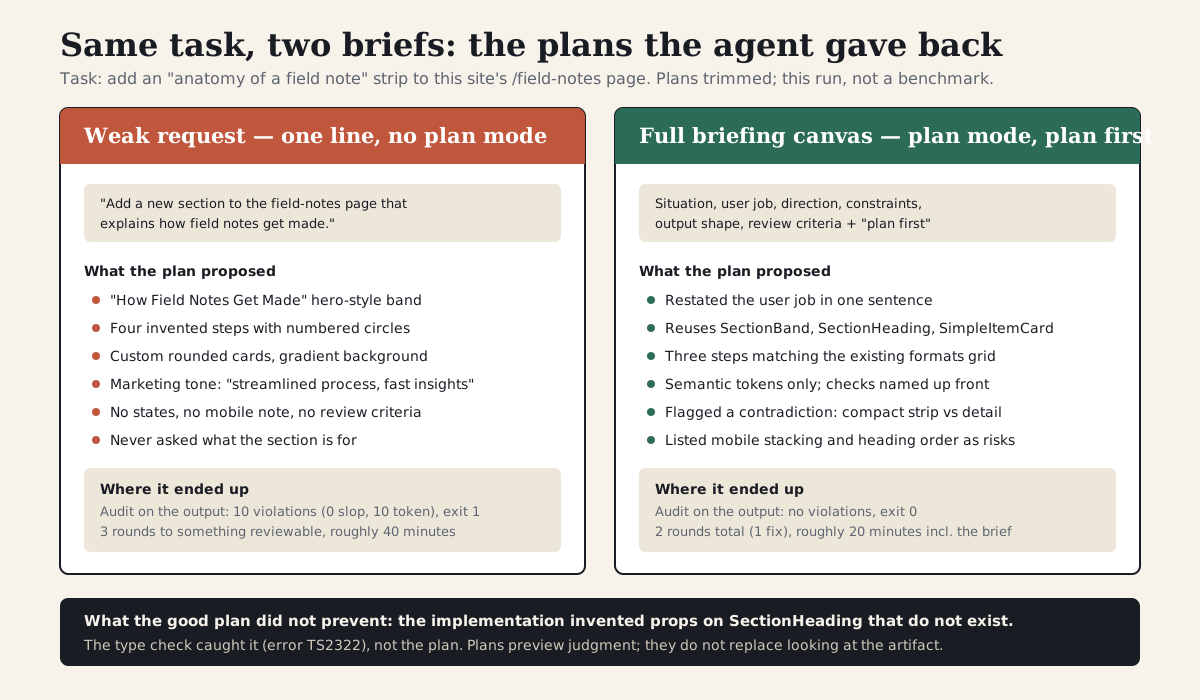
The plans the agent produced from the one-line request and from the full briefing canvas, with what each run cost. The footer records the issue the good plan did not prevent.
Section 10
Ask for a plan before the artifact
For design work, the plan is not bureaucracy. It is a cheap preview of the agent's judgment. If the plan says the screen will start with a giant headline, three feature cards, and a gradient background, you can correct that before the agent spends time writing code — exactly the correction the weak run above paid for in iterations instead.
The plan should be short and concrete. It should name the sections, hierarchy, key components, states, and checks. If the agent cannot produce a sensible plan, it is not ready to produce the artifact. And because every major CLI agent now ships a plan mode, you can let the platform enforce the gate instead of trusting the model to hold back: switch to plan mode, paste the brief, and the agent stays read-only until you approve.
The prompt below is the plan-first instruction used in the case study, generalized. Append it to any brief, or use it on its own when the task is small enough that the full canvas feels heavy.
Before you build, give me a compact design plan with: 1) the user job as you understand it, 2) the page sections in order, 3) the primary visual hierarchy, 4) the components you will reuse, 5) the interaction states, 6) the accessibility checks, and 7) anything in the brief that is contradictory or underspecified. Wait for approval before implementing.
Section 11
Build a context packet, not a brief that restates the harness
A strong brief is not one enormous paragraph, and it is not a copy of your design system pasted into the chat. Durable context — color, type, spacing, components, anti-patterns, working rules — belongs in the project's harness files, where every session can load it: DESIGN.md for the visual system, AGENTS.md or CLAUDE.md for working rules, skills for procedures. The agents.md format documents exactly this idea of a project-level README for agents. If your repository does not have that layer yet, start with the companion article on building a design harness before you prompt, and the instruction-hierarchy article for what loads when; this article assumes that layer exists and stays out of its way.
What the brief carries is everything specific to this task: the user job, the evidence behind it, the direction for this screen, and the review criteria. For anything bigger than a single section, keep that material as a small folder of files the agent can inspect and quote back, rather than one long message. Codex CLI's documented PLANS.md pattern is the same idea from the other direction — the plan itself becomes a file beside the work, reviewable and diffable, instead of a message that scrolls away.
In the field-notes run, the packet was minimal: the brief, a one-paragraph note on why the strip exists, and a pointer to the existing page and content module. For a heavier task — a redesigned onboarding flow, a new product surface — the packet earns more files: screenshots of the current state, a summary of the support tickets or research that motivated the change, and the acceptance criteria as their own document.
agent-workflows/
└── field-notes-anatomy-strip/
    ├── brief.md              # the briefing canvas for this task
    ├── user-job.md           # why the section exists, in one paragraph
    ├── evidence.md           # research, tickets, or analytics behind the change
    ├── screenshots/
    │   └── current-page.png  # the surface being changed, as it is today
    ├── plan.md               # the agent's approved plan (or PLANS.md kept by the agent)
└── review-criteria.md # the pass/fail checks for this taskDesign decision
Brief
Design decision
User job
Design decision
Evidence
Design decision
Screenshots
Design decision
Approved plan
Design decision
Review criteria
The harness carries durable context; the packet carries this task. Intent, evidence, the approved plan, and review criteria live beside the work as files.
Section 12
Good vs bad briefing details
Useful detail changes the agent's choices. Weak detail only decorates the request. If a sentence would not help the agent choose between two layouts, it probably belongs somewhere else or should be rewritten.
The goal is to turn taste into operating constraints. Instead of saying the section should feel on-brand, explain what that means in this product: which components to reuse, what density to match, what tone the copy takes, and which familiar patterns are explicitly off the table. Every row on the right side of the table below is something the agent can act on and something a reviewer can check.
Make it clean and modern
Match the density and tone of the existing formats grid; no new visual treatments
Use our design system
Reuse SectionBand, SectionHeading, and SimpleItemCard with semantic tokens before any custom markup
Explain how field notes get made
A reader deciding whether to subscribe should see that each note starts as a real experiment
Keep it simple
Three steps maximum, one line each; link out for depth instead of explaining inline
Make sure it looks good on mobile
The grid stacks to one column below the md breakpoint and the heading order is preserved
Good briefing details are specific enough to shape layout, hierarchy, states, and review.
Section 13
How to brief visual direction
Visual direction is where many prompts collapse into adjectives. Words like clean, modern, premium, elegant, and delightful are too elastic. They can help as a starting point, but they are not enough for an agent to make layout decisions.
Translate visual direction into design behavior. Instead of saying premium, say the page should use fewer elements, stronger type hierarchy, more negative space, slower reveal of detail, and restrained color. Instead of saying playful, say the page can use warmer accent colors, illustrated empty states, friendlier microcopy, and visible progress feedback.
If the project has a harness, most visual direction should already live there, and the brief only needs to say which parts of it apply with extra force on this task — the way the field-notes brief said instructional, not promotional and banned numbered-circle process graphics, because that specific surface is unusually prone to that specific failure.
- Name density: sparse, balanced, compact, or data-dense.
- Name hierarchy: what should be seen first, second, and third.
- Name rhythm: editorial bands, tool panels, compact rows, or step-by-step cards.
- Name restraint: what not to add, such as decorative gradients, nested cards, or generic illustrations.
- Name reference behavior: not copy this screenshot, but match its navigation density or table rhythm.
Section 14
Brief the states, not only the default screen
Many agent-built interfaces look acceptable because the prompt only described the happy path. Real product design lives in states: empty, loading, error, disabled, selected, expanded, mobile, long copy, and permission-limited views.
Static content sections get off lightly — the field-notes strip only had to worry about mobile stacking and heading order, and the brief said so in one line. Interactive surfaces do not. For an upload flow, a settings form, or a data table, the brief should describe what happens when the input is wrong, the request fails, the list is empty, the copy is three times longer than expected, or the user comes back after abandoning the task halfway. If these states are absent from the brief, the agent will often invent shallow placeholders, and the plan review will not catch what the brief never asked for.
A practical habit: write the states as a short list at the end of the brief, in the same breath as the review criteria. The plan should then name how each one is handled, which gives the review gate something concrete to check.
- Default state: what the user sees before they have done anything.
- Empty and first-run states: what teaches the next step when there is no data yet.
- Error states: what recovery looks like, not just that something went wrong.
- Loading and pending states: what the user is told while they wait.
- Success state: what changed and what the next useful action is.
- Mobile and long-content states: what must stay visible and in what order.
Include default, empty, loading, error, success, and mobile states. The error state should teach recovery, not only say something went wrong. The loading state should explain what is happening. The success state should point to the next useful action. Name how each state is handled in your plan.
Section 15
The critique contract
A design brief should include the critique contract: the list of things the agent must check before calling the work done. This is especially important when the output is code, because the implementation can technically compile while failing the design task.
Make as much of the contract executable as you can. In the field-notes run, two of the review criteria were commands — the token audit and the type check — and both did real work: the audit caught the weak run's hardcoded colors, and the type check caught the briefed run's invented props. The rest of the contract stayed human: does the strip read as part of the page, does the copy hold the site's voice, does the mobile order still make sense. The agent can self-check the first kind before handoff; the second kind is what your review time is for.
- Can a reader identify what the section is for in three seconds?
- Does the section reuse the named components and tokens, with no invented styling?
- Does the design avoid the anti-patterns the brief named?
- Does the mobile layout preserve the content order and hierarchy?
- Do the executable checks — audit, type check, verify — pass before the agent reports completion?
Named and specific
Behavioral, not just adjectives; defers to the harness for durable rules
Stack, components, tokens, accessibility, mobile
Listed alongside the review criteria
Executable checks plus the human pass/fail questions
Plan, prototype, audit, or production code — and where it lands
Use this checklist before asking an agent to build a design artifact.
Section 16
Run a brief review before implementation
Before the agent builds, ask it to review the brief. This is a cheap way to catch missing context. The review should identify assumptions, contradictions, unclear constraints, and likely design risks — and in plan mode, it costs nothing, because the agent is already reading the project without permission to change it.
This is the step that paid for itself in the case study. The brief asked for a compact strip and, in the same breath, for step descriptions detailed enough to explain the whole workflow. The plan flagged the conflict and proposed a resolution; agreeing took one sentence. Without the review, that contradiction would have surfaced as a built section that was either too dense or too thin, and the fix would have cost a full revision round instead.
Treat a plan that raises no questions with mild suspicion. Real briefs have gaps, and an agent that finds none is usually pattern-matching its way to agreement rather than reading carefully. The prompt below makes the questions part of the deliverable.
Review this brief before building.

Return:
1. What user job you think this screen serves.
2. The design decisions that are clear.
3. The design decisions that are missing or contradictory.
4. The states that are underspecified.
5. The likely failure modes.
6. The implementation plan you would follow.

Do not build until I approve or revise the brief.
Can the agent restate it in one sentence?
Can the agent name first, second, and third read?
Are error, loading, success, and mobile covered?
Are components, tokens, and accessibility rules clear?
Did the agent find at least one real gap or conflict?
Does the agent know what a bad answer looks like?
The review gate catches unclear intent before the agent turns it into code.
Section 17
Limits, anti-patterns, and what briefing costs
A full briefing canvas and a plan gate are not always the right tool. For a tiny tweak — change a label, swap an icon, fix a spacing bug — a one-line request in a well-harnessed repository is fine, and writing seven canvas lines first is procrastination. The same is true for throwaway explorations you intend to delete: the cost of being wrong is one regeneration, so spend nothing preventing it. The brief earns its ten minutes when the task has real structure, real states, or a real audience, and when a wrong first draft would cost more than the brief does.
Over-briefing has a quieter cost: briefs that restate what the harness already enforces. If your DESIGN.md names the tokens, the components, and the anti-patterns, repeating them in every brief adds noise, drifts out of date, and trains you to skip reading your own briefs. Point at the harness instead, and keep the brief task-shaped. If you find yourself pasting the same three paragraphs into every brief, that material is telling you it wants to live in a config file or a skill.
Watch for plan theater. A plan can be plausible, well-structured, and approved — and the implementation can still drift from it, the way the field-notes run drifted from the component API the plan itself had named. Plans preview judgment about structure and intent; they do not bind the code. Keep the executable gates and the human look at the rendered artifact, especially at mobile width and with real content lengths. A passing plan plus a passing audit is still not a design review.
Finally, briefing cannot supply product judgment or taste. The brief encodes decisions you have already made — what the screen is for, what to cut, what good means here — so the agent stops remaking them badly. Making those decisions is still design work, and no canvas, plan mode, or review gate does it for you.
- Skip the full canvas for tiny tweaks and throwaway explorations; use it when structure, states, or stakes are real.
- Do not restate the harness in the brief; point at it and keep the brief task-specific.
- Treat the plan as a preview, not a contract — keep type checks, audits, and a human look at the artifact.
- Expect the plan review to find at least one gap; a plan with no questions deserves a second read.
- Move recurring brief content into the harness or a skill; keep one-off context in the brief.
Section 18
A reusable briefing prompt
This prompt is intentionally structured. It asks the agent to slow down at the beginning so the rest of the work can move faster. Use it for prototypes, page redesigns, product flows, and design-system tasks — in plan mode where your platform supports it, so the do-not-build instruction is enforced rather than merely requested.
Start with the canvas, run the plan, review it against the brief, and only then let the agent build. In the run traced above, that order turned a forty-minute correction loop into a ten-minute brief, a three-minute review, and one cheap fix. The numbers will differ on your task; the order of operations is the part that transfers.
You are my design implementation partner for [project].

Task: [what needs to be designed or changed]
User job: [what the user needs to accomplish]
Audience/context: [who uses it and who reviews it]
Constraints: [stack, design system or harness files, components, accessibility, performance]
Visual direction: [density, hierarchy, tone, references, anti-patterns specific to this task]
States: [default, empty, error, loading, success, mobile]
Inputs available: [screenshots, files, routes, components, docs]
Output needed: [prototype, component, audit, plan, production code — and where it lands]
Review criteria: [executable checks to run, plus the human pass/fail questions]

First, restate the brief in your own words. Then list the design risks, the contradictions or
gaps you see in the brief, and a short plan. Do not build until the plan is approved.
Sources
Sources & further reading
- Claude Code best practices (plan mode)
Official guidance on plan mode as a read-only permission mode and the explore, plan, implement, commit workflow.
- Codex CLI features
Official Codex CLI documentation, including plan mode for gathering context before changing files.
- Using PLANS.md for multi-hour problem solving (OpenAI Cookbook)
The PLANS.md pattern: keeping the plan as a living, reviewable file beside long-running agent work.
- OpenCode agents documentation
Documentation for OpenCode's built-in read-only Plan agent and research subagents.
- Gemini CLI Plan Mode
Official documentation for Gemini CLI's read-only Plan Mode and its plan-approval step.
- GitHub spec-kit
Toolkit for spec-driven development: specify, plan, tasks, implement, with templates that work across many coding agents.
- How to write a good spec for AI agents (Addy Osmani)
Practitioner guidance on specs for agents: intent, constraints, examples, and acceptance criteria over vague adjectives.
- agents.md
The open AGENTS.md convention for project-level agent instructions — where durable context belongs, so the brief can stay task-shaped.


