Section 01
The problem with nice
The fastest way to get generic agent design is to ask for something nice. Nice does not tell the agent what job the interface performs, what kind of buyer or user is looking at it, what visual references matter, or what tradeoffs are allowed. Left to fill those gaps itself, the agent reaches for the most common version of the page it has been asked for. For product UI, that usually looks like a familiar SaaS template: large headline, soft gradient, rounded cards, three columns, vague benefits, and a call-to-action that could belong to any company.
This is not a controversial diagnosis anymore. Anthropic's own prompting guidance leads with explicitness — name the task, say who the output is for, and describe what done looks like — and the company ships a public frontend-design skill specifically because unconstrained generation tends toward predictable gradients and cookie-cutter components. The vendors building UI generators say the same thing about their own tools: what you do not specify, the tool decides for itself.
The fix is not to write a longer prompt. The fix is to make the prompt more decidable. A decidable prompt gives the agent enough criteria to choose one layout over another and enough constraints to reject generic defaults. The rest of this article shows that difference with a real run, not a thought experiment: the same pricing-page request executed twice, once vague and once specific, with the generated code, the audit results, the iteration counts, and the place where even the specific prompt fell short.
Projects to inspect
Section 02
Where this article fits: harness, brief, and the request itself
Prompt specificity is one lever among several, and it is the smallest one. Rules that should apply to every task — tokens, components, banned patterns, verification commands — belong in a persistent harness, not in every prompt; that layer is covered in Build a Design Harness Before You Prompt. The mechanics of where those rules live and when they load are covered in the instruction-hierarchy article. Project context that spans many tasks — the product, the users, the constraints, the success measures — belongs in a brief, covered in Brief an Agent Like a Design Partner.
This article is about the layer underneath all of that: the single request. The last sentences you type before generation starts. Even with a good harness and a good brief, a vague request produces a vague answer, because the request is where the specific design decision for this screen has to show up. And without a harness or brief — which is how most people start, and how the case study below was deliberately run — the request is carrying everything.
Keeping the layers straight also tells you where a constraint should go when you find yourself repeating it. If you have typed no decorative gradients into your last five prompts, that line has earned a place in DESIGN.md. If you keep re-explaining who the product is for, that belongs in the brief. The prompt should carry only what is genuinely specific to this request: the user decision, the content, and the judgment this screen needs.
Projects to inspect
Section 03
Case study: pricing page for a design workflow product, executed this time
The product is a design workflow tool used by freelance designers and small product teams. The business needs a pricing page. The existing page has three tiers, but trial users do not understand which tier fits them. The founder asks for a cleaner pricing page. A pricing page is not just a layout — it is a comparison tool. The user is trying to decide whether the product fits their work, their team size, and their risk. A solo designer wants to know whether they can try the tool cheaply. A studio lead wants to know whether collaboration, review history, and export limits are included. A team buyer wants security, support, and predictable billing.
Earlier versions of this article described that scenario hypothetically. For this revision we ran it. The two prompts printed in the next sections — the weak one and the strong one — were executed against the same scratch Next.js and Tailwind target, outside this site's app and component code, with no DESIGN.md, no AGENTS.md, and no skills loaded, so the prompt was the only variable. Each run was iterated with realistic revision prompts until the output would survive a five-minute design review or four rounds were reached, and each run's final file was checked with the same audit command this repository uses as a review gate.
Three honesty notes before the results. The walkthrough is a faithful reconstruction of those runs: the generated code, the audit output, and the iteration counts are real artifacts from the run, while the elapsed-time figures are estimates of what the equivalent interactive session costs and the layout descriptions are read from the generated code rather than pixel screenshots. The audit checks hardcoded colors and a set of slop patterns, not information design, so it is a partial gate, not a verdict. And the numbers describe these specific runs, not a benchmark.
Section 04
The vague version: three rounds to nowhere in particular
The first run used the article's own weak prompt, verbatim. The first output was exactly the genre average the opening section describes, and it arrived looking confident: a full-width gradient hero announcing Simple, transparent pricing, an Unlock your creativity subhead, three identical rounded cards with soft shadows, invented prices of $9, $29, and $99, feature lists like AI-powered designs and Unlimited inspiration, and a closing call-to-action band with a second gradient button. Every color was a hardcoded hex value. None of the actual product's plans, limits, or buyers appeared, because the prompt never mentioned them.
That is what makes the vague prompt dangerous: the output is polished enough to screenshot and weak enough to be useless. The plans read as fair and interchangeable, the comparison the visitor came for does not exist, and the copy could be pasted onto any AI product page without anyone noticing.
Two revision rounds followed. The plans look the same — make it easier to compare them produced a feature comparison strip below the cards, but kept the hero and the invented content. It still feels generic — make the hero smaller and show the actual differences shrank the hero into a heading and added a Most popular badge to the middle card. After three rounds the page was tidier, but the decision problem was untouched: the prices were still fictional, the differences were still feature names rather than limits a buyer cares about, and the styling was still hardcoded. The revisions improved the surface because the surface was all the prompt ever specified.
Create a modern pricing page for our AI design workflow tool. It should have three plans, a nice hero, feature cards, and a call to action.
Section 05
The specific version: the decision shows up in round one
The second run used the article's strong prompt, also verbatim, against an identical scratch target. The difference was visible in the first response before any code appeared: because the prompt asks for decision criteria before building, the agent listed five — which plan fits my team size, what do I lose on the cheaper plan, what does the recommended plan add, what will I pay, and what requires talking to sales — and then built the page around them.
The first generated version opened with a compact heading and one sentence of orientation, no hero. Three plan cards followed, with the middle Studio card visually emphasized and labeled with a reason — recommended for small teams: shared reviews and no export limits — rather than a bare Most popular badge. Below the cards sat a real comparison table with seven rows of limits: seats, active projects, review history, export limits, admin controls, support, and billing. Styling was restrained: system colors from the framework's palette, modest radii, no gradients, no AI claims. One round-one weakness was obvious and predictable: because the prompt contained no real content, the agent invented plausible prices and limits of its own. That is the gap the content packet closes in a later section.
The comparison board below summarizes both runs side by side, drawn from the generated code. The thing to notice is not that the specific output is prettier. It is that the specific output is about something: a buyer choosing between three plans, with the information that choice needs placed where the choice happens.
Create a pricing page for a design workflow product used by solo designers, small studios, and product teams. The page should help a visitor choose a plan in under 60 seconds. Use three tiers, but make the middle plan the recommended path for small teams. Prioritize comparison clarity over marketing drama. Use compact feature rows, clear limits, accessible contrast, and short plan descriptions. Avoid a giant hero, decorative gradients, vague AI claims, and repeated feature copy. Before building, list the decision criteria the page must make visible.
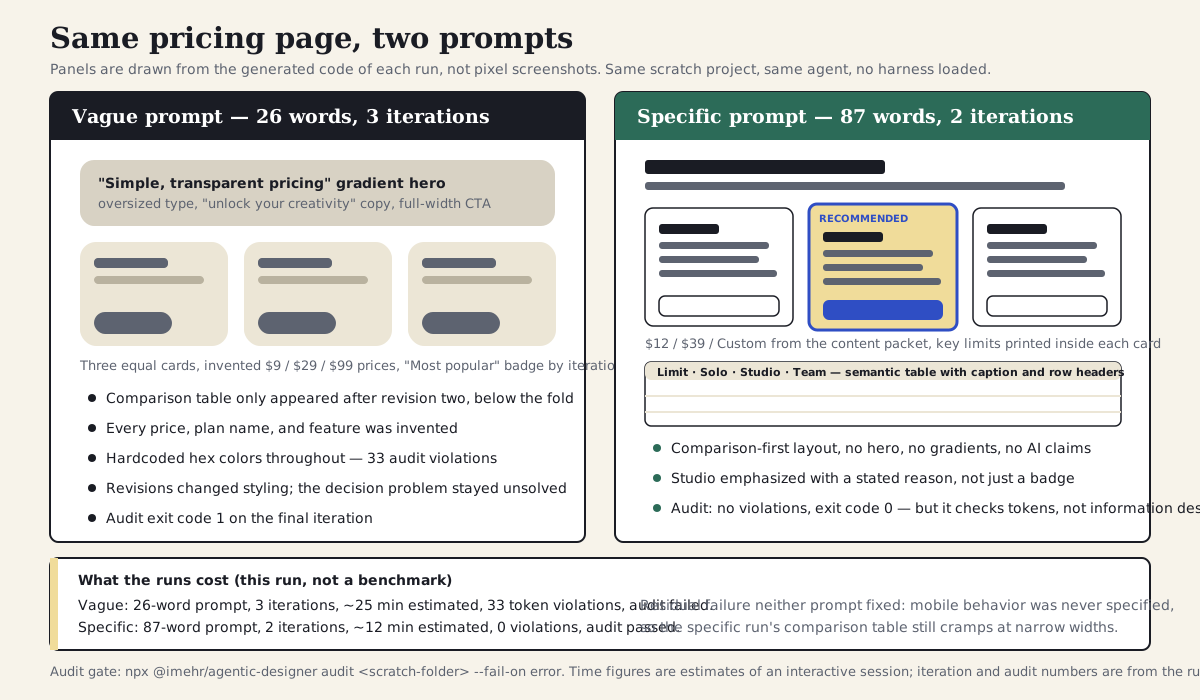
Both runs, drawn from their generated code: the vague version optimizes for the genre; the specific version optimizes for the buyer's decision. The footer carries the run accounting and the failure neither prompt fixed.
Section 06
What changed in the prompt
The stronger prompt does not merely add detail — it is only about sixty words longer. It changes the design problem. The weak prompt asks for a pricing page as a genre, and the run shows what genre delivery looks like: the most familiar arrangement of hero, cards, and call-to-action, executed competently. The stronger prompt asks for a pricing page as a decision tool, and the agent has to make different layout choices to satisfy it.
This matches what the tool vendors themselves recommend. Anthropic's prompting guidance asks you to state the task, the audience, and the completion criteria explicitly rather than hoping the model infers them; Claude Code's best practices ask for specific implementation instructions when the work matters. The strong prompt is just those rules applied to a design request.
- It names the buyer segments: solo designers, small studios, and product teams.
- It defines the job: help a visitor choose a plan quickly — a review question the team can argue about, even if 60 seconds is not literally measured.
- It sets the hierarchy: comparison clarity over marketing drama.
- It defines density: compact feature rows, clear limits, short descriptions.
- It bans common filler: giant hero, decorative gradients, vague AI claims.
- It asks for reasoning before implementation, which is where the decision criteria came from in the run.
Nice, modern pricing page
Solo designer, studio lead, team buyer
Hero plus cards
Comparison clarity before marketing
Looks polished
The buyer can find the right plan and its limits without scrolling past decoration
The stronger version replaces generic taste words with design decisions the agent can act on.
Section 07
What the runs cost, and what the audit caught
The accounting from the two runs: the vague prompt was 26 words and took three iterations to reach something presentable, roughly 25 minutes of an interactive session. The specific prompt was 87 words and took two iterations — the second one only because the real content had not been supplied yet — at roughly 12 minutes. Writing the longer prompt took two or three minutes. The asymmetry is the whole argument: a minute of specification up front replaced a round or two of dissatisfied revision, and the revisions on the vague run never actually fixed the underlying problem because they were aimed at symptoms.
Both final files were then checked with the same audit gate this repository uses on its own code, pointed at the scratch folder. The vague run failed with 33 hardcoded-color violations across its iterations — the same class of failure every unharnessed generation tends to produce. The specific run passed cleanly. That second result deserves a caveat rather than a victory lap: the audit checks token discipline and known slop patterns, not information design. The specific run passed partly because the prompt asked for restraint and the agent leaned on the framework's default palette instead of inventing hex values. A passing audit did not prove the page helps anyone choose a plan; the comparison rubric in the next section is what checks that.
The output below is the real audit output from the run, trimmed to shorten paths and elide repeated lines.
$ npx @imehr/agentic-designer audit scratch/pricing-vague --fail-on error

scratch/pricing-vague/iteration-1.tsx
  L7: [token:color] #EEF2FF
    Expected: A CSS variable reference (e.g., var(--color-primary))
  L18: [token:color] #6366F1
  L18: [token:color] #8B5CF6
  ... (13 more)

scratch/pricing-vague/iteration-3-final.tsx
  L53: [token:color] #6366F1
  L94: [token:color] #F9FAFB
  ... (15 more)

Total: 33 violations (0 slop, 33 token)
# exit code 1

$ npx @imehr/agentic-designer audit scratch/pricing-specific --fail-on error
No violations found.
# exit code 0
Section 08
Where the specific prompt still failed
The strong prompt is printed in this article as an example of doing it right, so it matters to be precise about what it still got wrong in the run. The clearest residual failure was responsive behavior. The prompt says compact feature rows and accessible contrast, but it never says what the comparison should do on a phone. The generated table is a four-column desktop layout; at narrow widths it simply compresses, and nothing in either iteration addressed it, because nothing in the prompt asked. The article's own revision-prompt section shows the fix — at 390px, show one plan at a time with a sticky plan switcher and visible limits before the CTA — but in the run, that decision was never made because it was never requested.
Two smaller honest notes. First, choose a plan in under 60 seconds worked well as a review question — it forced the comparison-first hierarchy — but it is not something the run measured, and you should treat it as design intent rather than a verifiable claim. Second, before the content packet arrived, the specific prompt produced confident, invented pricing. Specificity about layout and hierarchy does not stop an agent from fabricating content; only real content does.
The lesson is not that the specific prompt failed. It is that a prompt only buys decisions you actually put in it. Whatever you leave unstated, the agent will resolve with the most common answer it knows — which for mobile behavior on a comparison table is to do nothing.
Section 09
A practical comparison rubric
After generating both versions, do not ask which one looks better. Ask which one helps the user make the right decision. That is the difference between design judgment and decoration, and it is the review the audit gate cannot do for you.
For the pricing-page case study, the review should focus on decision quality. Can a solo designer identify the right entry plan quickly? Is the team plan meaningfully different? Is the recommended plan visually emphasized without becoming manipulative? Are limits visible before checkout? In the run, the specific version passed the first four of these on its first iteration and needed the content packet to pass the last one honestly.
- Clarity: the difference between plans is visible without reading every row.
- Trust: pricing, limits, and terms are not hidden behind vague language.
- Hierarchy: the recommended plan is clear but not visually aggressive.
- Scannability: the page works for someone comparing plans quickly, on a phone as well as a laptop.
- Accessibility: contrast, focus states, and table semantics support real use.
Section 10
Make the agent expose its design assumptions
A specific prompt should not only request better output. It should make the agent reveal the assumptions it is about to use. This is especially important for pages like pricing, onboarding, dashboards, and checkout, where the visible layout is downstream from product assumptions. The strong prompt's final sentence — list the decision criteria before building — is a lightweight version of this, and in the run it was the single highest-leverage line: the layout followed the criteria the agent had just written down.
In the pricing case, the agent needs assumptions about buyer segments, plan limits, upgrade triggers, proof, trust, and risk. If those assumptions are wrong, the UI may look polished while guiding the wrong buyer to the wrong plan. The fuller version of the pattern is a dedicated assumption-check prompt, sent before the build prompt, so you can correct the assumptions instead of the pixels.
Before designing the pricing page, list your assumptions.

Return:
1. buyer segments
2. main decision each buyer is making
3. plan differentiation strategy
4. information that must be visible before signup
5. trust risks
6. mobile comparison strategy
7. design-system components you plan to use

Then ask up to three questions only if a missing answer would materially change the layout.
Solo designer, studio lead, product team buyer
Try cheaply, collaborate safely, buy with confidence
Middle tier is recommended for small teams
Hidden limits, vague AI claims, surprise billing
Comparison rows collapse into plan-specific decision summaries
Assumptions turn a vague page request into design decisions that can be approved or corrected.
Section 11
Add real content constraints
Many otherwise-specific prompts fail because they do not include real content. The run showed exactly this: the strong prompt produced a well-structured page with fabricated prices and limits, because the agent had nothing real to work with. Content constraints force the design to solve the actual communication problem. For the pricing page, the prompt should include plan names, prices, limits, team-size cues, support levels, billing terms, and the feature differences that matter most.
The UI-generation vendors say the same thing about their own products. Vercel's guidance for prompting v0 recommends naming the actual components, data, and states you want rather than leaving placeholders for the tool to fill. Lovable's prompting documentation is blunter still: the tool does not infer intent you have not stated, so anything you leave out is a decision you have delegated. Treat the content packet below as the design-prompt version of that advice — paste it with the build prompt, or as the first revision once the structure is right.
Projects to inspect
Plans:
- Solo: $12/month, one user, 3 active projects, watermark on exports
- Studio: $39/month, five users, 25 active projects, shared review history, no watermark
- Team: custom, unlimited users, SSO, admin controls, priority support

Primary decision:
Solo designers should see Solo as low-risk.
Small studios should understand why Studio is recommended.
Product teams should know Team requires a sales conversation.

Do not invent features.
Do not hide limits below the fold.
Do not use vague claims like "unlock your creativity."
Section 12
What the content packet changed in the code
In the run, the content packet was sent as the single revision to the specific version. The diff between the two iterations is small and entirely about substance: the invented $10 and $35 prices became the packet's $12 and $39, the export limit gained its real shape (watermarked exports on Solo, none on Studio), the three load-bearing limits moved into the plan cards themselves so they are visible before the table, and the page's opening sentence started carrying the packet's framing — Solo is low-risk, Studio is recommended, Team means talking to sales. The same revision also tightened the comparison table's semantics with a caption and row headers.
Notice what did not change: the layout. The structure was already right after iteration one because the structural decisions were in the prompt. The content packet swapped fabricated facts for real ones. That separation — structure from the build prompt, facts from the content packet — is worth keeping deliberately, because it tells you which kind of revision you are making when something looks wrong.
   {
     name: "Solo",
-    price: "$10/mo",
-    fit: "One designer, client work, no shared reviews.",
+    price: "$12/month",
+    fit: "One designer trying the tool on real client work.",
+    keyLimits: ["1 user", "3 active projects", "Watermark on exports"],
     cta: "Start Solo",
   },
   {
     name: "Studio",
-    price: "$35/mo",
+    price: "$39/month",
     fit: "Small studios that review work together.",
+    keyLimits: ["5 users", "25 active projects", "Shared review history", "No watermark"],
     recommended: true,
-    reason: "Recommended for small teams: shared reviews and no export limits.",
+    reason: "Recommended for small teams: shared review history and watermark-free exports.",
   },

 const COMPARISON = [
-  { label: "Seats", values: ["1", "Up to 5", "Unlimited"] },
-  { label: "Active projects", values: ["3", "20", "Unlimited"] },
+  { label: "Users", values: ["1", "5", "Unlimited"] },
+  { label: "Active projects", values: ["3", "25", "Unlimited"] },
+  { label: "Export watermark", values: ["Yes", "No", "No"] },
Section 13
Prompt patterns that improve design output
The patterns that separated the two runs are not specific to one tool. They describe the design decision rather than the brand of the agent, which is why the same advice shows up in Anthropic's prompting guidance, Claude Code's best practices, and the prompting documentation of the UI generators.
- Replace adjectives with design behavior: not premium, but fewer elements, stronger hierarchy, and restrained color.
- Replace page genres with user jobs: not dashboard, but a daily operations view for triaging overdue work.
- Replace generic references with specific traits: use the density of this table, the hierarchy of this settings page, or the navigation rhythm of this app.
- Replace placeholder content with real content: real plan names, prices, and limits, plus an explicit ban on inventing more.
- Replace final-output requests with planning requests: ask for assumptions, risks, and hierarchy before code.
- Replace vague approval with measurable checks: can the user complete the main task, compare options, or recover from an error?
Section 14
Debug the output by rewriting the prompt
When the output is generic, do not only tell the agent to make it better. Diagnose which part of the prompt allowed the generic choice. The revision should add the missing design decision, not just stronger adjectives. This is also what Claude Code's best practices recommend at the agent level: after a couple of failed corrections, stop patching and write a better initial prompt, because each vague correction layered on a vague request compounds the drift.
The vague run is a worked example of the failure: revision one and two improved styling because styling was all they named. If the pricing page opens with a huge hero, the missing decision is hierarchy. If the three cards feel interchangeable, the missing decision is plan differentiation. If the copy sounds like every AI tool, the missing decision is product specificity. The table below maps the symptoms you will actually see to the antipattern in the prompt that produced them and the stronger move.
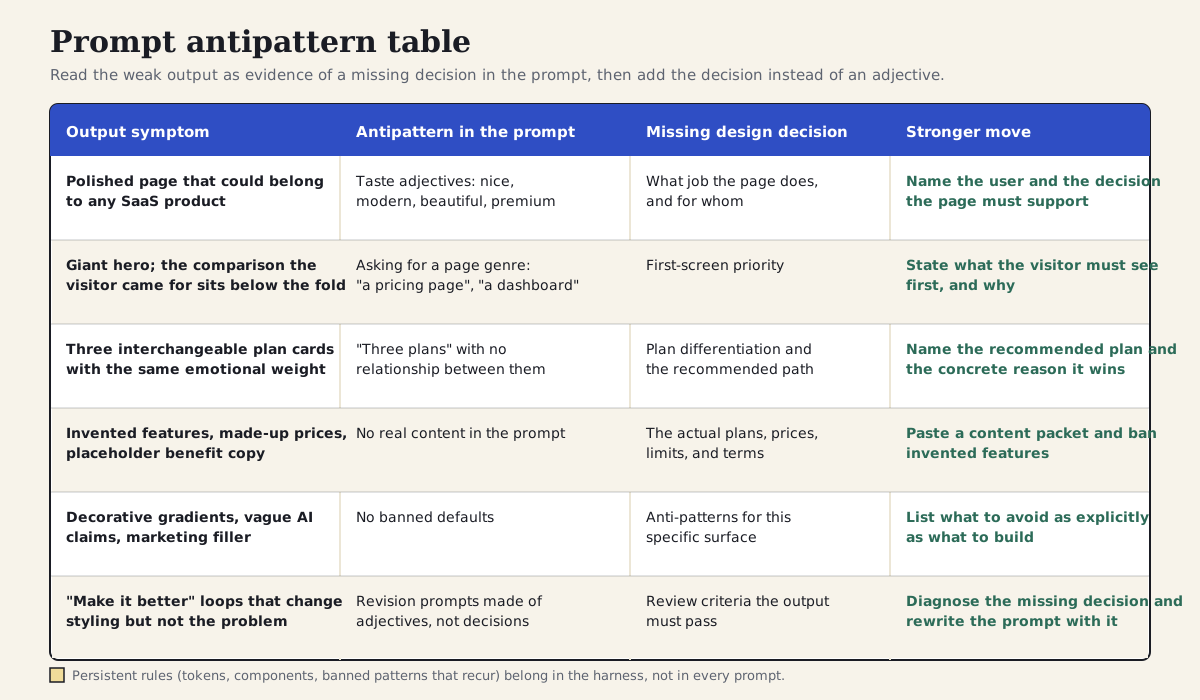
Treat weak output as evidence of a missing prompt decision: symptom, antipattern, missing decision, stronger move.
Section 15
Good vs bad revision prompts
A revision prompt should point to a concrete mismatch. If the first output is weak, the next prompt should describe the specific design failure and the desired correction. The vague run's revisions — easier to compare, less generic — are the bad column of this table lived out: the agent obliged each time and the page barely moved.
Make it less generic
Remove the oversized hero because the buyer needs comparison first; start with plan choice and proof
Make the middle plan pop
Emphasize Studio as recommended with label, border weight, and a concise reason tied to collaboration
Improve mobile
At 390px, show one plan at a time with sticky plan switcher and visible limits before CTA
Strong revision prompts name the problem, user impact, and design direction.
Section 16
Use screenshots as evidence, not decoration
A screenshot can improve agent output when it is used as evidence. The prompt should explain what the screenshot is for. Are you asking the agent to match spacing, borrow navigation structure, inspect component density, or avoid a competitor's visual language?
Without that instruction, the agent may copy the wrong thing. It might imitate a color palette when the useful reference was the table layout. It might copy card styling when the useful reference was the way filters collapse on mobile. The same applies to the comparison table from this case study: a reference image of a dense pricing table is useful for rhythm and density, and dangerous for brand and copy.
Use the attached screenshot only as a reference for information density and table rhythm. Do not copy its colors, brand, icons, or copy. Match the way it lets users compare many rows without feeling crowded.
Ignore: brand
Ignore: copy
Ignore: color palette
A good screenshot instruction tells the agent which traits to read and which traits to ignore.
Section 17
When specificity is not the fix
Specificity has limits, and pretending otherwise produces its own antipatterns. The first is over-specification. A prompt that pins every layout decision — column counts, exact paddings, the order of every section — turns the agent into a typesetter and throws away the explorations it might have done well. If you already know every answer, you are writing a spec, and a spec deserves a review process, not a chat message. Leave room for the agent to propose; constrain the decisions that matter and the failures you cannot accept.
The second is prompt bloat as a symptom of a missing harness. If every prompt you write repeats the same token rules, the same banned gradients, and the same component names, those lines are not request-specific — they are project rules wearing a disguise, and they belong in DESIGN.md, AGENTS.md, or a skill. The harness article covers where each kind of constraint should live. A 300-word prompt is also simply too much ceremony for a throwaway exploration; for a moodboard you will delete tomorrow, a vague prompt is fine, because the cost of a generic answer is zero.
The third limit is the one the case study demonstrated. Specificity cannot substitute for product decisions or real content. The strong prompt could not know the real prices, so it invented some; no amount of prompt craft fixes a missing pricing decision, an unresolved plan structure, or an unwritten policy. And even a good specific prompt only covers the decisions you remembered to make: the run's mobile gap existed because nobody — prompt author included — had decided what the comparison should do on a phone. The prompt is a vehicle for decisions, not a replacement for making them.
- Do not pin decisions you actually want explored; constrain outcomes and failure modes instead of dictating every measurement.
- If the same constraint appears in every prompt, move it to the harness or a skill and keep the prompt for what is new.
- Real content beats clever phrasing: missing prices, plans, or policies cannot be prompted into existence.
- Match effort to stakes: throwaway explorations do not need a decidable prompt; shipping surfaces do.
- Expect residual gaps: whatever you do not specify, the agent resolves with a default — review for the decisions you forgot.
Section 18
Turn the exercise into a team habit
The vague-versus-specific exercise works best when teams use it before design generation, not after a disappointing output. Keep a small library of weak requests, rewritten prompts, generated outputs, and critique notes. Public precedents for this already exist — Anthropic's interactive prompt-engineering tutorial teaches the rewrite muscle, and community and vendor prompt libraries for UI work show what a shared collection looks like — but the useful version is the one filled with your product's pages and your team's standards.
Over time, the library becomes a taste memory for the team. New agents and new collaborators can see what the team means by compact, editorial, operational, playful, dense, trustworthy, or restrained because each term is tied to examples and outcomes. Where the library lives matters less than that it is in the repository the agent can read; if your project already has a harness, keep it beside the examples folder described in the harness article so prompts, outputs, and critiques stay together.
Projects to inspect
agent-workflows/
└── prompt-library/
    ├── pricing-page/
    │   ├── weak-prompt.md
    │   ├── specific-prompt.md
    │   ├── output-notes.md
    │   └── critique.md
    ├── onboarding-flow/
    └── dashboard-triage/
Section 19
A reusable rewrite exercise
Before you ask an agent to design a page, write the weak version first. Then rewrite it by adding the missing design decision. This turns prompting into a design exercise instead of a guessing game, and it takes the two or three minutes that the case study showed paying for themselves within the first revision round.
Use the template below for any surface, then run the same loop the case study ran: send the rewritten prompt, read the output against your review criteria, and when something is wrong, name the missing decision in the next message instead of reaching for an adjective. If the missing decision keeps being the same one, promote it into your harness and stop typing it.
Weak request: [generic page or component request]
User decision: [what the user needs to decide or do]
Context: [who the user is and where this appears]
Real content: [actual names, numbers, limits, and copy — plus a ban on inventing more]
Visual behavior: [density, hierarchy, rhythm, tone]
Constraints: [stack, design system, accessibility, mobile, content]
Failure modes: [what would make the output unusable]
Review criteria: [what you will check before accepting it]
Final prompt: [rewrite the request with the above included]
Sources
Sources & further reading
- Claude prompting best practices
Anthropic's guidance on explicit tasks, audiences, done-criteria, concrete examples, and systematic iteration.
- Prompt engineering overview (Claude docs)
Index of Anthropic's prompt engineering techniques, from clarity and examples to prompt chaining.
- Claude Code best practices
Agent-level guidance: specific instructions for important work, plan-then-implement, and rewriting the prompt rather than stacking corrections.
- frontend-design SKILL.md (anthropics/claude-code)
Anthropic's public skill that counters generic AI aesthetics by establishing purpose, audience, and an explicit aesthetic direction before coding.
- Improving frontend design through Skills
Anthropic's write-up of the failure mode this article opens with — predictable, cookie-cutter frontend output — and the packaged fix.
- How to prompt v0
Vercel's guidance on prompting v0 with named components, real data, and states instead of placeholders.
- v0 text prompting documentation
Official v0 documentation on text prompting for UI generation.
- Lovable prompting best practices
Lovable's documentation on stating intent explicitly, one concern per prompt, and planning before building.
- Anthropic interactive prompt engineering tutorial
A free hands-on tutorial for practicing clear, direct, example-driven prompting.
- claude-code-ui-agents
A community collection of UI-focused agent prompts; a public example of the team prompt-library pattern.


