Section 01
The procedure you keep pasting
Every designer who works with a coding agent for more than a few weeks accumulates a private library of procedures. The critique checklist you paste in before asking for a review. The export routine for marketing assets. The exact spec for how diagrams should look on your site: which palette, which fonts, which file path, which size limits, which things to never do. None of this is secret knowledge. It is just procedure — and right now it probably lives in one of two bad places.
The first bad place is your clipboard. You keep a note somewhere, you paste it into the chat when the task comes up, and you hope you pasted the current version. The agent follows it well enough, but nothing about the workflow improves over time, nothing is shared with the team, and the fifth paste feels exactly like the first. The second bad place is your always-loaded configuration file. The procedure gets appended to CLAUDE.md or AGENTS.md because that is the file the agent always reads, and six months later that file is 500 lines long, costs context on every session including the ones that have nothing to do with diagrams, and still gets skimmed when the model is deep in an unrelated task.
There is a third place, and it has quietly become a cross-tool standard: a skill. A skill is a folder with a SKILL.md file in it. The file's frontmatter tells the agent when the procedure applies; the body holds the steps and the quality bar; supporting files hold templates, examples, and scripts. The agent sees only the skill's name and description until a task matches — then the full procedure loads, does its job, and the rest of your context window stays free for the actual work. This article covers when a design procedure earns that packaging, what goes inside, what the public ecosystem already offers, and what happened when we built one for this site's own editorial pipeline.
Projects to inspect
Section 02
A skill is a packaged briefing, not a prompt in a file
The mental model that makes skills click is the briefing you would give a capable junior designer who has never seen this task before. You would not recite the brand book — they can look that up. You would tell them when this kind of task shows up, what the steps are, what good looks like, where the reference examples live, and what to check before they hand the work back. That is exactly the anatomy of a skill: the description is the trigger, the body is the procedure plus the quality bar, and the supporting files are the reference shelf.
What separates a skill from a prompt saved in a notes app is the lifecycle around it. A skill is committed to the repository, so it is versioned, reviewable, and shared with anyone who clones the project. It announces itself to the agent through a one-or-two-sentence description that is always in context, which means the agent can reach for the procedure without being told to. And its full body only enters the context window when a task actually matches — either because you invoked it by name or because the model recognized the request — so a project can carry dozens of packaged procedures while paying almost nothing for the ones that sit idle.
That loading behavior is the economic argument, and it is worth internalizing because it drives every placement decision. Configuration files cost context on every session, whether or not their content is relevant. Skill descriptions cost a small, fixed amount. Skill bodies cost nothing until used, and once used they typically stay available for the rest of the session. The official Claude Code guidance puts the rule plainly: when a section of your configuration file has grown into a procedure rather than a fact, it should become a skill. Facts are cheap and always relevant; procedures are long and only sometimes relevant.
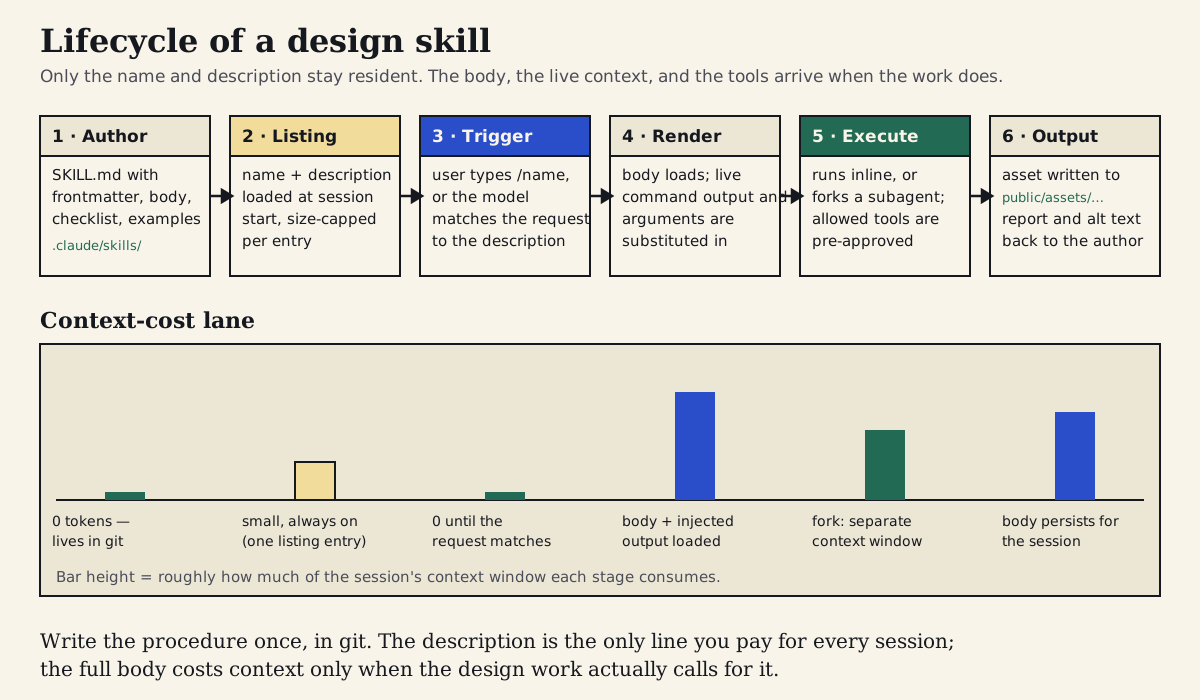
The six stages of a design skill. Only the listing entry is always resident; the body, injected context, and tool permissions arrive when a task triggers the skill, and the output is an artifact written back into the repository.
Section 03
What the format actually is, and who reads it
SKILL.md started as a Claude Code feature and became an open format. The Agent Skills standard, originally created by Anthropic and published as a cross-platform specification in late 2025, defines a deliberately small core: a folder, a SKILL.md file with name and description frontmatter, a Markdown body, and optional supporting files alongside it. Anything that sticks to that core is portable in the most literal sense — it is a folder of text files that any agent supporting the standard can discover and read.
On top of that core, Claude Code adds a substantial set of extensions, documented in its skills reference. Frontmatter fields can restrict which tools the skill may use (allowed-tools and disallowed-tools), control whether the model may invoke the skill on its own (disable-model-invocation) or whether users can call it directly (user-invocable), run the skill in a forked subagent context (context: fork) or hand it to a named agent, scope it to file paths, pin a model or effort level, and attach hooks. Skill bodies can include dynamic context injection — a shell command whose output is inserted when the skill loads — plus argument substitution, so a design skill can read the current token file rather than a copy pasted into it months ago. Custom slash commands have been folded into the same mechanism, which makes skills the single packaging unit for procedures in Claude Code.
Other agents read the same files, with differences that matter less than you might fear. Codex CLI documents skill discovery from project and user folders (this site's .codex/skills/ directory is exactly that path) with the same progressive-disclosure behavior: names and descriptions first, body on use. OpenCode and Gemini CLI document their own discovery paths, and OpenCode's includes .claude/skills/, which means a single committed folder can serve a mixed-tool team. Two honest caveats: some of these integrations are still labeled experimental in their own docs, and we have only hands-on verified the Claude Code and Codex paths in this repository — treat the rest as documented behavior to confirm in your own setup. The portability rule that follows from all of this: keep the procedure in the body, which every tool reads, and treat vendor-specific frontmatter as progressive enhancement that other tools will simply ignore.
- Portable core: folder + SKILL.md with name and description + Markdown body + optional supporting files.
- Claude Code extensions: allowed-tools, disallowed-tools, invocation switches, context: fork, agent, paths, model, effort, hooks, dynamic context injection, argument substitution.
- Description-based triggering is budgeted: each skill's listing entry is size-capped and the total listing shares a small slice of the context window, so descriptions need to be short and specific.
- Distribution paths: project folders in git, user-level folders for personal skills, and plugins for packaging a team's skill set.
- Cross-tool reality in mid-2026: Claude Code, Codex CLI, OpenCode, and Gemini CLI all document SKILL.md support; verify discovery paths in your own toolchain before relying on them.
Projects to inspect
Section 04
The public design-skill ecosystem, surveyed without the hype
Skills would be a niche convenience if every team had to write their own from a blank file. They do not. A real public ecosystem of design skills exists, and reading through it is the fastest way to learn what good ones look like — even if you never install a single one.
Anthropic's public skills repository is the reference corpus. Its example skills include several that are squarely about design: a frontend-design skill that encodes opinions about visual hierarchy and component quality, a canvas-design skill for visual artifacts, a brand-guidelines skill that shows how to make an agent respect an identity, and a skill-creator skill whose entire job is helping you write more skills. The example skills are Apache-2.0 licensed; the separate document-creation bundle in the same repository is source-available rather than open source, which is worth knowing before you copy text out of it.
Open Design takes the idea further: it is an open-source, local-first design tool whose engine is essentially a large library of composable SKILL.md skills paired with portable DESIGN.md design systems, usable from whichever agent CLI you already run. Its catalog has grown quickly — quickly enough that any specific count published here would be stale within weeks, so go look at the repository rather than trusting a number. Huashu Design is the most extreme demonstration of the format: the entire product is one long SKILL.md that encodes an HTML-native design pipeline, a set of named design philosophies to choose from, explicit anti-AI-slop rules, and a five-dimension critique rubric. It was relicensed under MIT in May 2026 after starting life under a non-commercial license, which made it considerably easier to learn from. And this site itself ships a skill pack in .codex/skills/ — critique, web prototype, article writing, and others — which is how the pattern earns its keep in a small editorial operation rather than a product team.
What all of these have in common is more interesting than their differences: they encode taste as procedure. Anti-slop rules, philosophy pickers, critique rubrics, asset protocols. The lesson for designers is that judgment survives packaging better than most people expect — but only when the skill is paired with a project design system. A skill knows how to do the work; your DESIGN.md and tokens know what your brand is. A skill that tries to be both becomes a brand book that goes stale, which is one of the failure modes covered later.
Projects to inspect
Section 05
Case study: a hero-illustration skill for this site
This site has a quality bar that every deep article must ship with at least two built visuals — diagrams, comparison boards, decision tables — stored under public/assets/articles/<slug>/ and drawn in the school's own visual language. Until this article, that procedure lived nowhere. The palette, the typography rules, the file-path convention, the legibility checks, the no-vendor-logos rule: all of it was carried in the head of whoever produced the last diagram, which is exactly the kind of repeated, judgment-laden procedure a skill is for. So the case study for this article is the skill this article needed anyway: article-hero-illustration, committed at .claude/skills/article-hero-illustration/.
The first draft took about twenty minutes. Frontmatter with a name, a description written to trigger on requests like 'build the hero diagram for the skills article', an argument hint for the article slug and visual title, and an allowed-tools list restricted to reading, writing, and the project's verify script. The body was a seven-step procedure: read DESIGN.md and the article's visual block, choose a visual grammar, draft the SVG against size and typography constraints, save it to the asset path, self-check against a checklist file that sits next to the skill, and report the file path plus a drafted alt text. A separate checklist.md carries the QA list so the body stays readable.
The first version had a real flaw, and it is worth being specific about because it is the kind of flaw skills are prone to. The draft procedure said 'use CSS variables only' for color, copied from the convention this site uses for components, where SVGs inherit the page theme. But article visuals are not inline components — they render through a plain img tag, and an SVG loaded that way cannot resolve the page's CSS custom properties. Following the skill as written would have produced diagrams that silently fell back to black-on-transparent. The procedure encoded a rule from the wrong context, and nothing in the skill would ever have caught it because the checklist checked palette names, not rendering paths. The fix was to hard-code the DESIGN.md palette values into the skill itself, with a sentence explaining why, so the next person who reads it does not 'correct' it back.
With the skill fixed, producing this article's lifecycle diagram took one invocation and one revision pass. The first output was structurally right — six stages, a context-cost lane underneath — but several stage labels were written for a wider box than the layout allowed and overflowed their frames; the revision shortened the labels and bumped the cost-lane text up to the checklist's minimum size. Total cost for the case study: roughly forty-five minutes, of which the skill itself was about half, and two iterations on the first real output. The second visual for this article, the decision table, reused the same procedure with no corrections, which is the payoff in miniature: the second use is where a skill starts earning back its setup time.
Section 06
The complete SKILL.md, as committed
Here is the skill exactly as it lives in this repository. Two things are deliberate about its shape. First, the description is one sentence about what it does, one sentence about when to use it, and one about when not to — that last clause matters because the description is the only thing standing between this skill and being triggered for screenshot or component work it is not designed for. Second, the body points at DESIGN.md and the article's own visual block instead of restating the brand: the skill owns the procedure, the design system owns the facts.
The folder holds two files. SKILL.md is the procedure; checklist.md is the QA list the procedure references in step five. An examples folder with one known-good output is a worthwhile addition once a few articles have shipped visuals, but it was left out of the first version rather than seeded with an example the skill had not actually produced.
---
name: article-hero-illustration
description: Create the hero or diagram SVG assets for an Agentic Design School article. Use when an article needs its hero illustration, section diagram, comparison board, or decision-table visual built under public/assets/articles/<slug>/. Not for UI components, screenshots, or photography.
argument-hint: [article-slug] [visual-title]
allowed-tools: Read, Write, Glob, Grep, Bash(npm run verify:*)
---

# Article Hero Illustration

Produce one original SVG visual for an Agentic Design School article and save it under
`public/assets/articles/$0/`. The visual must support a specific claim or workflow in the
article, follow the school's design system, and remain legible from 360px to 960px wide.

## Inputs

- `$0` — article slug (folder name under `public/assets/articles/`).
- `$1` — visual title (used to choose the file name, e.g. `skill-lifecycle`).
- The article module at `content/articles/$0.ts` (read its `visual` blocks for title, caption,
  alt intent, and `items`).
- `DESIGN.md` sections 1-9 for identity, palette, typography, and anti-slop rules.

## Palette (hard-coded, not CSS variables)

Article assets render through a plain `<img>` tag, so the SVG cannot resolve the page's CSS
custom properties. Hard-code these values, taken from DESIGN.md:

- Warm paper background: `#F8F4E9`
- Ink (text, borders, arrows): `#16181F`
- School blue (primary emphasis, one concept per diagram): `#2A4DC9`
- School yellow (learning bands, soft fills): `#F1DC9C`
- Lab green (workflow / proof-layer cues): `#226A53`
- Muted paper panel: `#ECE6D5`
- Secondary text: `#4A4D58`

Do not introduce other hues, gradients, or drop shadows. Offset solid-border shadows are allowed
for at most one focal panel.

## Procedure

1. Read `DESIGN.md` and the target article's `visual` block. Restate in one sentence what claim
   the visual supports. If no claim is clear, stop and ask.
2. Choose the visual grammar: stack diagram, loop, lifecycle/flow, decision table, or comparison
   board. Do not invent decorative illustrations.
3. Draft the SVG:
   - `viewBox="0 0 1200 700"` (or taller for stacked/vertical variants), no fixed width/height.
   - Serif (Georgia) for the title, sans-serif for labels, monospace only for file names and code.
   - No text smaller than 12px at the 1200-wide reference size; prefer 15px+ for labels.
   - Letter spacing 0. No vendor logos, product UI, or screenshots.
4. Save to `public/assets/articles/$0/<visual-name>.svg` using a kebab-case file name derived
   from `$1`.
5. Self-check against `checklist.md` in this skill folder. Fix anything that fails before
   reporting.
6. Report back: the file path, a drafted alt text (one sentence, descriptive, no "image of"),
   and any checklist items that needed a second pass.

## Output contract

- One `.svg` file per invocation, committed-ready, under the article's asset folder.
- Alt text returned in the report so the article's `visual.asset.alt` can be filled in.
- No edits to article content, components, or routes. The article author wires the asset in.
Section 07
What an invocation actually looks like
The transcript below is the trigger and report from producing this article's lifecycle diagram, condensed for length but not rewritten — the prompt is what was typed, and the report structure is what the skill's final step asks for. Notice how short the prompt is. Everything that used to be in the prompt — palette, sizes, file paths, the QA pass — is in the skill, so the prompt only carries what is specific to this visual: which article, which diagram, what it needs to show.
Notice also the shape of the failure in the first pass. The skill caught its own checklist violation (label text overflowing the stage boxes when previewed narrow) because the checklist made legibility at 360px an explicit check rather than a vibe. The thing the skill could not catch was the thing the skill itself got wrong in its first draft — the CSS-variable assumption — because a procedure cannot check the assumption it is built on. That review is yours.
> /article-hero-illustration design-skills-skill-md skill-lifecycle
  Build the skill lifecycle diagram for the SKILL.md article: six stages
  (author, listing, trigger, render, execute, output) left to right, with a
  context-cost lane underneath showing what each stage costs in the session.

[skill: article-hero-illustration loaded]

Claim this visual supports: only a skill's listing entry is always resident;
the body and tools cost context only after a trigger.
Grammar: lifecycle/flow with a cost lane (per the article's visual block).

Draft 1 issues found in self-check:
- Stage labels 3 and 4 overflow the 170px stage frames at 360px width
  -> shortened labels, kept 15px size.
- Cost-lane annotations were 12px -> raised to 14px (checklist minimum is
  12px, but the lane is the densest area of the diagram).

Saved: public/assets/articles/design-skills-skill-md/skill-lifecycle.svg
Alt text: "Lifecycle of a design skill in six stages - author, listing,
trigger, render, execute, output - with a context-cost lane showing that
only the listing entry is always loaded."
Checklist: pass (2 items needed a second pass, noted above).
Section 08
Skill or configuration rule? The decision in one table
The most common mistake is not writing bad skills — it is writing skills for things that should have been a one-line config rule, and config rules for things that should have been skills. The decision comes down to the nature of the knowledge. A fact the agent should always know — the spacing scale, the component library, the accessibility floor — belongs in the configuration file, where its constant context cost is justified by its constant relevance. A constraint that only applies to certain file types belongs in a path-scoped rule. A procedure with steps, judgment calls, and a definition of done belongs in a skill. And the agent's own observations about your preferences accumulate in memory, which you audit rather than author.
The failure smells are as diagnostic as the rules. If your config file has grown a numbered list with more than five steps, that section is a skill wearing the wrong file name. If you keep pasting the same paragraph into chat, that paragraph is a skill that does not exist yet. If a skill begins by restating your entire palette and type scale, it is duplicating the design system and the two will drift apart — the skill should read DESIGN.md or the token file, not replace it.
# BAD - a procedure jammed into the always-loaded config file
# (CLAUDE.md, costs context on every session, skimmed when irrelevant)

## Article diagrams
When making article diagrams use the warm paper background and the school
blue, draw at 1200x700, use Georgia for titles, save the file under
public/assets/articles in a folder named after the slug, check the text is
readable on phones, write alt text, do not use logos, then run verify...

# BAD - a fact dressed up as a skill
# (.claude/skills/brand-colors/SKILL.md - there is no procedure here)

---
name: brand-colors
description: The brand colors for this project.
---
Primary is school blue, background is warm paper, accent is lab green.

# GOOD - the fact stays in config, one line, always relevant

## Design facts (CLAUDE.md)
- Palette, type, and spacing live in DESIGN.md; never invent values outside it.

# GOOD - the procedure becomes a skill, loaded only when diagram work happens

.claude/skills/article-hero-illustration/
├── SKILL.md       # trigger description + 6-step procedure + output contract
└── checklist.md   # the QA list step 5 runs before reporting
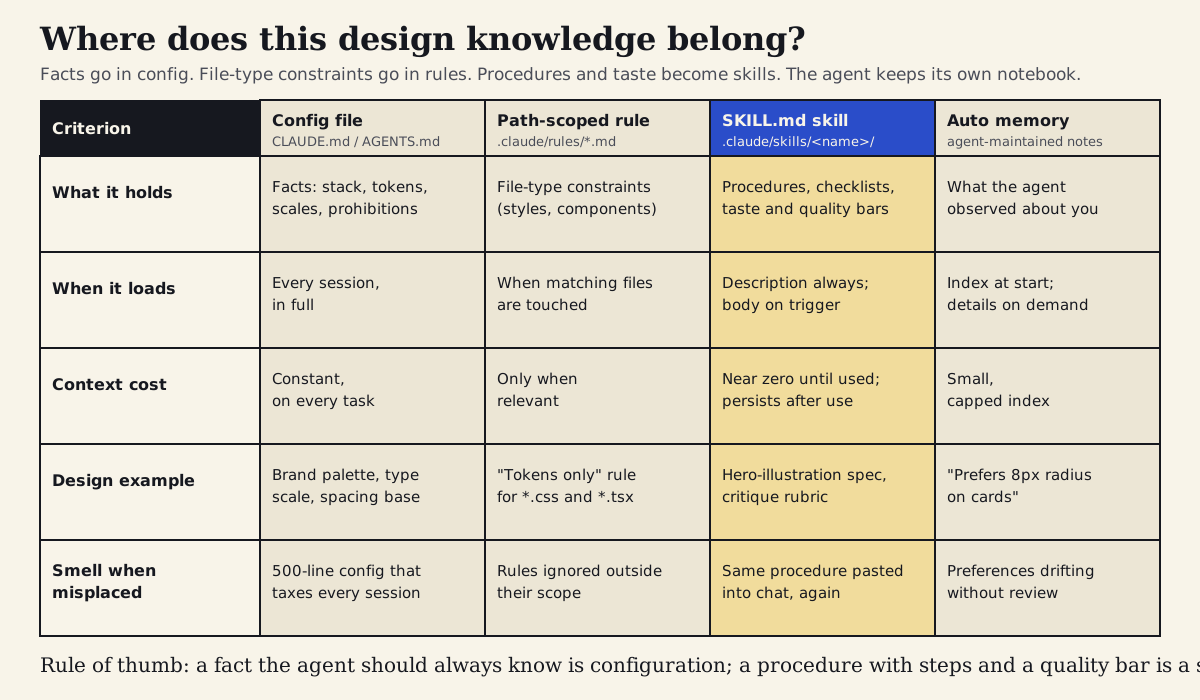
Config files hold facts, path-scoped rules hold file-type constraints, skills hold procedures and taste, and auto memory holds what the agent observed — each with a different loading behavior and failure smell.
Section 09
Writing the description: the part that decides whether the skill ever runs
A skill that never triggers is indistinguishable from a skill that does not exist, and triggering is decided almost entirely by the description. The description is the only part of the skill the model sees when it is deciding what to do with your request, it is size-capped per skill, and it shares a limited listing budget with every other skill installed in the project and your user folder. That makes description writing a small design problem of its own, and it rewards the same discipline as good UX copy.
Three patterns separate descriptions that trigger reliably from descriptions that do not. State what the skill produces, not what it is about — 'create the hero or diagram SVG assets for an article' beats 'helps with article visuals.' Include the words a person would actually use when asking — slug, diagram, comparison board, hero — because matching happens against the request as typed, not against your internal taxonomy. And say what the skill is not for; the single clause 'not for UI components, screenshots, or photography' is what keeps a visual-asset skill from firing when someone asks for a component screenshot, and false triggers erode trust in the whole mechanism faster than missed ones.
- Bad: "Helps with design visuals." — no output named, no trigger words, will either never fire or fire constantly.
- Good: "Create the hero or diagram SVG assets for an Agentic Design School article. Use when an article needs its hero illustration, section diagram, or comparison board built under public/assets/articles/<slug>/. Not for UI components, screenshots, or photography."
- Bad: a 900-character description that restates half the procedure — it crowds the listing budget and gets truncated exactly where the trigger words were.
- Good: two or three sentences; the procedure belongs in the body, which is free until it loads.
- Test both directions: ask for the task in natural words and confirm the skill fires; ask for adjacent tasks and confirm it does not.
Section 10
A starter template for your first design skill
Most teams' highest-value first skill is whichever procedure they currently paste most often — usually a critique checklist, an asset-export routine, or a prototype workflow. The template below is the structure that has held up across the skills in this repository and the public ones worth imitating: a tight description, the inputs the skill expects, a numbered procedure that ends in a self-check, and an explicit output contract so the skill knows where its job stops.
You do not have to write it by hand. The most reliable shortcut is to have the agent draft the skill from a session where you already did the work manually: point it at the conversation, ask it to extract the repeated procedure into this structure, and then edit the result the way you would edit a junior's first attempt at documentation — tightening the trigger, deleting the steps that were one-off, and adding the checks you applied silently. Anthropic's skill-creator skill formalizes this pattern, and it is a reasonable thing to install while you build the habit.
---
name: <verb-noun, kebab-case, e.g. export-marketing-assets>
description: <What it produces, in one sentence. When to use it, with the words
  people actually type. One clause about what it is NOT for.>
argument-hint: [main-input] [variant]
# Optional, Claude Code-specific (other agents ignore unknown fields):
# allowed-tools: Read, Write, Glob, Bash(npm run verify:*)
---

# <Skill name>

One paragraph: what this skill produces and the standard it must meet.

## Inputs
- What the agent should read first (DESIGN.md, token file, the brief, $0/$1 arguments).
- What to do if a required input is missing (usually: stop and ask).

## Procedure
1. Read the sources of truth. Restate the goal in one sentence.
2. <The steps you currently perform or paste, as numbered actions.>
3. <Include the judgment calls: what to prefer, what to avoid, what to never do.>
4. Self-check against ./checklist.md. Fix failures before reporting.
5. Report: file paths produced, decisions made, anything needing human review.

## Output contract
- Exactly what files/artifacts this skill writes, and where.
- What it must NOT touch.

---
Prompt for extracting a skill from work you already did:

"Read this conversation. I want the repeated procedure here packaged as a
SKILL.md using the structure above: a 2-3 sentence description with the
words I would naturally use to ask for this, a numbered procedure including
the checks I applied, and an output contract. Do not include project facts
that already live in DESIGN.md or CLAUDE.md - reference them instead."
Section 11
Risks, limits, and the ways skills go wrong
Skills are leverage, not magic, and the failure modes are predictable enough to list. The first is over-packaging. A one-off task does not need a skill; neither does a pure fact. If you find yourself writing a skill whose body is three sentences, it is probably a config line. If you cannot imagine the third use, wait for the second one to happen naturally before packaging it.
The second is trust. A community skill is executable influence over your agent: its frontmatter can pre-approve tools, its body can embed shell commands that run when the skill loads, and its instructions steer what the agent does in your repository with your credentials. That puts installing a skill in the same category as installing a dependency. Read the SKILL.md and every supporting script before it goes anywhere near a real project, be suspicious of skills that ask for broader tool access than their job requires, keep workspace-trust prompts turned on, and prefer skills from repositories you can audit over snippets from a thread. None of this is hypothetical caution; it is the same hygiene the ecosystem learned for package managers, applied to a newer, more persuasive kind of package.
The third is staleness and drift. A skill that hard-codes values — as ours now deliberately does for the img-tag reason — must be updated when the design system changes, and nothing will remind you. Where the toolchain allows it, dynamic context injection (reading the token file at load time) is the better default; where it does not, add the skill to the checklist you run when tokens change. The fourth is listing crowding: descriptions are cheap but not free, and a project that accumulates forty skills will find the agent triggering the wrong ones or none at all. Prune as deliberately as you add. And the last limit is the one that matters most: a skill encodes how you work, not whether the work is good. The hero-illustration skill guarantees the diagram is on-palette, legible, and in the right folder. It has no opinion about whether the diagram explains anything. That judgment did not get packaged, and it is not going to be.
- Do not package one-off tasks or pure facts; wait until a procedure has repeated before extracting it.
- Review community skills like dependencies: read the body and scripts, check tool permissions, keep trust prompts on.
- Hard-coded values inside skills go stale silently; prefer reading sources of truth at load time, or tie skill updates to design-system changes.
- Too many installed skills crowd the listing budget and degrade triggering; prune regularly.
- Vendor-specific frontmatter quietly does nothing in other tools; keep the procedure portable in the body.
- A skill standardizes execution quality, not design judgment; the review of whether the output is right remains yours.
Section 12
The skill-extraction loop you can run this week
The reliable way to build a skill library is not a workshop where the team brainstorms what skills it should have. It is a small loop you run whenever you notice yourself repeating a procedure, and it takes about an hour the first time and less after that.
Run it on one procedure this week — for most design teams the critique checklist or the asset-export routine is the obvious first candidate — and resist the temptation to do five at once. A single skill that triggers reliably and produces correct output teaches the team what the mechanism is worth; five half-tested ones teach them to ignore it.
- Notice the repetition: anything you have pasted into chat twice, or any config section that has grown into numbered steps, is a candidate.
- Write the description first: what it produces, when to use it, what it is not for. If you cannot write that in three sentences, the skill's scope is not clear yet.
- Write the body as steps plus checks, referencing DESIGN.md and tokens rather than restating them; put the QA list in a checklist file the final step runs.
- Test both the trigger and the work: invoke it directly, then ask for the task in natural language; run it on a real artifact and fix what the first output gets wrong — there will be something.
- Commit it to the project so it travels with the repository, and review changes to it like code, because that is what it is.
- Schedule the staleness check: when the design system or file conventions change, the skills that mention them are part of the change.
Projects to inspect
Sources
Sources & further reading
- Claude Code skills documentation
Official reference for SKILL.md frontmatter, triggering and listing budgets, dynamic context injection, and skill behavior in Claude Code.
- Agent Skills specification
The open standard defining the minimal portable SKILL.md format shared across agent tools.
- anthropics/skills
Anthropic's public skills repository with design-relevant examples such as frontend-design, canvas-design, and brand-guidelines.
- Codex CLI Agent Skills
Codex CLI documentation for skill discovery folders, progressive disclosure, and configuration.
- openai/skills
OpenAI's public skills catalog for Codex, a second first-party corpus of SKILL.md examples.
- Gemini CLI Agent Skills
Gemini CLI documentation for skill folders and activation behavior.
- Open Design
Open-source, local-first design tool built on composable SKILL.md skills and portable DESIGN.md design systems.
- Huashu Design
An HTML-native design tool shipped as a single SKILL.md, with named design philosophies and a five-dimension critique rubric.
- Claude Code plugins documentation
How skills are packaged and distributed to a team as plugins.


