Section 01
Drift is a maintenance problem, not a launch problem
Most design systems do not fail at launch. They fail eighteen months later, quietly, when the system and the product it describes have drifted far enough apart that nobody fully trusts either one. The failure is rarely dramatic. A brand color gets adjusted in the CSS but not in the documentation. A component grows a one-off variant during a deadline week. A spacing decision gets copied into four files because the person making the change did not know there was a token for it. Each individual gap is small and defensible. Together they are why the next person who asks what color is our accent gets three different answers depending on which file they open.
The root cause is structural: every design decision lives on more surfaces than any one person remembers. A single accent color exists as a CSS custom property, as a Tailwind theme mapping, in the hover states of a button component, in a card stripe on a content page, in a sentence of prose inside the system documentation, and possibly in a design canvas, a token schema, and a screenshot in the onboarding deck. A change has to land on every one of those surfaces, and the gaps between them are exactly where drift lives. People are good at making the decision and bad at finding all the places it has to land. That is not a discipline problem; it is a search-and-bookkeeping problem.
Search and bookkeeping is also a fair description of what coding agents are best at. They can find every reference to a value across a repository, edit each one, regenerate the documentation that describes it, and run the checks that prove nothing else broke — all while producing a diff a human can actually review. This article is about turning that into a standing arrangement: a maintenance loop the agent runs whenever the system changes, with explicit gates where humans stay in charge. The almost in the title is doing real work. Propagation, drift detection, and documentation upkeep can be delegated. Deprecation, breaking changes, intentional variation, and taste cannot, and the loop is designed to route those decisions to a person rather than around one.
Section 02
The maintenance loop: what an agent can own
The mental model that makes this manageable is a loop with six stations, and a clear answer at each station to the question who runs this. The loop starts at the source of truth: the token layer (in this site's case, the CSS custom properties in app/globals.css) and the system documentation (DESIGN.md). When a decision changes there, the agent runs propagation: it finds every surface the change touches — generated outputs, components that quietly hardcoded the old value, prose documentation, design canvases, schema and inventory files — and edits them in the same change. The result is not a deployed update; it is a diff.
That diff then passes through standing gates: scripted checks that run on every change, not just when someone remembers. In this repository the gates are the token audit (which fails on raw color values in component code), the TypeScript compiler, and a structural verify script; in other stacks they might be a Style Dictionary build, a contrast check, a visual regression run, or all of the above. Gates are agent-run in the sense that the agent executes them and responds to failures, but they were designed by humans and they exist precisely because agent output cannot be taken on faith. After the gates comes human review — a person reading the diff, the gate output, and the rendered result before merge.
Two more stations close the loop. A recurring drift audit runs on a schedule rather than on a trigger, sweeping the whole surface for the gaps that standing gates do not see: meaning drift, behavior drift, the component that is technically token-compliant but no longer matches the documented intent. And a human decision gate handles everything the audit surfaces that is not mechanical: should this token be deprecated, is this variation intentional or accidental, is this breaking change worth the migration cost. Approved decisions go back into the source of truth, never directly into components, and the loop starts again.
The important boundary is that the agent wraps the token pipeline; it does not replace it. If you already build tokens with Style Dictionary in CI, keep doing that. The pipeline handles value-to-output generation. The agent handles the connective tissue the pipeline cannot see: the prose that describes the token, the duplicated raw value nobody remembers adding, the canvas that designers still trust, and the report that tells a reviewer what changed and why.
- Source of truth: tokens plus system documentation, edited only through review.
- Propagation: agent finds and edits every surface the change touches, and reports what it touched.
- Standing gates: scripted checks that run on every change — token audit, type check, structural verify, visual check.
- Human review: a person reads the diff, the gate output, and the render before merge.
- Recurring drift audit: a scheduled, whole-surface sweep for what the standing gates miss.
- Human decisions: deprecation, breaking changes, intentional variation, and taste feed back into the source of truth.
Projects to inspect
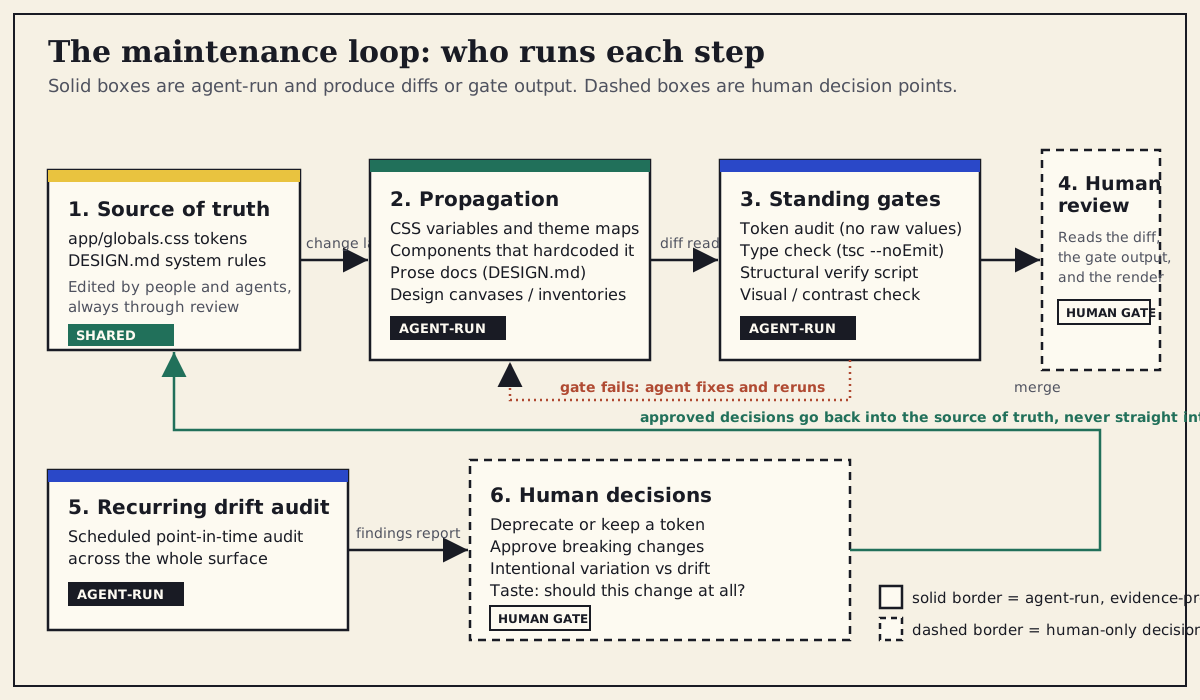
Solid-bordered boxes are agent-run and produce evidence: diffs, gate output, audit findings. Dashed-bordered boxes are human decision points. Approved decisions return to the source of truth rather than landing directly in components.
Section 03
What exists publicly, as of June 2026
None of this requires exotic tooling, because the public ecosystem has converged on a recognizable shape over the past couple of years. On the pipeline side, the DTCG token format reached its first stable version in late 2025, Style Dictionary v5 consumes that format as its base and builds it into CSS variables and platform outputs, and Tokens Studio plus its sd-transforms package bridges the designer-side editing surface into the same build. Teams run those steps in continuous integration: validate the token files, run the build, run checks such as contrast tests, publish the package. The facts about the formats are covered in the design-as-code article and are not re-argued here; what matters for maintenance is that the mechanical half of propagation — value in, outputs out — is already scriptable, repeatable, and boring. That is exactly what you want from it.
The newer development is on the consumption side: the major public design systems have become noticeably easier for agents to read. Shopify exposes Polaris documentation through its official developer MCP server, so an agent can query current component guidance instead of relying on whatever version of Polaris was in its training data. shadcn/ui ships an official MCP server that lets agents browse, search, and install registry components, and its registry items are JSON the CLI consumes — component distribution itself is becoming something an agent can operate. Figma's MCP server, when teams have wired up Code Connect, injects real component implementations from the team's own codebase into the agent's context, which closes the loop between the canvas and the components that actually ship. Adobe publishes Spectrum's tokens as open data in its spectrum-design-data repository, and Material Design 3 documents its token system publicly. Availability and plan requirements vary by vendor, so check the current docs before depending on any one of these.
The pattern across all of them is consistent and worth copying even if you never touch those particular systems: tokens published as machine-readable data, component truth expressed as structured documentation or real code rather than screenshots, and a live query surface — an MCP server, a registry, a CLI — so the agent reads the current state instead of a remembered one. A design system with those three properties can be maintained by an agent with much less supervision, because the agent's picture of the system is the system. There is also an emerging convention of publishing llms.txt files to orient language models on documentation sites, but MCP servers and registries are the mechanism the design-system world has actually adopted so far; treat llms.txt as something to watch rather than something to rely on.
Projects to inspect
Section 04
Case study: one accent token, propagated on a working copy
The claim that an agent can run propagation is easy to make and cheap to test, so this article tests it on this site's own system. The change is small and real: the accent color — the lab green this site uses for workflow and proof-layer cues — moves from oklch(0.44 0.08 166) to a slightly deeper, slightly cooler oklch(0.40 0.09 168). One honest note on method before the results: because other work was in flight in this repository at the time, the propagation was executed on a working copy rather than on the live files. The relevant surfaces — app/globals.css, components/ui/button.tsx, the workflows page, and the DESIGN.md color section — were copied into a scratch directory with its own git history, the agent performed the propagation there, the diffs below were captured from that copy verbatim, and this site's real audit gate was run against the scratch paths. The files, values, commands, and outputs are all real; the only thing simulated is the location. The scratch copy was deleted afterward, and the published accent token is unchanged.
The propagation pass itself was undramatic, which is the point. The agent updated the two root variables that carry the value (--accent and --lab-green), confirmed their paired foreground variables still made sense against the slightly darker green, searched the copied surfaces for any other occurrence of the old oklch value, and updated the one prose surface that records it: the Accent line in DESIGN.md section 2. It then reported every file it touched and why. Elapsed time for the clean pass, including running the gates, was under ten minutes, and it landed in a single iteration — no back-and-forth was needed, because the prompt named the surfaces and the rules explicitly rather than asking the agent to change the green everywhere.
What did not need editing is as informative as what did. The Tailwind theme mappings already reference var(--accent) and var(--lab-green), so they followed automatically. The button component's outline and ghost variants use hover:bg-accent and hover:text-accent-foreground, so they picked up the new value without a line of change. The workflows page paints its card stripe with border-t-lab-green, so it followed too. Two files changed; every other surface came along through references. That small blast radius is not luck — it is the payoff of the token discipline the earlier articles in this series argue for, and it is what makes the change reviewable in one sitting.
The second pass deliberately broke that discipline to see whether the gates would notice, and they did. The full account of the introduced error and the gate output is two sections below; the table here records the whole change surface by surface, including that row.
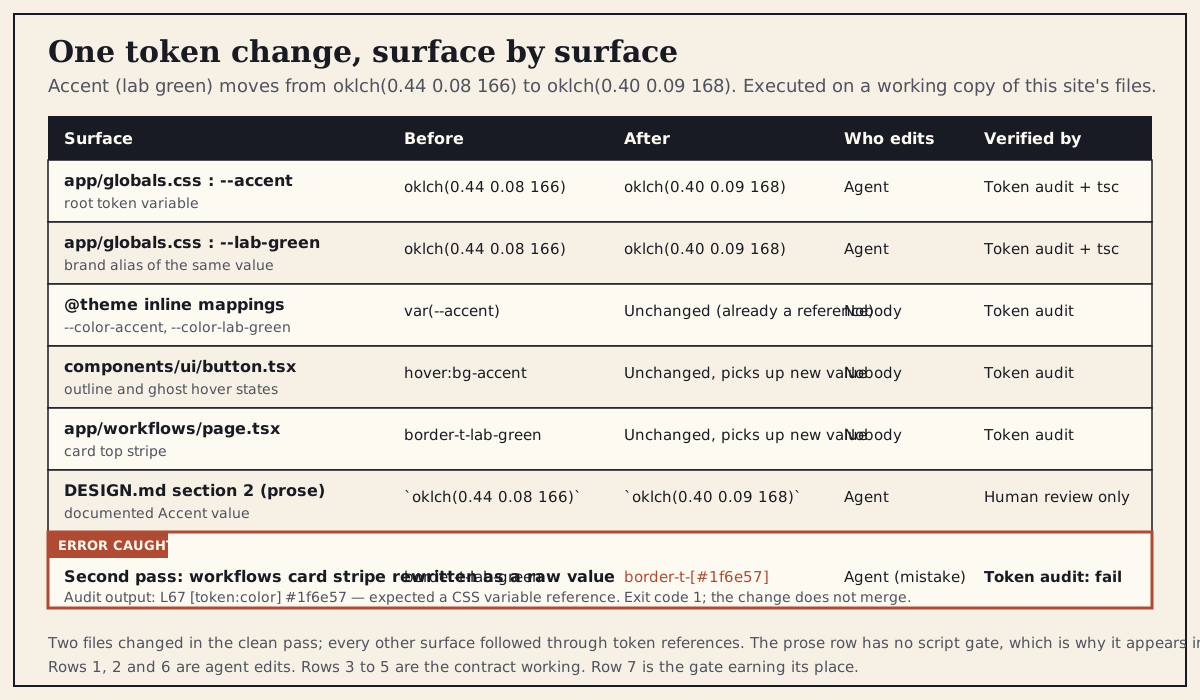
Each surface the accent change touched: the before and after state, who made the edit, and which gate verifies it. The final row is the deliberately introduced error from the second pass and the audit failure that caught it. Executed on a working copy of this site's files on 2026-06-01.
Section 05
The propagation prompt
The prompt that produced the clean pass is short, but every line in it earns its place. It names the new value exactly, lists the surfaces by path instead of trusting the agent to discover them, requires a search for stragglers rather than assuming the named surfaces are the only ones, includes the prose documentation as a first-class surface, forbids the failure mode the gate later caught, and demands a report of every file touched. The difference between this and change the accent color to a darker green is the difference between a reviewable diff and a treasure hunt.
Three rules matter more than the rest. The keep-references rule — components must keep referencing the token, never the raw value — is what keeps the blast radius small and is the rule the second pass deliberately dropped. The search rule is what catches the hardcoded copy nobody remembers adding; even when it finds nothing, the agent reporting that it searched and found nothing is evidence a reviewer can use. And the documentation rule treats DESIGN.md as part of the change, not as a follow-up ticket, which is the single cheapest defense against docs drifting away from reality.
The accent token (lab green) is changing.

Old value: oklch(0.44 0.08 166)
New value: oklch(0.40 0.09 168)

Do the following, and nothing else:

1. In app/globals.css, update --accent and --lab-green to the new value.
   Check that --accent-foreground and --lab-green-foreground still read
   clearly against the new shade; flag them for review if in doubt,
   do not change them silently.
2. Search app/, components/, and DESIGN.md for any occurrence of the
   old value oklch(0.44 0.08 166) or a hardcoded near-duplicate
   (hex or oklch). Report every match, even if you do not change it.
3. Components must keep referencing tokens (bg-accent, border-t-lab-green,
   var(--accent)). Never replace a token reference with a raw color value.
4. Update the Accent line in DESIGN.md section 2 to document the new
   value, in the same change.
5. Do not touch primary, secondary, or any other token.
6. Report every file you edited and why, plus every file you checked
   and left alone. Then run the token audit and the type check and
   include their output in your report.
Section 06
The diff the agent produced
This is the complete diff from the clean pass, captured from the working copy's git history. Two files, three changed lines. The CSS records the consequence; the documentation records the decision in prose. Nothing else appears, because nothing else needed to change.
Read it the way a reviewer would. The two variable edits are identical, which is what you expect when --lab-green is a brand-named alias of the same decision that --accent carries semantically. The DESIGN.md line changes only the value, not the description — the role of the color is the same, its shade is not. And the absence of component edits is verifiable, not asserted: the audit run that follows confirms the components still reference tokens, and the search step in the prompt confirmed there were no hardcoded copies of the old value hiding elsewhere in the copied surfaces.
diff --git a/DESIGN.md b/DESIGN.md
--- a/DESIGN.md
+++ b/DESIGN.md
@@ -15,7 +15,7 @@ Colors map to shadcn semantic variables in `app/globals.css`.
 - **Primary**: `oklch(0.43 0.17 263)` deep school blue for CTAs, ...
 - **Secondary**: `oklch(0.92 0.10 87)` warm school yellow for ...
-- **Accent**: `oklch(0.44 0.08 166)` lab green for workflow and proof-layer cues
+- **Accent**: `oklch(0.40 0.09 168)` lab green for workflow and proof-layer cues
 - **Background**: `oklch(0.97 0.018 86)` warm paper base

diff --git a/app/globals.css b/app/globals.css
--- a/app/globals.css
+++ b/app/globals.css
@@ -49,7 +49,7 @@
   --muted-foreground: oklch(0.46 0.02 260);
-  --accent: oklch(0.44 0.08 166);
+  --accent: oklch(0.40 0.09 168);
   --accent-foreground: oklch(0.99 0.006 86);
@@ -58,7 +58,7 @@
   --school-yellow-foreground: oklch(0.16 0.015 260);
-  --lab-green: oklch(0.44 0.08 166);
+  --lab-green: oklch(0.40 0.09 168);
   --lab-green-foreground: oklch(0.99 0.006 86);

 components/ui/button.tsx: no changes
 app/workflows/page.tsx:   no changes
Section 07
The gate that earned its place
The second pass re-ran the propagation with one rule removed: the instruction that components must keep referencing tokens. The resulting mistake is the most common one in real maintenance work — the agent (or a hurried human) decides to be helpful and writes the new color directly where it is used. In this run, the workflows page's card stripe went from border-t-lab-green to border-t-[#1f6e57], a hex approximation of the new green hardcoded as a Tailwind arbitrary value. The page renders fine. Nothing looks wrong. The next time the accent changes, this card silently stays on the old green, and that is exactly how drift starts.
The standing gate caught it. This site's audit command — the agentic-designer audit CLI that the repository's npm run agentic:audit script wraps — was run against the scratch copy of the app directory, flagged the raw color value, named the file and line, said what it expected instead, and exited non-zero, which is what stops the change from merging in CI. The output below is quoted as captured. After reverting the stripe back to the token reference, the same command reported no violations on both the app and components copies and exited cleanly.
One finding from this run is worth stating plainly because it is the kind of thing only an executed case study surfaces: the audit caught the hardcoded hex value, but an earlier variant of the same mistake — the raw value written as a Tailwind arbitrary oklch class instead of hex — passed the audit at its current settings. That is not a reason to drop the gate; it is a reason to know your gate's blind spots and to keep the human review step and the prompt-level rule even when the script is green. A passing gate means the checks you wrote found nothing. It does not mean nothing is wrong.
$ npx @imehr/agentic-designer audit app --fail-on error

/tmp/a7-case-study/app/workflows/page.tsx
  L67: [token:color] #1f6e57
    Expected: A CSS variable reference (e.g., var(--color-primary))

Total: 1 violations (0 slop, 1 token)
exit code: 1

# after reverting the stripe to border-t-lab-green

$ npx @imehr/agentic-designer audit app --fail-on error
No violations found.

$ npx @imehr/agentic-designer audit components --fail-on error
No violations found.
exit code: 0Clean-pass diff: two files, three lines, no component edits
Audit on app and components copies: no violations found, exit 0
Error-pass diff: card stripe rewritten as border-t-[#1f6e57]
Audit failure: L67 [token:color] #1f6e57, expected a CSS variable reference, exit 1
Known blind spot noted: an arbitrary oklch class was not flagged at current settings
Render check: button hover states and workflows card stripe show the deeper green
What the reviewer of this change actually looks at before approving: the diff, the gate output for both passes, the agent's own report of what it searched, and the rendered accent surfaces. All artifacts are from the executed working-copy run.
Section 08
Drift as a standing concern: gates plus a recurring audit
The case study covers the moment a change happens. Drift mostly does not happen in those moments; it accumulates between them, in the changes nobody thought of as design-system changes. That is why the loop has two distinct drift defenses, and why conflating them weakens both. Standing gates run on every change and catch the mechanical violations the moment they are introduced: raw values in component code, type errors, structural breakage, generated output that no longer matches its source. They are cheap, they are unambiguous, and because they run constantly, they keep the baseline from eroding. Their limitation is scope — they can only check what someone thought to encode as a rule.
The recurring audit is the other defense, and it is a different activity: a scheduled, whole-surface review that asks whether the system as built still matches the system as intended — meaning, behavior, implementation, and presentation, not just token hygiene. This site already has a full article on how to run that audit with an agent, including how to scope the surface, collect evidence, and grade findings by severity, and that workflow does not need to be repeated here. What changes when you adopt the maintenance loop is only the cadence and the trigger: the audit stops being a heroic once-a-year cleanup and becomes a recurring brief — monthly or quarterly, sized to how fast your product changes — whose findings feed the human decision gate rather than a backlog nobody owns.
The practical wiring is unglamorous. Put the gate commands in CI so they cannot be skipped. Put the audit brief in the repository next to the system documentation, with a date in it for the next run. When the audit runs, have the agent open its findings as reviewable items with evidence attached, graded by severity, and route anything that involves a judgment call — deprecation, intentional variation, breaking changes — to the humans who own those calls. The agent's job is to make drift visible and cheap to fix; deciding what counts as drift versus evolution is not its call.
Section 09
Document as you go, not afterward
The least automated surface in the case study was also the most fragile one: the sentence in DESIGN.md that records the accent value in prose. No build step regenerates it, no type checker reads it, and the audit script does not parse Markdown. If the propagation prompt had not named it as a surface, it would have kept documenting a color that no longer exists — and six months later someone would have trusted it, because documentation that looks authoritative gets believed long after it stops being true.
The fix is a habit, enforced by the prompt and the review checklist rather than by tooling: documentation is updated in the same change that makes it stale. For token changes that means the value tables and color descriptions. For component changes it means usage guidance and the do-and-do-not examples. Agents are well suited to this because regenerating prose from source is exactly the kind of low-judgment, high-tedium work people defer; an agent can draft the documentation update from the diff it just produced, and the human reviewing the change reads both together. Some teams go further and have the agent regenerate whole reference pages from component source on a schedule. That works, with the same caveat as everything else in this loop: generated documentation still needs an owner who reads it, because plausible-sounding documentation that is subtly wrong is worse than a gap.
A useful test for whether documentation belongs in the propagation surface list: if this sentence still said the old value tomorrow, who would be misled, and how would they find out? If the answer is an agent reading DESIGN.md as its instruction set — which is precisely how the rest of this site's workflow uses it — then stale documentation does not just confuse people, it actively instructs future changes to be wrong. Documentation that agents read is configuration, and it deserves the same change discipline as code.
Section 10
Good delegation, bad delegation
The maintenance loop fails in two opposite ways: delegating too little, so the agent is just a fancier find-and-replace and the human still does all the bookkeeping, or delegating too much, so changes flow into the system without anyone exercising judgment. The line between them is not about how much the agent does; it is about whether every agent action produces evidence a human can review and whether the decisions that shape the system still pass through people.
Good delegation looks like the clean pass in the case study: the human decides the accent should deepen, the agent finds and edits every surface, runs the gates, and reports what it touched, what it checked, and what it left alone; the human reads a three-line diff and approves it. Bad delegation looks like the same change made by an agent with write access and no gate — or, more subtly, like a reviewer who approves whatever passes the audit without reading the diff, which is the human equivalent of a gate blind spot. The gates exist to make review cheap, not to make it optional.
The same logic applies to scope. Asking an agent to keep components compliant with the documented system is good delegation, because compliance is checkable. Asking it to decide whether the system should allow a second accent color is bad delegation, because that is a question about product intent, and the agent will answer it confidently anyway. The propagation prompt's do not touch any other token line is there for exactly that reason: a clear scope is what lets you trust a small diff.
- Good: the human picks the new value; the agent finds every surface, edits, runs gates, and reports.
- Good: the agent proposes a missing token or flags a contrast concern, and stops for a decision.
- Good: docs regenerated in the same change that made them stale, reviewed together with the code.
- Bad: the agent merges its own changes because the gates passed.
- Bad: the reviewer approves on green checks without reading the diff or the render.
- Bad: the agent decides a deprecation, a rename, or a new variant on its own initiative.
- Bad: propagation prompts without scope limits, search steps, or a required report.
Section 11
The almost: what stays human
It would be convenient to claim the remaining human work is temporary — that better models will eventually own deprecation and taste the way they own propagation. The honest position is that most of what stays human stays human because it is a decision right, not a capability gap. Whether to deprecate a token is a question about which teams you are willing to break and on what timeline. Whether a variation is drift or evolution is a question about intent that only the people who own the intent can answer. Whether the deeper green is better is taste, and taste is the thing the design system exists to encode, not a chore to be encoded away. An agent can give you the impact analysis for all of these — every consumer of the token, every surface a breaking change touches — and that analysis genuinely changes how confidently humans can decide. It does not change who decides.
There are also operational limits worth naming. Gates have blind spots, as the oklch finding in this run showed, and a maintenance loop tuned only to what its gates can see will drift in the dimensions they cannot. Accessibility is the sharpest example: nothing in this article's gates checks contrast, so nothing in this article should be read as an accessibility claim; if the accent change had landed on text-sized elements, a contrast check would belong in the gate list and a human judgment on legibility would still sit behind it. Cost is real too — running audits and builds on every change is cheap for a site this size and not free at scale, and a recurring whole-surface audit takes real review time even when an agent collects the evidence. And the loop inherits the quality of its source of truth: an agent maintaining a badly structured system will faithfully propagate its problems everywhere, faster than before.
Finally, resist the temptation to let the loop run unattended because it has been reliable for a while. The failure mode of automated maintenance is not a dramatic breakage; it is a slow accumulation of technically compliant changes that nobody with taste has looked at in months. The system stays consistent and gets quietly worse. The schedule that matters most in this article is not the audit cadence; it is the standing appointment where a person looks at the product and asks whether the system is still serving it.
- Deprecations, renames, and breaking changes: humans decide, agents provide the impact analysis.
- Intentional variation versus drift: a question about intent, owned by whoever owns the intent.
- Taste and direction: the system encodes it; the loop must not flatten it.
- Accessibility: a passing token audit says nothing about contrast or legibility — add specific checks and keep human judgment.
- Gate blind spots: know what your checks cannot see, and review accordingly.
- Cost: gates on every change and recurring audits have a real price; size the cadence to the product.
Section 12
A maintenance workflow you can adopt this week
Everything above compresses into a setup you can do in a working day on an existing project, provided the basics from the earlier articles are in place: tokens as the single source of truth and a written system document the agent reads. The order matters less than making each step produce something reviewable.
Start by naming the surfaces. List every place a design decision lives in your project — token files, generated outputs, theme mappings, components known to hardcode values, prose documentation, canvases, schemas — and keep that list in the system document, because it is the propagation prompt's most important ingredient and the part agents cannot reliably guess. Then write the propagation prompt as a template with the surface list baked in, wire the gates you already have into CI so they run on every change, and add the review checklist below to your pull-request template so human review stays a step rather than a vibe. Finally, schedule the recurring drift audit using the audit article's workflow, and write down — explicitly, with names — which decisions are human-only. That last list is the one that makes the almost trustworthy.
- Name every surface a design decision lives on, and keep the list in your system documentation.
- Turn the propagation prompt into a template: exact values, named surfaces, search step, scope limits, required report.
- Wire the standing gates into CI: token audit, type check, structural verify, plus contrast or visual checks where they matter.
- Add the review-gate checklist to your pull-request template and require it for any system change.
- Schedule the recurring drift audit and route findings to a named human decision owner.
- Write down the human-only decisions: deprecation, breaking changes, new tokens, intentional variation, taste.
- Update documentation in the same change that makes it stale — never as a follow-up task.
## Review gate: design-system change

Decision
- [ ] What changed, in one sentence, and who decided it
- [ ] Scope respected: nothing outside the named tokens/surfaces was touched

Diff
- [ ] Source of truth changed first (tokens / DESIGN.md), not just consumers
- [ ] No raw color, spacing, or radius values introduced in component code
- [ ] Surfaces that "did not change" are listed and explained
- [ ] Documentation updated in this same change

Gates (attach output)
- [ ] Token audit passes on app/ and components/
- [ ] tsc --noEmit passes
- [ ] Structural verify passes
- [ ] Contrast / visual check done where the change affects text or states

Judgment (human only)
- [ ] Rendered result reviewed on at least one affected surface
- [ ] Any deprecation, rename, or breaking impact has a named owner and plan
- [ ] Known gate blind spots considered (a green check is not a design review)
Sources
Sources & further reading
- Style Dictionary
Documentation for the v5 token build tool that turns DTCG JSON into CSS variables and platform outputs.
- Tokens Studio documentation
The designer-side token editing surface: token sets, themes, and sync into git-based pipelines.
- tokens-studio/sd-transforms
The transforms package that adapts Tokens Studio output for Style Dictionary builds.
- Migrating token automation to Style Dictionary v5 (zeroheight)
A secondary source describing the CI-pipeline shape teams use for token builds.
- Using Polaris with the Shopify dev MCP server
Shopify's guide to querying Polaris documentation through its official MCP server.
- Shopify/polaris-tokens
Polaris design tokens shipped as a versioned, consumable package.
- shadcn/ui MCP server
The official MCP server for browsing, searching, and installing shadcn registry components from agents.
- Figma MCP server: Code Connect integration
How connected components inject real implementation code into agent context; check current availability for your plan.
- Adobe Spectrum design tokens (spectrum-design-data)
Spectrum's tokens published as open data, with token viewer tooling.
- Material Design 3: design tokens
Material's public documentation of its token system and naming model.
- How I use Claude Code as a design system designer (Design Systems Collective)
A practitioner's account of agent-assisted design-system maintenance work; secondary source.
- Designing with Claude Code and Codex CLI (UX Collective)
A practitioner write-up pairing two agents around a design system and Code Connect; secondary source.
- llms.txt
The emerging convention for orienting language models on documentation sites, mentioned here as something to watch.


