Section 01
The problem: an open-source wave you cannot read from the README
Within weeks of Anthropic releasing Claude Design as a research preview in April 2026, a cluster of open-source projects started describing themselves as the open alternative. Some of them are skills — long markdown files that teach an agent a design procedure. Some are full products with daemons, web apps, and desktop builds. One is a vector canvas with its own file format. Their READMEs lead with bold claims, big counts, and comparison tables against the commercial tool, and from the outside they all look like the same thing: another AI design tool with a star badge.
That surface similarity is the problem. A designer or design engineer evaluating this ecosystem has to answer questions the READMEs do not: what does this project actually install on my machine, what does it ask my shell-capable agent to execute, who maintains it, what license is it really under, and what breaks if the maintainer loses interest next quarter? Those questions matter more here than for an ordinary npm dependency, because design skills and design shells run inside agents that can read your files, run your scripts, and fetch things from the network on your behalf.
This article maps three projects that, as of June 2026, are the most substantial public examples: Huashu Design, Open Design, and OpenPencil. All three were verified directly against their repositories on 2026-06-01 — cloned, read, and in two cases exercised on a real brief — rather than summarized from their marketing. The goal is not to crown a winner. It is to show how the three relate to each other, what each one honestly offers today, and how to evaluate and adopt this kind of tooling on evidence instead of enthusiasm.
Two ground rules for the whole piece. First, every count, version, and date below is a snapshot as of June 2026; this ecosystem moves weekly, and you should re-verify before relying on any number. Second, star counts are deliberately absent. They are the most volatile and most marketed signal available, and they tell you almost nothing about whether a project will still serve you in six months.
Section 02
Three layers, one movement
The most useful mental model is that these are not three competitors. They are three answers to the same question — how do you get serious design work out of the coding agents people already run — given at three different layers of the stack.
At the bottom layer, taste and procedure are shipped as plain text. Huashu Design is the clearest example: an entire design tool expressed as one SKILL.md plus reference documents and export scripts, installable into any agent that understands the skills convention. Around it sit curation projects such as awesome-design-md and awesome-design-skills, which collect design systems and design skills written for agents. The middle layer wraps that text in a product. Open Design is a web application and local daemon that detects whichever agent CLIs are already on your PATH and drives them with a bundled library of skills and design systems, plus a direction picker that turns taste into deterministic palettes and font stacks. The top layer gives the agent somewhere to draw. OpenPencil is an agent-native vector canvas whose files are human-readable JSON, with an MCP server and a CLI so that the same agents can create and edit canvases instead of HTML.
The dependency arrows point upward, and the projects say so themselves. Open Design's README credits Huashu Design as one of the upstream projects it distills, bundles a third-party deck skill verbatim under its original MIT license, and pulls design systems from the community curation repos. OpenPencil ships a companion skill repository that teaches coding agents to drive its CLI. Underneath all of it sit the agent CLIs — Claude Code, Codex CLI, Gemini CLI, OpenCode, and the rest — which is why this ecosystem feels less like a new product category and more like an extension of the harness-and-skills pattern this site has covered before.
Claude Design sits beside the diagram, not inside it. It is the closed, cloud-only reference point all three projects position against, and it is covered later in this article in factual terms only. The important thing the map should make you feel is that adopting this ecosystem is not one decision. You can take a single skill, or a product shell, or a canvas and file format, independently — and the evaluation work is different for each layer.
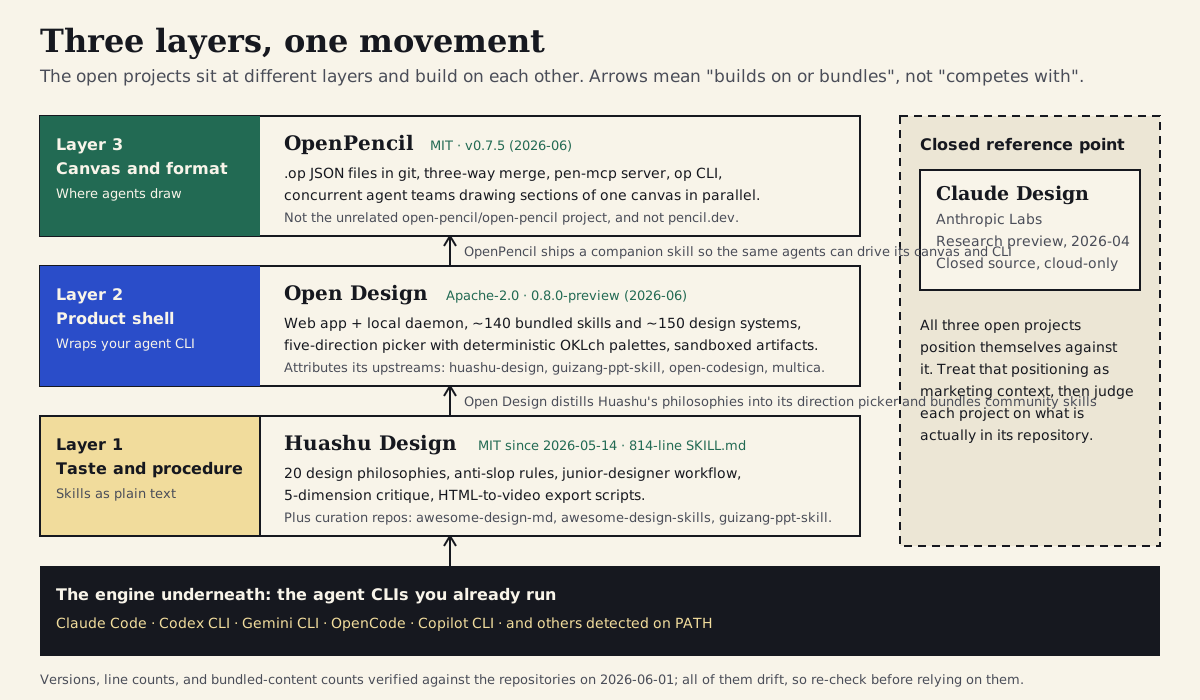
Three layers that build on each other, the agent CLIs that power all of them, and Claude Design as the closed reference point. Counts and versions verified 2026-06-01.
Section 03
How to read an open-source design project before you adopt it
Before looking at the three projects individually, it is worth naming the method, because the method is the part you can reuse on whatever ships next month. Every claim in the project profiles below came from the same short routine: clone the repository, read the LICENSE file rather than the badge, check the date of the last commit on the default branch and the most recent release tag, count the directories the README brags about, read the install path end to end, and read whatever the project says about its own stability.
That routine sounds obvious, and it keeps producing surprises. README badges drift from reality within days — Open Design's README claimed 137 skills and 150 design systems while the repository contained roughly 140 and just over 150 entries on the day it was cloned; neither number is wrong so much as already stale, which is exactly the point. Marketing version numbers and release tags disagree. Activity differs sharply between projects that look equally alive on their landing pages. And licensing is occasionally more interesting than the badge suggests: Huashu Design's MIT license only took effect in mid-May 2026, replacing a custom non-commercial license, which matters enormously if you wanted to use it for client work before that date.
The other half of the method is reading for risk rather than features. A design skill is markdown plus scripts that run with your agent's permissions. A product shell is a daemon with network access. A canvas app is an Electron build you install. For each of those, the questions are the ones you would ask of any dependency — what does it execute, what does it fetch, who wrote it, can I pin it — and the answers are all discoverable from the repository if you spend fifteen minutes looking. The checklist later in this article packages that routine so you can run it on anything.
Section 04
Huashu Design: a whole design tool in one skill file
Huashu Design (alchaincyf/huashu-design) is the proof that an entire design product can be a skill. As of 2026-06-01 the repository's SKILL.md is 814 lines long, MIT-licensed since 2026-05-14, and installable into any compatible agent with a single command. There is no app to run. The product is the text: a workflow, a set of design philosophies, a critique rubric, and a folder of export scripts that the agent uses on your behalf.
The skill positions the agent as a junior designer working in HTML, and the procedure it teaches is opinionated in useful ways. Before any pixels, it requires fact verification for any real product mentioned in the brief, and a brand-asset protocol that insists on real logos, product imagery, and UI screenshots over CSS approximations — with the explicit instruction to stop and ask rather than fake an asset. The working loop is staged: state assumptions and reasoning in comments, ship an early pass full of honest placeholders, get confirmation, then fill in the real components, and verify in a browser before delivery. Around that loop sits a long anti-slop section that names the defaults agents fall into — purple gradients, emoji as icons, rounded cards with colored left borders, invented statistics — and explains why each one erodes brand identity rather than just looking dated.
The reference folder is where the taste lives. A design-styles document defines twenty design philosophies, grouped into five schools and mapped against output scenarios in a fitness matrix; a critique guide defines a five-dimension review — philosophy alignment, visual hierarchy, craft quality, functionality, and originality, each scored out of ten with a fix list; other references cover slide decks, animation pitfalls, and a narrated-video pipeline. The scripts folder turns HTML into MP4, GIF, PPTX, and PDF, and includes a text-to-speech narration pipeline. Two practical caveats belong in any honest description: the skill text and most references are written in Chinese, which agents handle without trouble but which slows down a human trying to review what they are installing; and those export scripts run with whatever shell permissions your agent has, which is a trust decision, not a feature.
Why it matters beyond its own outputs: Huashu demonstrated that taste and procedure travel as data. Its philosophy library is explicitly credited as the source that Open Design distilled into its direction picker, and its critique structure visibly echoes through other community skills. If you read one artifact from this ecosystem to understand it, read this SKILL.md.
Projects to inspect
# one-command install via the skills.sh installer (agent-agnostic)
npx skills add alchaincyf/huashu-design

# or pin to a commit by cloning and vendoring it yourself
git clone --depth 1 https://github.com/alchaincyf/huashu-design

# what you are actually installing
huashu-design/
├── SKILL.md            # 814 lines: workflow, anti-slop rules, junior-designer loop
├── references/         # 23 docs: design-styles.md (20 philosophies),
│                       #   critique-guide.md (5-dimension rubric), slide decks,
│                       #   animation pitfalls, narrated-video pipeline
├── scripts/            # HTML → MP4 / GIF / PPTX / PDF, TTS narration, verification
├── assets/             # starter components, device frames, sound effects
└── LICENSE             # MIT (relicensed from a custom non-commercial license, 2026-05-14)
Section 05
Open Design: a product shell around the agents you already have
Open Design (nexu-io/open-design) is the heaviest of the three: an Apache-2.0 web application plus local daemon, with optional desktop builds, that turns whichever coding-agent CLI is already installed on your machine into a design engine. As of 2026-06-01 the repository announces a 0.8.0-preview release, the default branch had received commits the same day, and the project's own documentation warns that its skill protocol may change before 1.0 — which is the right way to read it: active, serious, and explicitly not stable yet.
The architecture is the differentiator against the closed reference point. The local daemon detects sixteen agent CLIs on your PATH — Claude Code, Codex, Gemini CLI, OpenCode, Copilot CLI, and others — and falls back to a bring-your-own-key proxy when none are present. Around the agent it wraps a library of bundled content: roughly 140 skill entries and just over 150 design systems on disk as of the verification date, spanning prototypes, decks, marketing assets, and utility workflows. A meaningful share of the skill entries are catalogue cards that point at upstream skills (several of Anthropic's official skills among them) rather than full local workflows, which is worth knowing before you assume every entry is a self-contained capability. The daemon renders generated artifacts in sandboxed iframes, blocks requests to internal addresses at its network edge, and persists projects in SQLite — security-relevant details the project documents itself.
The most quotable mechanism is the direction picker. When a brief arrives without a brand, the agent offers five curated visual directions — editorial, modern minimal, human and approachable, tech utility, and brutalist experimental — each defined in a TypeScript file with a deterministic OKLch palette, font stacks, real-world references, and concrete layout posture rules. One radio click binds those values to the generated artifact's CSS root tokens before any generation happens. The file credits Huashu's philosophy library as its source, and it is the cleanest public example of taste being treated as data rather than vibes: you can read the exact hue your click will produce.
Provenance is handled unusually well, and it is worth saying so because it is rare. The README names the four upstream projects it builds on, the bundled third-party deck skill keeps its original MIT license alongside the project's Apache-2.0, and curated design systems point back to the collections they came from. Adopting Open Design today means accepting a pre-1.0 product with a real install footprint — Node 24 and pnpm for source installs, a Docker installer, or packaged desktop builds — in exchange for the largest open corpus of design skills and design systems currently available in one place.
Projects to inspect
# from source (Node 24, pnpm)
git clone https://github.com/nexu-io/open-design
cd open-design && pnpm install && pnpm tools-dev

# or the Docker one-click installer
bash deploy/scripts/install.sh

# excerpt: apps/daemon/src/prompts/directions.ts — one of the five directions
{
  id: 'editorial-monocle',
  label: 'Editorial — Monocle / FT magazine',
  references: ['Monocle', 'The Financial Times Weekend', 'NYT Magazine'],
  displayFont: "'Iowan Old Style', 'Charter', Georgia, serif",
  palette: {
    bg:      'oklch(98% 0.004 95)',   // neutral paper, not beige wash
    fg:      'oklch(20% 0.018 70)',   // ink
    accent:  'oklch(52% 0.10 28)',    // restrained editorial red; override from brand when available
  },
  posture: [
    'serif display, sans body, mono for metadata only',
    'no shadows, no rounded cards — borders + whitespace do the work',
  ],
}
// one radio click binds these values to the artifact's :root before generation
Section 06
OpenPencil: an agent-native canvas with a diffable file format
OpenPencil (ZSeven-W/openpencil) is the canvas of the trio: an MIT-licensed vector design tool, available as a web app and Electron desktop builds, whose design files are human-readable JSON with the .op extension. As of 2026-06-01 the latest release is v0.7.5; the default branch had been quiet since late April 2026 while a v0.8.0 branch was in progress. That is an activity observation, not a verdict — but it is exactly the kind of signal the evaluation checklist later in this article asks you to record and date.
What makes it relevant to this ecosystem rather than just another design app is that agents are first-class users. Prompt-to-canvas generation streams elements onto the canvas; an orchestrator can decompose a page spatially and hand sections to concurrent agent teams that draw in parallel, which is the clearest public implementation of multi-agent design on a shared surface. A built-in MCP server, pen-mcp, installs into Claude Code, Codex, Gemini CLI, OpenCode, and other clients with one click and exposes a layered workflow — skeleton first, then content, then refinement. An op CLI on npm and a companion openpencil-skill repository let terminal agents drive the same canvas without the GUI. Files live in git: design variables generate CSS custom properties, and the app ships a git panel with three-way merge and conflict resolution for .op files, an honest acknowledgment that diffable design files need merge help at canvas scale. Code export targets include React with Tailwind, plain HTML and CSS, Vue, Svelte, Flutter, SwiftUI, Compose, and React Native.
Two disambiguations matter more than any feature. OpenPencil is not the unrelated open-pencil/open-pencil project, a Figma-compatible collaborative editor that happens to share the name; OpenPencil's own README flags the clash. And it is not Pencil from pencil.dev, the proprietary in-IDE canvas covered in this site's connected-canvases article. This article did not execute OpenPencil — it is a canvas application, and there was no honest way to run it inside the environment used for the case study below — so treat this section as a verified description rather than a field test, and see the design-as-code article for a closer look at what diffable design files change in practice.
Projects to inspect
// MCP client configuration (Claude Code, Codex, OpenCode, and others)
// OpenPencil's UI offers one-click install; this is the equivalent JSON
{
  "mcpServers": {
    "pen-mcp": {
      "command": "npx",
      "args": ["-y", "@zseven-w/openpencil", "mcp"]
    }
  }
}
// exposed tools follow a layered workflow:
//   design_skeleton → design_content → design_refine

# the CLI for terminal agents (paired with the openpencil-skill repo)
npm install -g @zseven-w/openpencil
op create landing.op
op export landing.op --target react-tailwind
Section 07
The closed reference point: Claude Design, in facts only
All three projects define themselves, at least partly, against Claude Design, so the article needs to state what that is — and stop there. Claude Design is an Anthropic Labs product released on 2026-04-17 as a research preview, built on Opus 4.7, and available to Pro, Max, Team, and Enterprise plans. It is closed source and cloud-hosted. Those facts come from Anthropic's own announcement, and as of June 2026 they are the only claims about it this article will make.
The open projects' READMEs include feature comparisons against it. Treat those the way you would treat any vendor's comparison table: as positioning written by one side. The honest framing is simpler. Claude Design demonstrated that mainstream demand exists for agent-driven design output; the open ecosystem answered with inspectable versions of the same idea, built on agents you already pay for, at the cost of doing your own integration, evaluation, and maintenance. Whether that trade is worth it for you is exactly what the rest of this article is for — and nothing here should be read as a review of Claude Design itself, which would need its own hands-on research run.
Section 08
Adopting community skills without adopting their risks
Everything in this ecosystem ultimately runs inside an agent that can read your filesystem, execute shell commands, and fetch from the network. A community skill is not a font you install; it is a set of instructions and scripts that will be followed by something with your permissions. That is not a reason to avoid the ecosystem — it is a reason to treat skill adoption with the same hygiene you already apply to dependencies, and the official guidance to anchor on is Anthropic's Claude Code security documentation (permission model, workspace trust, least privilege) and its published prompt-injection research.
The concrete risks are mundane rather than exotic. A skill's markdown can instruct the agent to run bundled scripts — Huashu's video-export pipeline, for instance, shells out to ffmpeg and a text-to-speech service — and the agent will generally comply if its permissions allow it. Skill text can grant itself broad tool access through frontmatter, or embed dynamic shell snippets a casual reader skims past. Skills that fetch images, fonts, or reference material at run time widen the injection surface, because fetched content becomes model input. None of the three projects covered here showed anything alarming during this run's review, and this article is explicitly not a security audit of any of them; the point is that you should do the review, every time, because the next skill you install may not deserve the same benefit of the doubt.
The practical rule: review a community skill the way you review a dependency, then constrain it. Read the SKILL.md and every script it ships before the agent does. Check what it downloads or executes, and whether you actually need those capabilities — you can use Huashu's design workflow without ever running its narration pipeline. Pin to a commit rather than tracking the default branch, vendor the files into your repository, and record where they came from and when. Run community skills in projects where the agent's permissions are scoped, not in the repository that holds your credentials. And prefer projects that make this easy: Open Design's explicit upstream attribution and preserved third-party licenses, and its daemon-side sandboxing of rendered artifacts, are positive examples of a project doing provenance and containment work for you — but they reduce the review burden, they do not remove it.
- Read the SKILL.md and every bundled script before your agent does; budget fifteen minutes, not zero.
- Pin to a commit, vendor the files, and record provenance (repo, commit, date, license) next to them.
- Scope the agent's permissions in the project where community skills run; keep secrets elsewhere.
- Treat run-time fetches (images, fonts, references) as part of the skill's attack surface.
- Re-review on update — a skill you audited in May is not the skill you pulled in August.
Section 09
Case study, leg one: Huashu executed from a clone
To get past the descriptions, we ran the same small brief through two of the three projects. The brief: build one marketing section for this site promoting the design-harness article — a headline, one supporting paragraph, three proof points, and a call to action — as a single static HTML file, judged against this site's DESIGN.md rather than against taste in a vacuum. The first leg used Huashu Design genuinely: the repository was shallow-cloned on 2026-06-01, the SKILL.md and its critique and style references were read and followed as written, and the skill's own five-dimension critique was run against our output. The export scripts were not used; they are out of scope for a static section and we only claim what we ran.
Following the procedure took longer than just generating the section would have, and most of that time was the point. The skill's first checkpoints — verify facts, gather brand assets, answer the four placement questions about narrative role, viewing distance, visual temperature, and content capacity — forced decisions that usually happen implicitly. The junior pass went out as HTML whose first twenty lines were comments: assumptions, reasoning, and two grey placeholder blocks for a logo and a diagram we did not have, exactly as the skill instructs instead of inventing them. One genuine friction point: the workflow assumes an interactive manager who answers clarifying questions and approves checkpoints, and when you run it solo you end up answering your own questions, which weakens the pattern the skill is built around. A second: reviewing what you are installing is slower if you do not read Chinese, even though the agent follows it without difficulty.
The five-dimension critique earned its place. Run against our own first full pass, it scored 33 out of 50 and caught three things worth catching: emoji bullets (explicitly on the skill's anti-slop list), a headline at roughly 2.1 times body size where the rubric demands at least 2.5, and a layout that read as the default three-equal-columns feature strip rather than this site's asymmetric editorial grammar. The fix round addressed those, kept the school's blue, yellow, and green tokens, and re-scored at 42 out of 50 — with the remaining deductions being fair, mostly about originality. Total effort: about fifteen minutes of setup and reading, two passes plus one critique-driven revision, in a single working session.
5-dimension critique — round 1, harness promo section vs DESIGN.md

1. Philosophy alignment   7/10  paper bg, blue CTA, flat borders follow DESIGN.md;
                                 but reads as a generic feature row, not the school's
                                 editorial-band grammar (no eyebrow badge, no asymmetry)
2. Visual hierarchy        6/10  headline 34px vs 16px body (~2.1x); rubric wants ≥2.5x
3. Craft quality           7/10  proof-point row breaks the 24px spacing rhythm
4. Functionality           8/10  one CTA, no invented stats, honest placeholders
5. Originality             5/10  emoji bullets are on the anti-slop list;
                                 three equal columns is the AI-default feature strip

Total: 33/50
Fix list:
  [Fatal]     replace emoji bullets with bordered, numbered proof cards
  [Important] raise headline to ~52px serif, add the school-yellow eyebrow badge
  [Important] move to the asymmetric copy + proof-column layout DESIGN.md describes
  [Optimize]  one spacing rhythm; lab-green accent only as a thin card stripe

— after the fix round: 42/50 (originality and craft still the honest weak spots)
Section 10
Case study, leg two: Open Design's skill and direction layer, honestly partial
The second leg has to be labeled carefully. Running Open Design properly means running its daemon and web application — Node 24, pnpm, a browser session, an interactive discovery form — which was not practical in the environment this case study used. What we ran instead was the layer of Open Design that is plain text: its frontend-design skill (adapted from Anthropic's official skill of the same name) and the editorial direction from its direction-picker file, with that direction's OKLch palette bound to the artifact's root tokens exactly as the picker would do. This is Open Design's content driven directly by an agent, not Open Design the product, and the comparison should be read with that asymmetry in mind.
The result was instructive in both directions. The first and only pass was typographically confident: a large serif headline, hairline rules, a restrained three-column proof row, a mono uppercase kicker — the direction's posture rules doing real work, with less steering and in less time than the Huashu leg. But it was off-brand. With no discovery form running and no accent override supplied, the direction's deterministic palette quietly won over our DESIGN.md: the accent came out as the direction's restrained editorial red rather than school blue, and the display face came out as the direction's serif stack rather than Georgia. In the full product, the discovery form, the design-system library, and the accent-override field exist precisely to prevent this; at the raw skill-and-direction layer, nothing asks, so you must notice and override it yourself. That is the failure worth reporting — not because Open Design did something wrong, but because it shows what the product shell is actually for.
The honest comparison, from one run of each: Huashu produced output that belonged to our brand, at the cost of more steering, more checkpoints, and more reading; Open Design's direction layer produced a cleaner first draft faster, at the cost of brand fidelity until a human intervened. Quality against DESIGN.md favored the Huashu leg; raw craft-per-minute favored the direction-driven leg; and both depended on the same underlying agent. OpenPencil was not part of this comparison at all, and nothing here should be extrapolated to it.
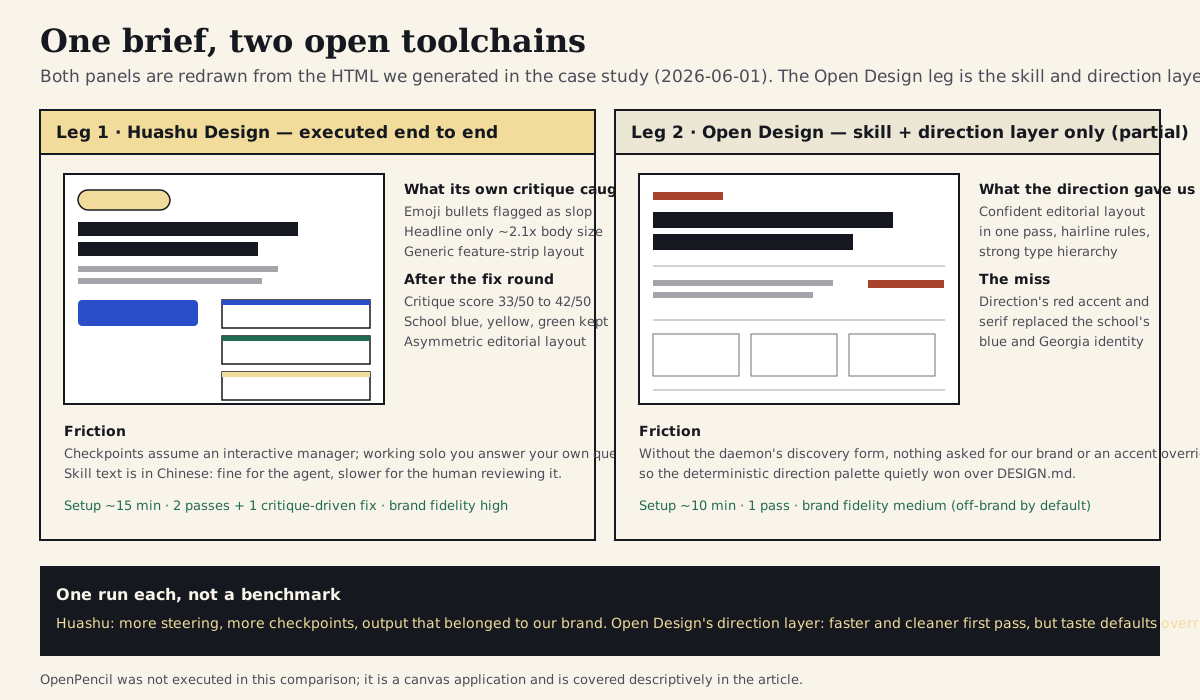
Both panels are redrawn from HTML we generated ourselves in this case study (one run each, 2026-06-01). The Open Design leg is its skill and direction layer only — the daemon and web app were not run.
Section 11
What the comparison actually tells you
One run of each leg is an anecdote, not a benchmark, so the useful conclusions are structural rather than numerical. The first is that the two projects are solving different problems even when they produce the same artifact. Huashu is a procedure: it slows you down at the moments where unexamined defaults creep in, and its critique gives you a named, repeatable way to challenge your own output. Open Design's direction layer is a constraint system: it makes the first draft confident and consistent by deciding taste questions before generation, and the full product exists to manage when those decisions should yield to a real brand. If your team already has a strong DESIGN.md, Huashu-style procedure adds more than another palette would; if your briefs regularly arrive with no brand at all, deterministic directions earn their keep immediately.
The second conclusion is about where quality control lives. In the Huashu leg, quality control was explicit and ran late: a rubric scored the output and produced a fix list. In the Open Design leg, quality control was implicit and ran early: the direction prevented whole classes of error before they could happen, and caught nothing afterward. Neither caught the brand-fidelity problem by itself — Huashu avoided it because its procedure demands existing context up front, and the direction layer caused it because we skipped the part of the product that asks. A team adopting either should plan for the gap: an audit gate or critique pass that checks output against your tokens, regardless of which tool produced it.
The third is about effort honesty. Neither leg was faster than just asking a well-harnessed agent for the section directly. What you are buying from these projects is not speed; it is encoded judgment — anti-slop rules, philosophy libraries, palettes, checkpoints — that you did not have to write yourself, plus the ability to read every line of it before trusting it. That framing also tells you when to skip them, which the anti-patterns section below makes explicit.
Section 12
An evaluation checklist you can run in fifteen minutes
This is the routine used to verify every claim in this article, packaged so you can run it on the next project that announces itself as the open alternative to anything. It requires nothing but a clone and a quarter of an hour, and it produces a dated record you can revisit when the project changes — which it will.
Two notes on using it. First, record what you find with a date next to it; the value of the checklist is mostly in being able to compare this quarter's answers with last quarter's. Second, weight the signals by what you are adopting. For a single skill file, the security and provenance rows dominate. For a product shell, install footprint, activity, and the project's own stability warnings matter more. For a canvas and file format, ask the extra question the table ends with: what happens to your files if the project goes quiet?
# Evaluation: <project> — <date>

## License and provenance
- [ ] Read the LICENSE file (not the badge); note any recent relicensing and its date
- [ ] Bundled third-party content is attributed and keeps its original license
- [ ] Upstream projects are credited; you can tell what is original vs curated

## Activity and maturity
- [ ] Last commit date on the default branch; release tags vs the version the README claims
- [ ] The project's own stability warnings (pre-1.0, preview, protocol may change)
- [ ] Maintainer structure: org or individual; bus factor noted

## Claims vs contents
- [ ] Count the directories the README counts (skills, design systems, templates)
- [ ] Tests / CI present; docs depth (install guide, contributor guide, architecture)
- [ ] Star counts ignored, or recorded only with a date and never as a quality signal

## Security surface
- [ ] What the skill/product asks the agent to execute (scripts, shell, network fetches)
- [ ] What it downloads at run time; whether you can disable those paths
- [ ] Install footprint: one text file vs daemon/Docker/desktop app

## Adoption decision
- [ ] Which layer you actually need: skill, product shell, or canvas/format
- [ ] Pin plan: commit hash, vendored copy, provenance note, re-review date
- [ ] Exit question answered: what breaks for us if this repo goes quiet?
Huashu: MIT since 2026-05-14
Huashu: last commit 2026-05-28
814-line SKILL.md as described
Export scripts run with the agent's shell permissions
One skill folder via npx skills add
Text keeps working as installed
The checklist applied to the three projects on the day they were cloned. Every cell is a snapshot; re-run the checklist before relying on any of it.
Section 13
Risks, limits, and anti-patterns
The biggest limitation of this entire ecosystem is churn, and the projects mostly admit it. Open Design is pre-1.0 and says its skill protocol may change; OpenPencil's release pace has been uneven; Huashu's skill grew, was relicensed, and had its description rewritten for compatibility limits within the few weeks before this article was written. Anything you adopt from here needs an owner and a re-verification cadence, the same way a design system does. Adopt by pinning, not by tracking.
There are also clear anti-patterns. Do not install a stack of community skills as a substitute for writing your own DESIGN.md — every project covered here works dramatically better when it has your brand as input, and the case study's off-brand direction palette is what happens when it does not. Do not adopt the product shell when all you needed was one skill, or vice versa; the layers are separable, and the heaviest option is rarely the right first step. Do not republish or rely on README counts and star numbers in your own decision documents without dating them. Do not run unreviewed community scripts in the repository that holds your credentials. And do not mistake the open projects' comparison tables against Claude Design for an evaluation — including this article's restraint about it — when what you actually need is a hands-on trial against your own briefs.
Finally, know when to skip all of it. If you produce design output occasionally and a hosted tool already fits your workflow and procurement constraints, the integration and review cost of the open ecosystem may simply not pay back. If your team has no one willing to read an 800-line skill or re-verify a pre-1.0 product quarterly, the honest move is to wait. Open source here means inspectable, not free of effort — the effort is the price of the control.
- Pin and vendor; never track a fast-moving default branch in production workflows.
- Your DESIGN.md comes first; community taste libraries are a complement, not a substitute.
- Adopt one layer at a time — skill, shell, or canvas — and only the layer you need.
- Date every count and claim you record; treat star counts as marketing surface.
- Skip the ecosystem entirely if no one on the team will own review and re-verification.
Section 14
A reusable adoption workflow
Pulling the threads together, here is the loop to run whenever a new open-source design project crosses your feed — this quarter it is these three; next quarter it will be something else built on the same parts.
Start by naming the layer you actually need: taste and procedure as text, a product shell around your existing agents, or a canvas and file format. Then run the fifteen-minute evaluation checklist against the repository and write down what you find, with dates. If it passes, trial it in a scoped sandbox project on one real brief from your own backlog — judged against your own design system, with your agent's permissions narrowed — and let the project's own quality mechanism (a critique rubric, a direction picker, a merge gate) show you what it catches and what it misses. If the trial earns it, adopt by pinning: vendor the files or lock the version, record provenance next to them, and add the project to whatever re-verification rhythm you already use for dependencies and design-system reviews. And keep the exit cheap — prefer formats and outputs you could keep using if the upstream repository went quiet tomorrow.
That loop is deliberately boring, which is the point. The interesting part of this ecosystem is not the drama of open versus closed; it is that taste, procedure, and design files are now things you can read, diff, vendor, and audit. The projects covered here will keep changing. The habit of evaluating them on evidence is the part you get to keep.
- Identify the layer: skill, product shell, or canvas/format.
- Evaluate: run the checklist against the repo; record dated findings.
- Trial: one real brief, in a sandbox, judged against your own DESIGN.md.
- Adopt by pinning: vendor, record provenance, schedule re-review.
- Keep the exit cheap: prefer readable formats and outputs that outlive the upstream repo.
Section 15
Resources and further reading
Primary sources for everything claimed above, plus the adjacent articles on this site that cover the pieces this one deliberately did not re-teach. All links verified on 2026-06-01.
Projects to inspect
Sources
Sources & further reading
- nexu-io/open-design
Open Design repository: Apache-2.0 license, daemon and web architecture, bundled skills and design systems, direction picker, install guides (verified 2026-06-01).
- open-design.ai
Open Design's landing and download site for packaged desktop builds.
- ZSeven-W/openpencil
OpenPencil repository: MIT license, v0.7.5, .op format, pen-mcp, op CLI, concurrent agent teams (verified 2026-06-01).
- ZSeven-W/openpencil-skill
Companion skill repository that teaches coding agents the op CLI.
- alchaincyf/huashu-design
Huashu Design repository: 814-line SKILL.md, references, scripts, MIT license since 2026-05-14 (verified 2026-06-01).
- op7418/guizang-ppt-skill
The MIT deck-design skill bundled verbatim inside Open Design's deck mode.
- VoltAgent/awesome-design-md
Curated DESIGN.md collection that feeds Open Design's design-system library.
- bergside/awesome-design-skills
Community index of design-focused agent skills.
- Anthropic: Claude Design announcement
Primary source for Claude Design's release date, research-preview status, model, and plan availability.
- Claude Code security documentation
Official guidance on the permission model, workspace trust, and least privilege for running third-party content.
- Anthropic: prompt injection research
Research on prompt-injection risks and mitigations for agentic systems.
- agentskills.io
The Agent Skills open standard for portable community skills.
- skills.sh
The npx skills add installer used for Huashu Design's one-command install.


