Section 01
The gap between the demo and the deploy
Design-to-code had a good year. By mid-2026, the strongest export paths — Figma's Dev Mode MCP server with Code Connect mappings, Paper's JSX export from an HTML-native canvas, Pencil's .pen files, v0-class generators — routinely produce React and Tailwind that compiles, uses modern patterns, and looks close enough to the design to pass a stand-up demo. That part of the promise is real, and this article does not argue otherwise.
The honest problem starts after the demo. "Production-ready" has quietly become a marketing word, and what it usually means is "compiled and looked right in the dev server." Independent hands-on tests of Figma's MCP server published in 2026 report functional React with correct project structure alongside visual discrepancies — wrong border radii, drifted colors, stretched assets, the wrong number of repeated elements — plus placeholder data wiring and interactions left for a developer to finish (research.aimultiple.com, 2026). Reviews of Figma Make output from rough or non-auto-layout frames describe absolute positioning and non-semantic structure that is not recommended for production without rework (Figma community forum and press reviews, 2025–2026). Multi-tool teardowns of exporters like Builder.io, Anima, and Locofy keep landing on the same arithmetic: real time saved on the initial build, then 20–30% of that saving spent cleaning the output up (aimultiple.com design-to-code comparisons, 2026).
There is also a cost that does not show up in the generated files at all: review. A 2025 randomized study by METR found that experienced open-source developers were a net 19% slower with AI assistance on their own mature codebases, largely because reviewing plausible-but-incorrect output ate the time the generation saved. That population is not designers exporting UI from a canvas, so do not read it as a design-to-code statistic — but the mechanism it documents, confident output that costs more to verify than to admire, is exactly the failure mode this pipeline has to manage. Stack Overflow's 2025 developer survey says the same thing in plainer words: "almost right, but not quite" is the most-cited frustration with AI tools.
This article is about the part of the workflow that turns almost-right into shipped: the pipeline from a design artefact to a production page, expressed as a sequence of explicit gates. It assumes you have already made the promotion decision — that this thing should become production code at all. That decision, the prototype contract, and the keep-rebuild-discard review belong to a different article on this site; start there if you are still holding a prototype and wondering whether to ship it.
Section 02
Gates, not generators
The mental model that makes this workflow manageable is small: the pipeline is a sequence of artefact transitions, and every transition has a gate. A gate is a check with three properties — a tool or procedure that runs it, an owner who acts on the result, and a named defect class it exists to catch. Work that fails a gate does not move forward with a note attached. It goes back to the agent, gets fixed or regenerated, and re-enters at the gate it failed.
Stated as transitions: a design artefact becomes generated components; components become responsive variants; variants pass an accessibility gate; the build passes a performance gate; and a human reviews the result against the original intent before anything ships. The generator is involved in exactly one of those transitions. Everything else is verification, and the verification is where production quality actually comes from. That is also why the quality of the artefact going in matters more than which generator you pick — every credible teardown this year converges on the same finding: structured artefacts (auto-layout or flex structure, semantic naming, components mapped to the real component library) export well, and unstructured artefacts export plausibly and degrade silently.
The ownership split matters as much as the order. The agent owns the mechanical middle: generating the components, producing breakpoint variants, adding accessibility attributes, optimizing assets, and running every check that has a command line. The human owns the two ends: the artefact and intent going in, and the judgment at each gate about whether a finding matters, plus the final call on what ships. The diagram below shows the stages, the gates, the owners, and — the part most pipeline diagrams omit — the return arrows.
- Stage 1 — design artefact: canvas frame, .pen file, or Figma design context. Owner: human.
- Stage 2 — generated components: React plus tokens, built by the agent against the project harness. Gate: type check, token and design-system audit. Owner: agent runs and fixes.
- Stage 3 — responsive variants: 360, 768, 1280. Gate: breakpoint review for task order, not just reflow. Owner: agent captures, human judges.
- Stage 4 — accessibility: automated scan, then manual heuristics for what scanners cannot see. Owner: shared.
- Stage 5 — performance: build output, image and font handling, budget assertions. Owner: agent runs, the budget decides.
- Stage 6 — human review and ship: severity-tiered review against the artefact and the user task, then ship, rebuild, or keep it as a prototype.
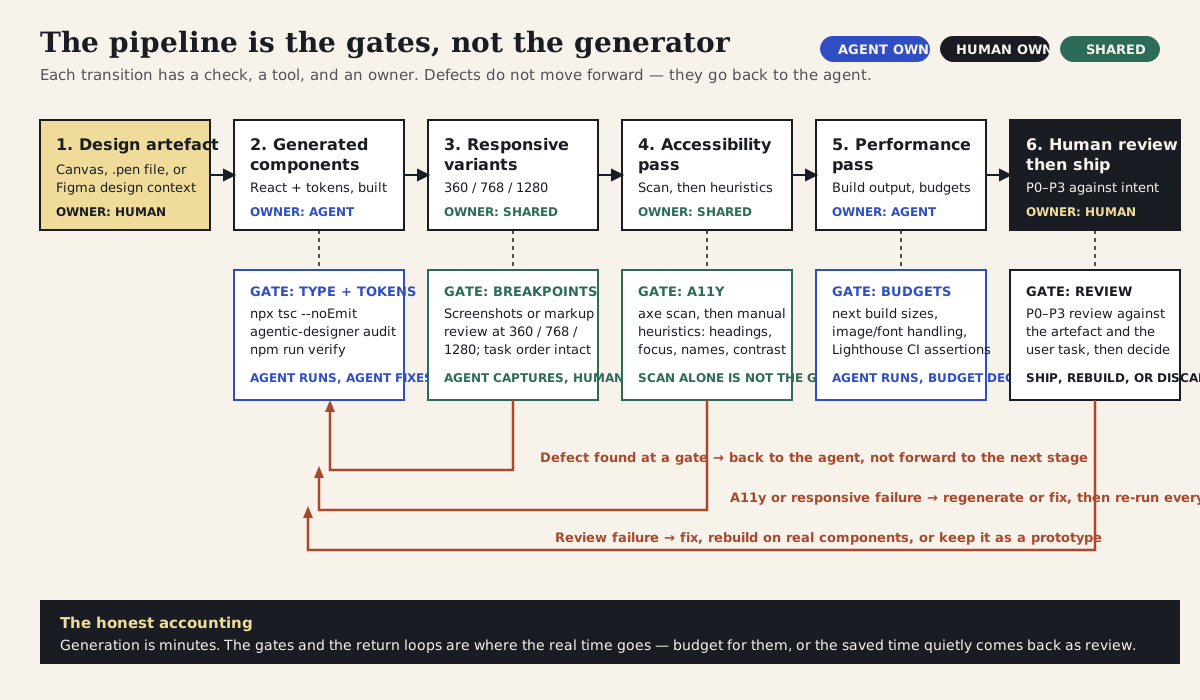
Six stages, five gates, two owners. The red return arrows are the honest part: defects found at any gate go back to the agent, and everything earlier gets re-run.
Section 03
What export quality actually looks like in mid-2026
It is worth being precise about what the export step can and cannot do right now, because both the hype and the dismissal are out of date. The claims below are paraphrased from official documentation and independent hands-on tests, verified against those sources as of June 2026; capabilities in this space change quickly enough that the date is part of the claim.
Figma's Dev Mode MCP server gives an agent structured design context for a selected frame, and — when a team has invested in Code Connect mappings — can emit code that imports the team's actual components with their real props instead of lookalike markup. Reviewers consistently identify that mapping work, not the generator, as the difference between code you keep and code you rewrite (Figma's own MCP server guide and independent CTO-style write-ups, 2026). The same independent tests still report fidelity gaps: drifted colors and radii, placeholder data, and interaction logic left unfinished. Figma Make, the prompt-to-app surface, gets the harshest reviews when the input frames lack auto-layout: absolutely positioned, non-semantic output that is fine for exploration and not recommended for production without rework.
The connected canvases take a different route to the same stage. Paper's canvas is HTML and CSS natively, so its JSX export is a serialization rather than a translation, and its multi-frame workflow covers breakpoint variants; Pencil's .pen files map design variables to CSS custom properties and ship a CLI that can validate and export in CI. Those are the cleanest entry points into this pipeline when they fit your team — but how to set them up, and how the design-to-code round trip works, is the connected-canvases article's job, not this one's. Likewise, v0-class generators now produce idiomatic Next.js plus shadcn/Tailwind output that 2026 reviews describe as routinely shipped after light review for straightforward UI, while remaining weak on complex logic and high-stakes paths.
The pattern across all of them: the export step has gotten genuinely good at producing plausible code from well-structured input, and it remains unreliable at exactly the things a glance does not check — semantics, accessibility, responsive intent, data wiring, and conformance to your specific system. Which is why the rest of this article is about gates.
- Figma Dev Mode MCP + Code Connect: structured design context and component-mapped code; fidelity and data wiring still need review (independent tests, 2026).
- Figma Make: fastest path to a demo; weakest output from non-auto-layout frames; treat as exploration, not export (reviews, 2025–2026).
- Paper get_jsx: HTML-native canvas, so export is serialization, not translation; multi-frame breakpoints map to the responsive stage.
- Pencil / OpenPencil: .pen variables map to CSS custom properties; CLI validation and export fit CI; this repository carries the OpenPencil tooling already.
- v0-class generators: idiomatic Next.js + Tailwind, shipped after light review for simple surfaces; not a substitute for the accessibility or review gates.
- Common finding: artefact structure and component mapping decide more of the output quality than the choice of generator.
Projects to inspect
Section 04
Plausible but wrong, with receipts
"Plausible but wrong" used to be an anecdote designers traded after a bad sprint. It is now documented well enough to plan around, and the documentation is what justifies each gate in this pipeline.
Accessibility is the clearest case. A practitioner benchmark published in 2025 and updated since had frontier models generate UI components with no accessibility instructions in the prompt, then ran automated checks against the output: the average pass rate was roughly 12%. The same benchmark found that loading accessibility instructions or skills changed the result substantially — which is an argument for the harness as much as for the gate. Treat the number as what it is, an individual practitioner's benchmark rather than a peer-reviewed study, but the direction matches what accessibility teams report: generated UI fails accessibility by default, because nothing in "make it look like this frame" asks for focus management, semantic structure, or accessible names.
The second documented problem is that the automated checks themselves only see part of the standard. Deque's own analyses and independent practitioner write-ups estimate that automated tools such as axe-core catch on the order of 30–40% of real WCAG issues; heading logic, focus order coherence, link text that makes sense in context, and keyboard usability mostly are not in that set. So a pipeline whose accessibility gate is "the axe scan passed" has automated a false sense of completion. The gate has to be scan plus heuristics, with a human or a model-assisted review covering what the scanner cannot express.
The defect classes are predictable enough to name in advance, which is what makes gates worth building: code that compiles but ignores your tokens; markup that looks right and reads wrong; output that passes the scan and traps the keyboard; responsive variants that stack DOM order instead of preserving task order; performance regressions from unoptimized images and fonts; and product rules silently invented from what a static frame happens to show. That last class — treating visual traits as product behavior — is covered in detail in the screenshot-to-implementation article, and the case study below ran into the rest of them.
Projects to inspect
Section 05
The pipeline, stage by stage
Here is the full sequence as it runs in practice, with the tool and owner for each gate. The stages are generic; the commands are the ones this site actually uses, and you should substitute your own equivalents rather than adopting these verbatim.
Stage one is the artefact. Before any generation, the artefact has to carry the information the code will need: layout structure (auto-layout or flex, not absolute positions), real component references, token names rather than raw values, and content that is at least realistic. Time spent here is the cheapest quality you will buy all week. Stage two is generation: the agent reads the artefact — through an MCP server, an exported .pen or JSX file, or structured design context — and builds the section using the project's existing primitives and tokens, not a parallel visual system. The prompt below is the shape that works: it names the artefact, the target location, the primitives to reuse, the gates that will run, and what not to invent.
Stage three is the structural gate, and the agent should run it without being asked: the type check, the design-system audit, and whatever structural verification the repository carries. Stage four is responsive: the agent produces or adapts the breakpoint variants and captures evidence at 360, 768, and 1280; the human checks task order, not just whether things stack. Stage five is accessibility: automated scan first, then the manual heuristic pass. Stage six is performance: the production build's route and bundle sizes, image and font handling, and — in CI — budget assertions that fail the build rather than relying on someone noticing. Stage seven is the human review gate, which on this site reuses the P0–P3 severity framework from the visual-QA article: P0 and P1 findings go back to the agent, P2s get scheduled, P3s get a judgment call, and only then does the section merge.
Projects to inspect
Read DESIGN.md and AGENTS.md before writing any code.

Task: build the "lab sessions" section as a standalone React component.
Source artefact: the designed section frame (three session cards: topic, title,
description, date, link) following this site's design language.
Target: a single .tsx file in the working folder I name — do not touch app/ or
existing components yet; this is the pre-promotion build.

Constraints:
- Reuse existing primitives: SectionBand, SectionHeading, Card, Badge, ArrowLink.
- Semantic Tailwind tokens only (bg-primary, text-muted-foreground, border).
  No hex values, no inline style colors.
- Semantic structure: this is a list of sessions; headings continue the page's
  heading order; every link has a descriptive accessible name.
- Responsive: single column at 360px, two columns at 768px, three at 1280px.
- Do not invent fields, states, or interactions that the artefact does not show.

After generating, run: npx tsc --noEmit and
npx @imehr/agentic-designer audit <folder> --fail-on error.
Report the results and stop for review — do not fix and merge in one step.
Section 06
Case study: one section, three iterations, every gate we could run
To keep this honest, we ran the pipeline on a real section in this site's repository on 2026-06-01 and recorded what happened, rather than describing what should happen. The subject is a small "lab sessions" section in the site's own design language: a section heading, supporting copy, and three session cards, each with a topic label, a title, a description, a date, and a link. The build happened in a temporary working folder outside the app and component directories — this was a pre-promotion build, per the prototype-contract rules — and the folder was deleted after the run. Two gates were executed for real in this environment: the type check and the design-system audit, both quoted verbatim below. The responsive and accessibility findings come from a manual, checklist-driven review of the rendered markup; no browser, axe scan, or Lighthouse run was available in this environment, and the next section shows those gates as configuration instead of pretending they ran.
Iteration one was the export-style first pass: a component written the way generators and unharnessed agents tend to write one — self-contained markup, inline color values, its own card structure rather than the site's primitives. It compiled in the editor's eyes and looked broadly right. The gates disagreed. The type check found one real bug: the session date was a string, and the component called a Date method on it, which would have thrown at runtime on the first render. The design-system audit found eleven hardcoded hex colors standing in for the site's semantic tokens. The manual review found more: a fixed 1200px wrapper and a rigid three-column grid that would force horizontal scrolling on a phone, a card link that was just an arrow icon with no accessible name, and card titles rendered as h4 directly under the page's h2.
Iteration two was the rebuild: same content, but assembled from the site's own SectionBand, SectionHeading, Card, Badge, and ArrowLink primitives, with semantic tokens throughout, a responsive grid (one column, then two, then three), a time element for the date, and descriptive link text per session. Both automated gates passed cleanly. The manual heuristic pass was mostly clean too — and then human review caught the kind of defect this pipeline exists to surface: the card titles were no longer the wrong heading level, they were no longer headings at all, because the card primitive renders its title slot as a div. Every automated gate was satisfied; a screen reader user navigating by headings would have found nothing inside the section. Iteration three wrapped each title in an h3 and re-ran both gates, which passed. One finding was accepted rather than fixed: at 768px the two-column grid leaves the third card alone on its own row, recorded as a P3 and left for a later content decision.
The accounting: three iterations end to end. Generation was minutes per iteration; the gates, the rebuild on real primitives, and the review consumed most of the session — which matches the published evidence about where the time actually goes, and is exactly why the time you report for design-to-code work has to include gate and review time, not just the satisfying first generation.
$ npx tsc --noEmit
scratch-canvas-pipeline/session-schedule-section.tsx(63,31): error TS2339:
  Property 'toLocaleDateString' does not exist on type 'string'.
# exit code 1

$ npx @imehr/agentic-designer audit scratch-canvas-pipeline --fail-on error
scratch-canvas-pipeline/session-schedule-section.tsx
  L37: [token:color] #FBF8EF
    Expected: A CSS variable reference (e.g., var(--color-primary))
  L40: [token:color] #F0DC9A
    Expected: A CSS variable reference (e.g., var(--color-primary))
  L46: [token:color] #6B7280
    Expected: A CSS variable reference (e.g., var(--color-primary))
  L53: [token:color] #2454D8
    Expected: A CSS variable reference (e.g., var(--color-primary))
  ... 7 more token violations ...
Total: 11 violations (0 slop, 11 token)
# exit code 1

# after the rebuild on site primitives (iterations 2 and 3):
$ npx tsc --noEmit
# exit code 0
$ npx @imehr/agentic-designer audit scratch-canvas-pipeline --fail-on error
No violations found.
# exit code 0Iteration 1 — export-style first pass: 1 type error (date treated as a Date object), 11 hardcoded hex colors, fixed 1200px wrapper, icon-only link, h2-to-h4 heading skip — failed the type, token, responsive, and accessibility gates
Iteration 2 — rebuilt on SectionBand, Card, Badge, and ArrowLink with semantic tokens and a responsive grid: both automated gates passed; human review found card titles rendered as divs, not headings
Iteration 3 — h3 added inside each card title; both gates re-run and passing; orphan card at 768px accepted as a P3
Executed here: tsc, agentic-designer audit, manual responsive and accessibility heuristics. Not executed here: axe, Playwright screenshots, Lighthouse
The case-study run at a glance: what each iteration produced and which gate sent it back. The automated gates caught the cheap defects; the expensive ones needed a checklist or a human.
Section 07
What each gate caught
The table below is the run's defect log, organized by the gate that caught each issue. It is deliberately small — one section, one session of work — but the shape is the point, and it matches the larger published picture: the automated gates caught two of the seven defect classes, quickly and cheaply; everything else needed a heuristic checklist or a human looking at the result with the original intent in mind.
Two rows deserve attention. The hardcoded-color row is the one most teams already expect, and it is also the one a decent harness largely prevents — the same audit, run on this site's real app and component directories, passes, because the harness teaches the agent to use semantic tokens in the first place. The div-title row is the opposite case: a defect introduced by doing the right thing (reusing the site's card primitive), invisible to the type checker, the token audit, and most automated accessibility scans, and meaningful to exactly the users least likely to be in the room when the demo happens. A pipeline that stopped at "both commands exited zero" would have shipped it.
Severity labels reuse the P0–P3 vocabulary from the visual-QA article: nothing in this run was a P0, the mobile layout and the unnamed link were P1s, the heading problems were P2s, and the orphan card was a P3 that was accepted rather than fixed. Recording the accepted findings matters as much as recording the fixes — it is the difference between a gate and a ritual.
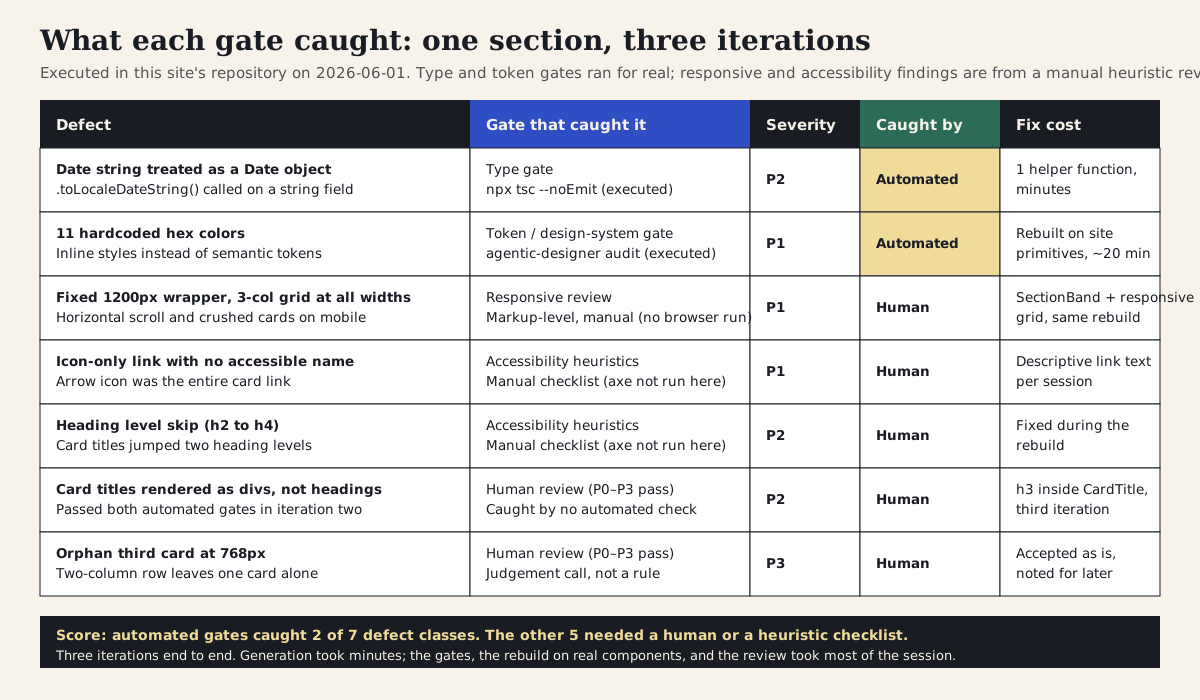
Seven defects from the executed run: what each one was, which gate caught it, severity, whether an automated check or a human caught it, and what the fix cost.
Section 08
The gates we could not run here
Three gates in this pipeline need a browser, and this article's environment did not have one: the axe scan, Playwright-driven breakpoint screenshots, and Lighthouse. Rather than quoting output we did not produce, here is the configuration for each, labeled plainly: these blocks were not executed for this article and are provided as the setup to run locally or in CI. The syntax is taken from the tools' official documentation as of June 2026 and should be re-checked against those docs when you adopt it.
The axe gate runs inside a Playwright test, which means it can run in the same CI job as your other browser tests and an agent can run it locally and read the JSON results directly. The Lighthouse gate belongs in CI as assertions rather than as a report someone is supposed to read: pick a small number of budgets — the accessibility category score, largest contentful paint, cumulative layout shift — and let the build fail when they regress. The Playwright screenshot step is the evidence-capture half of the responsive gate; the judgment half stays human.
One honest note on coverage, repeated from earlier because it is the most common way this gate gets misused: a passing axe scan is necessary and not sufficient. In this run, the defect that mattered most at the accessibility stage — card titles that were not headings at all — is precisely the kind of issue automated scanners are weakest on. Keep the manual heuristic checklist in the gate even after the automation is wired up.
Projects to inspect
// tests/a11y.spec.ts — axe scan inside a Playwright test
import { test, expect } from "@playwright/test"
import AxeBuilder from "@axe-core/playwright"

test("lab sessions section has no detectable a11y violations", async ({ page }) => {
  await page.goto("/")
  const results = await new AxeBuilder({ page })
    .include("#lab-sessions")
    .withTags(["wcag2a", "wcag2aa", "wcag22aa"])
    .analyze()
  expect(results.violations).toEqual([])
})

// Responsive evidence capture (agent runs, human judges)
// npx playwright install chromium
// npx playwright screenshot --viewport-size=360,800  http://localhost:3000 shots/360.png
// npx playwright screenshot --viewport-size=768,900  http://localhost:3000 shots/768.png
// npx playwright screenshot --viewport-size=1280,900 http://localhost:3000 shots/1280.png

// lighthouserc.json — performance and accessibility budgets in CI
{
  "ci": {
    "collect": { "startServerCommand": "npm run start", "url": ["http://localhost:3000/"] },
    "assert": {
      "assertions": {
        "categories:accessibility": ["error", { "minScore": 0.95 }],
        "largest-contentful-paint": ["error", { "maxNumericValue": 2500 }],
        "cumulative-layout-shift": ["error", { "maxNumericValue": 0.1 }]
      }
    }
  }
}
// run with: npx @lhci/cli autorun
Section 09
The component that came out the other end
For completeness, here is the heart of the component as it stood after the third iteration — the version that passed the type and token gates and survived human review. It is not remarkable, and that is the point: production-ready generated code mostly looks like code a careful person on your team would have written, because the gates keep sending back everything that does not.
Three details are worth noticing because each one exists only because a gate demanded it. The date is a plain string formatted through a helper, because the type gate caught the original runtime bug. There is not a single color value in the file, because the token audit refuses hex codes and the site's primitives carry the semantics. And the title inside the card is an explicit h3, because a human reviewer asked who would find these cards when navigating by headings — a question no command in this pipeline knows how to ask.
import { SectionBand, SectionHeading, ArrowLink } from "@/components/site-shell"
import { Badge } from "@/components/ui/badge"
import { Card, CardContent, CardHeader, CardTitle, CardFooter } from "@/components/ui/card"

function formatSessionDate(date: string) {
  return new Date(`${date}T00:00:00`).toLocaleDateString("en-US", {
    month: "long",
    day: "numeric",
  })
}

export function SessionScheduleSection() {
  return (
    <SectionBand tone="paper">
      <SectionHeading label="Lab sessions" title="Take one section through the gates">
        Three working sessions on the design-to-code pipeline: export, gates, and the promotion decision.
      </SectionHeading>
      <ul className="grid list-none gap-6 p-0 sm:grid-cols-2 lg:grid-cols-3">
        {sessions.map((session) => (
          <li key={session.title}>
            <Card className="h-full rounded-lg border-2 border-t-[12px] border-t-primary shadow-none">
              <CardHeader>
                <Badge variant="outline" className="w-fit rounded-full border-foreground font-black uppercase">
                  {session.topic}
                </Badge>
                <CardTitle className="font-serif text-2xl leading-tight">
                  <h3 className="font-serif text-2xl leading-tight">{session.title}</h3>
                </CardTitle>
              </CardHeader>
              <CardContent className="flex flex-col gap-3 text-muted-foreground">
                <p>{session.description}</p>
                <p className="font-semibold text-foreground">
                  <time dateTime={session.date}>{formatSessionDate(session.date)}</time>
                </p>
              </CardContent>
              <CardFooter>
                <ArrowLink href={session.href}>Reserve a seat: {session.title}</ArrowLink>
              </CardFooter>
            </Card>
          </li>
        ))}
      </ul>
    </SectionBand>
  )
}
Section 10
Good and bad promotion decisions
The pipeline only produces good outcomes when the inputs and the decisions around it are sane. The same gates that protect a well-prepared section will grind pointlessly on work that should never have entered the pipeline, and they will quietly miss problems when they are run as theater rather than as checks someone acts on.
On the input side, the dividing line is whether the artefact carries structure or just appearance. A frame built with auto-layout, named layers, mapped components, and token references gives the generator something to be faithful to; a flat picture of a design gives it something to imitate. On the gate side, the dividing line is whether a failure changes anything. If the audit fails and the work merges anyway, or the axe scan is green and nobody does the heuristic pass, or "responsive" means someone resized a browser window once, the pipeline exists on paper only. And on the decision side, the dividing line is scope: a content section with no business logic is a good candidate for this whole workflow; a checkout flow, a permissions screen, or anything where the artefact cannot express the product rules is a place where the generated code is the least important part of the work and the gates cannot save you from a wrong understanding of the problem.
Bad: promote a flat mockup or a non-auto-layout frame and expect the gates to add the missing structure
Bad: gates run after merge, or findings are recorded and merged anyway
Bad: a green axe run treated as the whole accessibility gate
Bad: responsive means it stacked without overflowing, once, on a laptop
Bad: count the five-minute generation and book the review hours as free
Bad: high-stakes flows and product rules the artefact cannot express — design the logic first, then use the pipeline for the surface
The pattern from the executed run and the published teardowns: structure in, judgment at the gates, and honest accounting of review time.
Section 11
Risks, limits, and anti-patterns
The clearest limit is the one the case study kept demonstrating: automated gates only catch what they encode. The type checker caught a real bug and stayed silent about meaning; the token audit caught every stray color and had no opinion about heading semantics; an axe scan, had it run, would likely have passed the iteration that human review sent back. If you take one number from the published evidence, take the coverage estimate — automated accessibility checks find roughly a third of real-world WCAG issues — and design the gate sequence so that a human or a model-assisted heuristic pass always sits behind the automation.
The second risk is the review-cost trap. The METR result is not a verdict on design-to-code, but it is a warning about accounting: when generation is nearly free, the cost moves to verification, and teams that only measure the generation step will believe they are faster while their reviewers quietly absorb the difference. Budget the gates explicitly, in the plan and in the retrospective. If the gates routinely cost more than building the section by hand would have, that is a real signal — sometimes the answer is a better artefact or a better harness, and sometimes the answer is that this surface was not a good candidate.
Watch for the anti-patterns that show up once the pipeline becomes routine. Gate theater: checks that run and never block anything. Prototype promotion: skipping the rebuild because the demo already works — the demo code was written to look right, not to be owned. Canvas worship: treating the design artefact as the source of truth for behavior it cannot express, instead of as the source of truth for appearance and structure. Over-automation: wiring up so many checks that nobody can tell which failures matter, which is how P1s start getting waved through alongside the noise. And silent acceptance: fixing what is cheap and not writing down what was accepted — the orphan card in this run is a trivial example, but the habit of recording it is what keeps the defect table honest at scale.
Finally, the pipeline does not make the work reviewable by someone who was not going to review it anyway. Every gate in this article narrows what the human has to look at; none of them replaces the looking. If no one on the team can or will do the accessibility heuristic pass and the final P0–P3 review, the pipeline will still produce code, and it will still ship plausible-but-wrong work — just with better-looking logs.
- Automated gates catch what they encode; keep a heuristic and human pass behind every scan.
- Account for gate and review time separately from generation time, and watch the ratio.
- Do not promote the prototype; rebuild on real primitives and let the gates check the rebuild.
- Do not let the canvas define behavior; product rules need words, not inference from a frame.
- Record accepted findings, not just fixes — an unwritten P3 today is an unexplained regression later.
- Keep high-stakes flows out of the fast path; use the pipeline for surfaces, not for logic.
Section 12
The pipeline checklist
This is the gate sequence from this article as a checklist you can copy into your repository and adapt. It assumes a harness exists (a design-system file, semantic tokens, and at least one executable audit) and that the promotion decision has already been made. The commands are this site's; replace them with your own equivalents and keep the order.
Two usage notes. First, the checklist is a contract with the agent as much as with the team: include it in the brief, ask the agent to run every gate it can run itself, and have it stop and report at the marked decision points instead of fixing and merging in one motion. Second, re-verify the tool claims behind this article before you rely on them — export capabilities, scan coverage, and CI syntax all change, and everything here was last verified on 2026-06-01.
# Design-to-code pipeline — production gates
# Last verified: 2026-06-01. Re-check tool claims before relying on them.

## 0. Entry conditions
- [ ] Promotion decision made (this is not a prototype being shipped by momentum)
- [ ] Artefact is structured: layout structure, named layers, mapped components, token references
- [ ] Harness in place: DESIGN.md / tokens / audit command the agent must use

## 1. Generation (agent)
- [ ] Brief names the artefact, target location, primitives to reuse, and what not to invent
- [ ] Output lands outside production paths until the gates pass

## 2. Type and design-system gate (agent runs, agent fixes)
- [ ] npx tsc --noEmit — zero errors
- [ ] npx @imehr/agentic-designer audit <path> --fail-on error — zero violations
- [ ] npm run verify (or your structural check)

## 3. Responsive gate (agent captures, human judges)
- [ ] Evidence at 360 / 768 / 1280 (screenshots or markup review)
- [ ] Task order preserved on mobile, not just stacked DOM order
- [ ] No fixed widths, no horizontal scroll, no hidden-instead-of-reflowed content

## 4. Accessibility gate (shared)
- [ ] Automated scan (@axe-core/playwright or equivalent) — zero violations
- [ ] Manual heuristics: landmarks, heading order, accessible names, focus order,
      keyboard path, contrast, link text in context
- [ ] Findings the scan cannot see are written down, fixed or accepted explicitly

## 5. Performance gate (agent runs, budget decides)
- [ ] next build route/bundle sizes reviewed against the page's budget
- [ ] Images and fonts go through the framework's optimization path
- [ ] CI budgets asserted (Lighthouse CI or equivalent) — build fails on regression

## 6. Human review gate (human)
- [ ] P0–P3 review against the design artefact and the user task
- [ ] P0/P1 → back to the agent; P2 scheduled; P3 judgment call, recorded
- [ ] Decision recorded: ship, rebuild, or keep as prototype

## 7. After merge
- [ ] Defect-by-stage notes kept (what each gate caught, what was accepted)
- [ ] Recurring defects encoded back into the harness, not re-fixed forever
Sources
Sources & further reading
- Figma Dev Mode MCP server documentation
Official documentation for design context, Code Connect mapping, and current beta limits.
- figma/mcp-server-guide
Figma's official guide to getting usable code out of the MCP server: rules files, component mapping, workflows.
- Independent Figma-to-code hands-on test (AIMultiple, 2026)
Third-party assessment of MCP-exported code: fidelity gaps, placeholder data, and time-saving estimates.
- Paper MCP documentation
JSX export, computed styles, and the multi-frame breakpoint workflow from Paper's HTML-native canvas.
- Pencil documentation
.pen design files, variables-to-CSS mapping, and CLI validation and export for CI.
- axe-core
The automated accessibility rules engine behind the scan half of the accessibility gate.
- Playwright accessibility testing
Official guide to integrating axe-core scans into Playwright browser tests.
- Lighthouse CI
Performance and accessibility budgets as CI assertions rather than reports.
- Chrome DevTools MCP
Agent-driven performance traces, console, and network data as a lighter performance-gate option.
- AI-generated accessibility benchmark (mfairchild365)
Practitioner benchmark of frontier-model UI output against automated accessibility checks, with and without instructions.
- METR: early-2025 study of AI on experienced open-source developers
Randomized study documenting the review cost of plausible-but-incorrect AI output, with population caveats.
- What axe and Lighthouse miss
Practitioner analysis of automated accessibility-check coverage and the issues that still require human review.
- AI has an accessibility problem (LogRocket)
Overview of why generated UI fails accessibility by default and the mitigation patterns.
- WCAG overview (W3C WAI)
The standard the accessibility gate is actually accountable to.


