Section 01
The motion gap product teams keep hitting
Product work generates a steady demand for short video that nobody is staffed to produce: the 30-second feature clip for a release announcement, the looping walkthrough on a marketing page, the animated spec that shows engineering how a transition should feel, the concept video that sells a roadmap bet to stakeholders. The traditional answers are a motion designer with After Effects, a contractor, or a screen recording with captions. The first two are expensive and slow for content that goes stale with the next product change. The third is cheap but communicates at the level of a bug report.
The structural problem is not skill, it is the artifact. A timeline edited in a GUI does not survive the product changing. When the button moves, the pricing changes, or the brand refreshes, the video has to be reopened, re-edited, and re-exported by whoever owns the project file — if that file can still be found and the fonts still load. Video produced this way is a snapshot, not a living artifact, and product teams treat it accordingly: they make less of it than they should, and what they make decays.
Programmatic video changes the artifact. A composition written as code — a React component in Remotion, or a plain HTML file with timing attributes in Hyperframes — lives in the repository next to the product, uses the same design tokens, goes through the same review, and re-renders from the terminal when something changes. More importantly for this site's readers: because it is code, a coding agent can write it. The same loop that produces components from a brief now produces motion from a brief.
This article is for product designers and design engineers who already use an agent for UI work and want motion without adopting a separate tool culture. It compares the two stacks that currently have a credible agent story — Remotion and Hyperframes — including the licensing facts that actually decide the choice for many teams, and it traces one real feature clip from prompt to MP4, with the failures included. It is also honest about when a screen recording is still the better tool.
Section 02
The mental model: a video is a function of time, living in your repo
Strip away the tooling and a programmatic video is one idea: every frame is computed from a time value. At 30 frames per second, a 27-second clip is 810 evaluations of "what should the screen look like at time t." The two frameworks compared here answer that question differently, and the difference matters more than any feature list.
Remotion answers it with React. A composition is a component; the current frame number comes from a hook; positions, opacities, and scales are interpolated from that number with helpers like interpolate() and spring(). Because every frame is a pure function of the frame index, rendering is deterministic and parallelizable — frame 400 can render on a different machine than frame 40. The cost of that purity is that animation libraries which run on wall-clock time, GSAP being the most common, do not fit naturally; you describe motion in Remotion's own vocabulary.
Hyperframes answers it with HTML. A composition is an ordinary HTML file: elements carry data-start, data-duration, and data-track-index attributes that define when they exist on the timeline; appearance is plain CSS; movement comes from an animation runtime — usually a GSAP timeline — that the renderer pauses and seeks to the exact frame time before capturing each frame with headless Chrome. The same seek-based adapter approach covers Lottie, Three.js, Anime.js, the Web Animations API, and CSS animations. The cost is the inverse of Remotion's: you give up frame-pure parallelism and a mature component model in exchange for using the web's existing animation vocabulary directly.
Both produce the same kind of artifact: a diffable text file that consumes your design tokens, sits in version control, and re-renders on demand. That is the property that pulls motion into the design loop this site keeps describing. The composition is reviewed like a component, gated like a component, and regenerated when the design system changes — the video file itself becomes a build output rather than a source of truth.
- Remotion: frames are a pure function of the frame number, written in React with interpolate() and spring().
- Hyperframes: frames are captured from a real browser page whose animation runtime is paused and seeked per frame.
- Both: the source of truth is text in your repository, not a project file in someone's Creative Cloud folder.
- The MP4 is a build artifact. When the product changes, you edit the composition and re-render; you do not re-edit the video.
Section 03
What exists publicly: Remotion
Remotion is the established option. The 4.x line has been the stable major for years; the latest release on npm at the time of this review was remotion 4.0.471, published June 1, 2026. The framework covers the full surface a product team needs: compositions defined in React, a Studio with a timeline and a props editor for previewing and parameterizing videos, a Player component for embedding interactive previews in web apps, and render targets that range from a local CLI to server-side rendering with renderMedia() to Remotion Lambda, a distributed renderer that splits a video across many short-lived cloud functions. Output formats include MP4, WebM, ProRes, GIF, and image sequences.
What makes Remotion relevant to this article specifically is that the project treats coding agents as a first-class authoring path. The official documentation has a "Building with AI" hub with guides for Claude Code and other coding agents, and the team publishes an installable agent skill pack — remotion-dev/skills — that teaches an agent the framework's conventions before it writes a composition. Prompting a video is documented behavior, not a community workaround.
The two facts most likely to decide against Remotion for a given team are structural, not qualitative. First, licensing: Remotion is source-available under its own license, free for individuals, non-profits, and for-profit companies with up to three employees, while larger companies need a paid Company License with per-seat and per-render tiers. The licensing section later in this article goes through this precisely, because it is the single most common surprise. Second, the frame-pure animation model: if your team's motion language already lives in GSAP — as it does for many web teams — translating it into interpolate() and spring() calls is real work, and mixing wall-clock animation libraries into Remotion's deterministic rendering is the kind of fight you should not pick on a deadline.
Projects to inspect
Section 04
What exists publicly: Hyperframes, the GSAP reality, and the rest of the field
Hyperframes is the newer, agent-first option, published by HeyGen under the tagline "Write HTML. Render video. Built for agents." A composition is an HTML file — no bundler, no project scaffold required — with data-* attributes for timing and an adapter-based animation model: the renderer pauses GSAP, Lottie, Three.js, Anime.js, WAAPI, or CSS animations and seeks them to each frame's exact time before capture, so wall-clock libraries render frame-accurately. The toolchain is a CLI built for non-interactive use: init, lint, inspect, preview, render, plus media preprocessing commands for text-to-speech, transcription, and background removal. It requires Node 22 or later and FFmpeg, renders on a single machine today, and ships an installable skill pack for coding agents. At the time of this review the latest core package was 0.6.67 — pre-1.0 and releasing rapidly, which is both a sign of momentum and a churn risk.
The GSAP question deserves its own paragraph because it changed recently and old information still circulates. Since GSAP 3.13, released after the Webflow acquisition, GSAP and all of the formerly paid Club plugins (SplitText, MorphSVG, and the rest) are free to use, including commercially. The latest release at review time was 3.15.0. The nuance: GSAP's license is its own "no charge" license, which permits free commercial use but is not an OSI-approved open-source license. For a team deciding whether the HTML-plus-GSAP route carries a hidden cost, the practical answer in mid-2026 is no — but describe it as "free, including commercially," not "open source."
Two other tools deserve a brief, fair mention. Motion Canvas (MIT licensed) pairs a TypeScript animation API with a visual editor and is genuinely open source, but its release cadence has slowed — the last core release on npm dates to late 2024 — and it has no agent-skill story. Theatre.js (Apache-2.0) is a visual motion design editor oriented toward hand-keyframing in a GUI, which is essentially the opposite of an agent-driven workflow; its last core release dates to mid-2024. Both are reasonable choices for a motion designer who wants an editor, neither is currently positioned for the prompt-to-MP4 loop this article is about.
- Hyperframes: HTML compositions, data-* timing, seek-based animation adapters, CLI dev loop, skill pack, Node 22+ and FFmpeg, single-machine rendering, pre-1.0.
- GSAP: free including all plugins since 3.13, under GSAP's own no-charge license — free for commercial use, not OSI open source.
- Motion Canvas (MIT) and Theatre.js (Apache-2.0): editor-centric alternatives with slower recent release cadence and no agent integration story.
Section 05
Remotion vs Hyperframes, structurally
Feature scoreboards age badly, especially when one of the two projects is pre-1.0 and shipping weekly. The comparison that stays useful is structural: how compositions are authored, how animation is evaluated, where rendering can run, what the license costs at your company size, and how mature the ecosystem is when something breaks at 11 pm before a launch.
Read the table below as a set of trade-offs rather than a winner. Remotion buys you ecosystem maturity, a real Studio, React component reuse, and distributed rendering — at the price of a commercial license above three employees and an animation model that wants you to think in frames. Hyperframes buys you agent ergonomics, no build step, deterministic rendering of the web's existing animation libraries, and a license without company-size thresholds — at the price of a pre-1.0 ecosystem, single-machine rendering, and an MP4-centric output story.
Two honest tie-breakers from practice. If your product is React and your team will embed previews in the app or render at volume, Remotion's Player and Lambda are structural advantages nothing in the Hyperframes ecosystem matches today. If your motion language is HTML, CSS, and GSAP — which is true of most marketing-site and design-system work — and the people prompting the videos are designers rather than React engineers, Hyperframes removes more friction than it adds. Teams that cannot say which sentence describes them should run the case study below in both stacks before committing; it takes an afternoon.
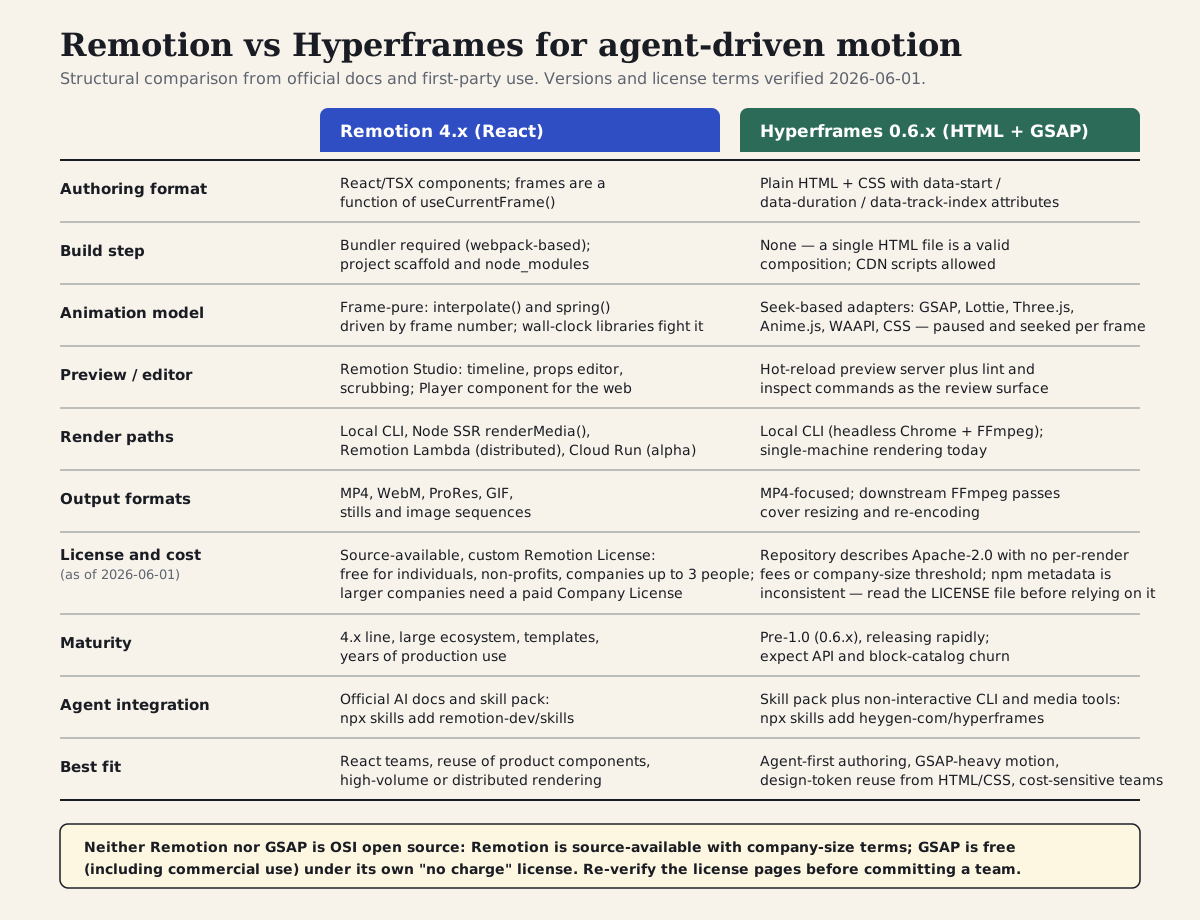
A structural comparison rather than a feature scoreboard: authoring model, animation evaluation, render paths, licensing, maturity, and agent integration. License terms verified June 1, 2026 — re-check before committing a team.
Section 06
How an agent actually drives a motion stack
Neither framework's agent integration is an MCP server or a plugin. Both ship the same thing: an installable skill pack — a folder of instructions, conventions, and reference material the agent loads on demand — plus documentation written to be read by a coding agent. If you have read this site's article on design skills, the mental model transfers directly: the skill carries the procedure (how to structure a composition, how timing works, what the CLI commands are), your design system carries the taste (colors, type, motion durations, voice), and the prompt carries only what is new — the content of this particular video.
The workflow that follows from that is the same loop you already run for UI. The brief goes in. The skill loads and the agent reads the project's DESIGN.md or token files before writing anything. It generates a composition — an HTML file or a TSX file. An automated gate runs: Hyperframes has lint, which catches timing and track errors, and inspect, which renders frames headlessly and flags problems like text overflowing the canvas; on the Remotion side the equivalents are the TypeScript compiler plus a scrub through Studio. You review a preview or exported stills, ask for changes, and only then render — because rendering is the slow, expensive step, and the whole point of the gates is to stop bad compositions from reaching it.
The diagram below shows the loop end to end. The detail worth internalizing is the feedback arrow: when something is wrong, you edit the composition and re-render. You never edit the video. That single discipline is what makes programmatic motion cheaper than traditional motion over the life of a product, and it only holds if the composition — not the MP4 — is the thing your team treats as the deliverable.
Projects to inspect
# Hyperframes: skill pack + CLI (Node >= 22 and FFmpeg required)
npx skills add heygen-com/hyperframes
npx hyperframes init my-clip

# Remotion: official skill pack + project scaffold
npx skills add remotion-dev/skills
npx create-video@latest

# Both projects also document CLAUDE.md / AGENTS.md guidance for repos
# that already carry their own agent instructions.
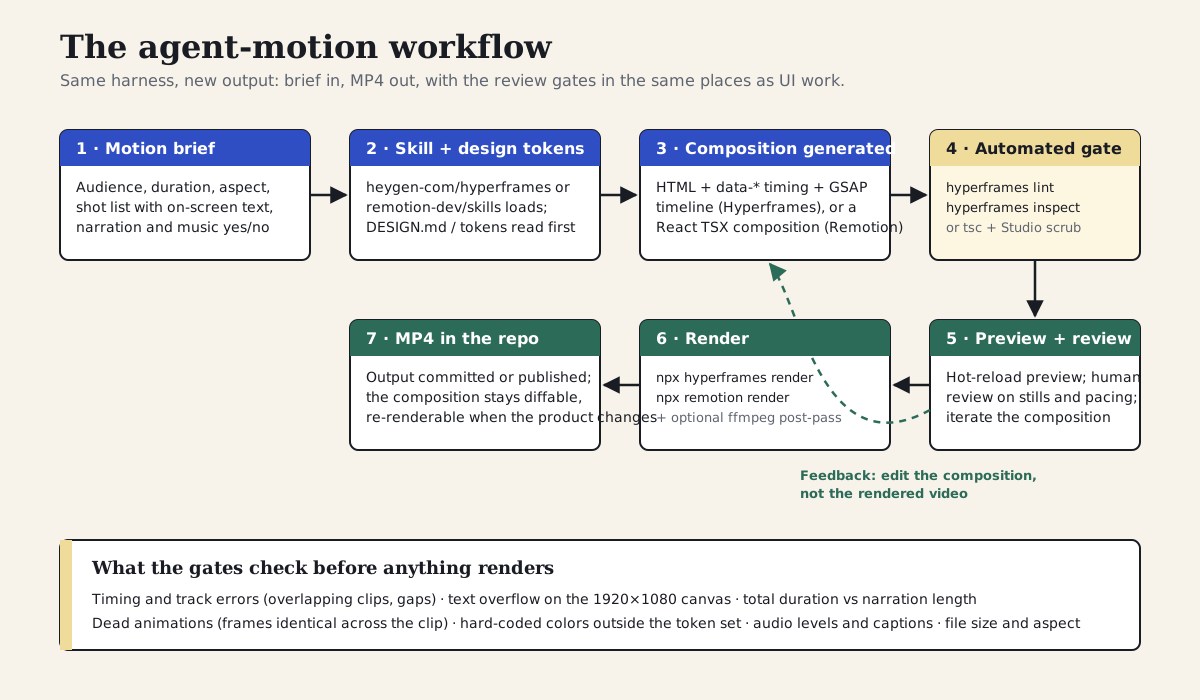
Brief → skill and tokens → composition → lint and inspect gate → preview and human review → render → MP4 in the repo. Feedback edits the composition, never the rendered video.
Section 07
Case study: a 27-second feature clip, from prompt to MP4
The case study comes from a first-party project: a Hyperframes-based video pipeline this site's author maintains, which turns written chapters and product material into rendered explainer videos. The pipeline is real and has produced finished MP4s — a full chapter render and a series of shorter test renders exist in the project's output folders — so the prompts, composition structure, gate commands, and render path shown here are taken from working material rather than invented for the article. One honesty note up front: the final render was not executed while writing this article, because the writing environment had no Chromium available; render output details below are from the project's existing local renders, and the iteration and time figures are labeled estimates reconstructed from that project's history, not measurements from a fresh benchmark run.
The clip itself is a 27-second landscape feature announcement: an opening title card with a kicker and two-line headline, two body shots that each pair a claim with a supporting visual card, and a closing card with the product name and a call to action. The brief was written the way the project's shot plans are structured — explicit shots with durations, on-screen text, and template hints — rather than as a mood description. That specificity is not optional. The single biggest quality lever in this workflow is whether the brief contains the actual words that will appear on screen; an agent asked to "make it feel premium" will fill the screen with placeholder enthusiasm.
From that prompt, the agent produced four composition files (one per shot) plus a root timeline that sequences them, reusing the project's existing CSS theme files so colors and type came from tokens rather than guesses. The first pass through the gates caught two real problems. The lint command flagged a timing overlap where the second body shot started before the title card's exit animation finished on the same track. More interestingly, the project's own template audit — a headless check that renders early and late frames of every composition and compares them — had previously flagged eight templates in the library as having dead animations: the GSAP timeline was registered but never advanced, so the "animated" clip was a still image for its full duration. One of the four generated shots inherited exactly that defect from the template it was based on. Both issues were fixed by editing the composition, not by touching any video file.
Labeled estimates for the full trace: three composition iterations (initial generation, the lint and dead-animation fixes, and one pacing pass after reviewing stills), roughly 45 to 60 minutes of wall-clock time from brief to approved composition, and a render measured in minutes, not seconds, on a laptop — the project's chapter-length render is the slow case, and short clips are proportionally faster but still not instant. One more friction worth recording because it will bite anyone reproducing this: the version of the Hyperframes CLI pinned in that project (0.6.38) rendered the declared 1920×1080 viewport at a 2x device scale factor, producing a 4K file regardless of the resolution flag, so the pipeline adds an FFmpeg downscale pass to get the intended 1080p output. That is the kind of pre-1.0 behavior the maturity row in the comparison table is warning about.
Create a 27-second landscape (1920x1080, 30fps) feature announcement video
as a Hyperframes composition. Use the hyperframes skill.

Design system: read DESIGN.md and use the existing theme stylesheet
(templates/styles/openai.css). Do not invent colors or fonts; everything
comes from the CSS variables (--bg, --text, --primary, --accent).

Shots (durations must sum to 27s):
1. 0.0-6.0s  Title card. Kicker: "New in Studio". Headline line 1:
   "Timeline editing". Headline line 2: "without the timeline".
   Staggered mask reveal on the headline, kicker fades in from the left.
2. 6.0-14.0s Claim + visual card. Headline: "Describe the change.
   The agent edits the composition." Card shows a three-step list:
   Brief, Edit, Re-render.
3. 14.0-22.0s Claim + visual card. Headline: "Every clip is HTML.
   Every change is a diff." Card shows a small code snippet visual.
4. 22.0-27.0s Closing card. Product name, one-line CTA
   ("Try it on your next release note"), no music swell, no emoji.

Constraints: GSAP timelines registered on window.__timelines, paused,
ease power3.out, 80ms stagger between reveal lines, respect
prefers-reduced-motion. No narration on this version; leave track 0
free for a future voiceover. After writing the files, run
`npx hyperframes lint` and `npx hyperframes inspect` and fix anything
they report before telling me it is ready to preview.Brief: 4 shots, 27 seconds, on-screen text written out in the prompt — not a mood description
Generated: 4 shot compositions + root timeline, reusing the project's theme CSS variables
Gate catch 1: lint flagged a timing overlap between shot 1's exit and shot 2's entrance on the same track
Gate catch 2: one shot inherited a dead animation from its template — timeline registered but never advanced (8 of 190 templates in the project's audit had this defect)
Iterations: 3 composition passes, roughly 45-60 minutes brief-to-approval (labeled estimate)
Render: executed on the project's local machine, not in this article's writing environment; 0.6.38 CLI output 4K despite the 1080p flag, fixed with an FFmpeg downscale pass
What was executed where: the composition, gates, and prompts are first-party working material; the render figures come from the project's existing local renders; iteration counts are labeled estimates.
Section 08
The composition the agent wrote: Hyperframes HTML
Below is a sanitized excerpt of the title-card shot, faithful to the structure the project's templates actually use. Three things are worth reading closely. First, timing lives in markup: the root element declares the shot's duration, and each child that should appear or disappear on its own schedule carries data-start, data-duration, and a track index. The renderer derives clip visibility from these attributes; the agent — and a reviewer — can read the entire timing structure without running anything.
Second, appearance is ordinary CSS pulling from the theme's custom properties, which is exactly how the rest of the design system reaches the video. When the brand color changes in the token source, the next render picks it up; nobody reopens a project file. Third, motion is a standard GSAP timeline, created paused and registered on a known global so the renderer can seek it. There is nothing video-specific about the animation code itself — it is the same timeline a front-end developer would write for a landing page, which is precisely why an agent that is already competent at web animation is competent here.
The full file in the project also carries a small variables block so the same template can be re-skinned per render — kicker text, headline lines, and theme are injected as composition variables rather than hard-coded. That detail matters for reuse: the case-study clip and the project's chapter videos share templates and differ only in the variables fed to them.
<!doctype html>
<html lang="en">
  <head>
    <meta name="viewport" content="width=1920, height=1080" />
    <script src="https://cdn.jsdelivr.net/npm/gsap@3/dist/gsap.min.js"></script>
    <link rel="stylesheet" href="../styles/theme.css" />
    <style>
      #root { width: 1920px; height: 1080px; overflow: hidden;
              display: flex; align-items: center; justify-content: center; }
      .kicker   { font-size: 20px; letter-spacing: .15em;
                  text-transform: uppercase; color: var(--accent); }
      .headline { font-size: 80px; font-weight: 800; line-height: 1.1;
                  font-family: var(--font-display); color: var(--text); }
      .mask-line { display: block; overflow: hidden; }
    </style>
  </head>
  <body>
    <div id="root" data-composition-id="shot-01-title"
         data-start="0" data-duration="6"
         data-width="1920" data-height="1080">
      <main class="content">
        <div class="kicker clip" data-start="0.2" data-duration="5.8"
             data-track-index="1">New in Studio</div>
        <h1 class="headline">
          <span class="mask-line"><span class="reveal" id="line-1">Timeline editing</span></span>
          <span class="mask-line"><span class="reveal" id="line-2">without the timeline</span></span>
        </h1>
      </main>
    </div>

    <script>
      // Timeline is created paused; the renderer seeks it per frame.
      window.__timelines = window.__timelines || {};
      const tl = gsap.timeline({ paused: true,
        defaults: { ease: "power3.out" } });

      gsap.set(".reveal", { yPercent: 110 });
      gsap.set(".kicker", { autoAlpha: 0, x: -30 });

      tl.to(".kicker", { autoAlpha: 1, x: 0, duration: 0.6 }, 0.2);
      tl.to("#line-1", { yPercent: 0, duration: 0.8 }, 0.3);
      tl.to("#line-2", { yPercent: 0, duration: 0.8 }, 0.38); // 80ms stagger

      window.__timelines["shot-01-title"] = tl;
    </script>
  </body>
</html>
Section 09
The same shot as a Remotion composition
To make the authoring difference concrete rather than rhetorical, here is the same six-second title card expressed as a Remotion composition. This version is reproduced for comparison: it was written and type-checked for this article but not rendered, and it is labeled accordingly. The structure is idiomatic Remotion — a Composition registered in the root file, a Sequence per shot, and motion driven by the current frame through spring() and interpolate().
Notice what changed and what did not. The design tokens still come from the same place — here imported as constants, in a real project from the shared token source. The timing structure is still explicit and reviewable, expressed as frame offsets instead of seconds in markup. What changed is the vocabulary: the staggered mask reveal is now two spring-driven transforms offset by a few frames, and the easing personality lives in spring configuration rather than a GSAP ease string. Neither version is harder in any absolute sense; the question is which vocabulary your team and your existing codebase already speak.
The other practical difference appears at the project level rather than the file level. The Remotion version needs the framework's scaffold — a bundler, an entry point, a Root component registering compositions — where the Hyperframes version is a file you could open in a browser. For an agent, both are routine; for a designer reviewing a diff or making a copy tweak by hand, the single HTML file has a lower floor.
// TitleCard.tsx
import { AbsoluteFill, interpolate, spring, useCurrentFrame, useVideoConfig } from "remotion";

const tokens = { text: "var(--text, #f7f4ef)", accent: "var(--accent, #e0a3c9)" };

export const TitleCard: React.FC<{ kicker: string; line1: string; line2: string }> = ({ kicker, line1, line2 }) => {
  const frame = useCurrentFrame();
  const { fps } = useVideoConfig();

  const kickerIn = interpolate(frame, [6, 24], [0, 1], { extrapolateRight: "clamp" });
  const line1Y = spring({ frame: frame - 9, fps, config: { damping: 200 } });
  const line2Y = spring({ frame: frame - 11, fps, config: { damping: 200 } }); // ~80ms later

  return (
    <AbsoluteFill style={{ justifyContent: "center", alignItems: "center" }}>
      <div style={{ color: tokens.accent, opacity: kickerIn, letterSpacing: "0.15em",
                    textTransform: "uppercase", fontSize: 20 }}>{kicker}</div>
      <h1 style={{ color: tokens.text, fontSize: 80, lineHeight: 1.1, overflow: "hidden" }}>
        <span style={{ display: "block", transform: `translateY(${(1 - line1Y) * 110}%)` }}>{line1}</span>
        <span style={{ display: "block", transform: `translateY(${(1 - line2Y) * 110}%)` }}>{line2}</span>
      </h1>
    </AbsoluteFill>
  );
};

// Root.tsx
import { Composition, Sequence } from "remotion";
import { TitleCard } from "./TitleCard";

export const Root: React.FC = () => (
  <Composition
    id="feature-clip"
    durationInFrames={27 * 30}
    fps={30}
    width={1920}
    height={1080}
    component={() => (
      <Sequence from={0} durationInFrames={6 * 30}>
        <TitleCard kicker="New in Studio" line1="Timeline editing" line2="without the timeline" />
      </Sequence>
    )}
  />
);
Section 10
Render paths, and what rendering actually costs
Rendering is where the two stacks diverge most in capability and least in day-to-day experience. For a single short clip on a laptop, both are a one-line command that drives a headless browser and FFmpeg, and both take minutes rather than seconds. The commands below are the real ones: the Hyperframes pair mirrors the case-study project's render stage — including the FFmpeg downscale pass that works around the 0.6.x device-scale behavior described earlier — and the Remotion command is the standard CLI render. As stated above, the case-study render itself ran on the project's local machine; the figures in this article come from that project's existing renders, not from a render executed while writing.
The divergence appears at volume. Remotion's frame-pure model lets it split a render across many cloud functions: Remotion Lambda distributes frames across short-lived workers and stitches the result, which turns a long render into a short, parallel one and makes per-video personalization at scale practical. That capability is also exactly where Remotion's per-render pricing applies for companies on the paid license, so the teams that benefit most from Lambda are the teams doing the math on it. Hyperframes renders on one machine today; for release-note clips and walkthroughs that is a non-issue, for thousands of personalized videos it is the wrong tool right now.
Budget rendering time into the workflow rather than treating it as an afterthought. The discipline that keeps the loop fast is the one the workflow diagram encodes: catch problems with lint, inspect, and a preview pass before rendering, render drafts at lower quality settings while iterating, and reserve full-quality renders for compositions that have already passed human review. A render queue full of rejected MP4s is the motion equivalent of reviewing pull requests by deploying them.
Projects to inspect
# Hyperframes: gate, then render, then normalize to 1080p
npx hyperframes lint ./clips/feature-clip
npx hyperframes inspect ./clips/feature-clip
npx hyperframes@0.6.38 render ./clips/feature-clip \
  -o output/feature-clip.raw.mp4 -f 30 -q standard --resolution landscape
# 0.6.38 renders the 1920x1080 viewport at 2x scale; downscale to 1080p:
ffmpeg -y -i output/feature-clip.raw.mp4 \
  -vf scale=1920:1080:flags=lanczos -c:v libx264 -pix_fmt yuv420p \
  output/feature-clip.mp4

# Remotion: type-check, then render the registered composition
npx tsc --noEmit
npx remotion render feature-clip output/feature-clip.mp4 --codec h264
Section 11
Licensing, honestly (as of June 1, 2026)
Licensing is where most write-ups about these tools get vague, and vagueness here costs real money or real legal review time. Everything in this section was checked against the official license pages and registry metadata on June 1, 2026, and all of it can change; treat the structure as durable and the specific terms as something to re-verify on the day you commit a team.
Remotion is not open source. It is source-available under the Remotion License, a custom license: free for individuals, for non-profit organizations, and for for-profit companies with up to three employees; companies above that threshold need a paid Company License. The paid tiers are structured around how you use it — per-seat pricing for people editing videos in the Studio, per-render pricing with a monthly minimum for automated rendering, and enterprise terms above that. None of this is hidden; it is documented clearly on the official license page. The point of repeating it here is that "npm install works and the repo is on GitHub" leads many teams to assume MIT-style terms, and that assumption fails exactly when the project succeeds and more people start using it.
Hyperframes' repository describes an Apache-2.0 license with no per-render fees and no company-size thresholds, which — if it holds — is the simplest possible answer for a commercial team. Two cautions, recorded here because this article found them rather than glossed over them: the npm metadata for the core package did not declare a license at review time, which is almost certainly packaging housekeeping rather than intent, but it means the LICENSE file in the repository is the document to read and keep a copy of; and the project is pre-1.0 and owned by a commercial company, so license terms, like APIs, deserve a glance at upgrade time. GSAP, the animation runtime underneath most Hyperframes work, is free including all plugins and commercial use under GSAP's own no-charge license — genuinely free to use, not OSI open source, and not yours to redistribute as if it were. Motion Canvas (MIT) and Theatre.js (Apache-2.0) remain the unambiguous open-source options for teams whose policy requires OSI licenses, with the trade-offs described earlier.
- Remotion: source-available, free up to 3 employees, paid Company License above that, with per-seat and per-render tiers — not open source.
- Hyperframes: repository describes Apache-2.0 with no thresholds; npm license metadata was missing at review time — read the LICENSE file directly.
- GSAP: free since 3.13 including all plugins and commercial use, under GSAP's own no-charge license — free, not OSI open source.
- All three claims date-stamped June 1, 2026; re-verify the official pages before a team-level adoption decision.
Section 12
Risks, limits, and anti-patterns
When motion is not worth it: a one-off internal demo that will be watched twice is a screen recording, not a composition; the entire economic argument for programmatic video rests on reuse and re-rendering, and a clip with no future has nothing to amortize. Heavy 3D sequences, character animation, and anything that needs color-grade-level finishing belong with motion specialists and their tools — both frameworks can technically host complex work, but you will fight them, and the result will look like a developer's idea of cinema. And if the message is "watch how the real product behaves under real latency," a recording of the real product is more honest than a stylized reconstruction.
The failure modes specific to agent-generated motion are worth naming because they differ from agent-generated UI. Dead animations — a timeline that is registered but never advances, producing a still image with a duration — are invisible in a code review and only show up when frames are actually compared; the case-study project's audit found them in 8 of 190 templates, which is exactly why a frame-comparison gate belongs in the loop. Hard-coded colors sneak into compositions the same way they sneak into components, and the same token audit catches them. Pacing is the failure no automated gate catches: agents reliably produce motion that is technically correct and slightly too fast, because nothing in lint measures whether a human had time to read the headline. Budget a human pass for pacing on every clip.
Finally, the staleness risks of the comparison itself. Hyperframes is pre-1.0; commands, the block catalog, and even the licensing packaging will drift, and anything built on it should pin versions and expect occasional breakage like the device-scale surprise in the case study. Remotion's terms and pricing are stable but not static, and per-render pricing changes the economics of exactly the high-volume use cases it enables. Accessibility is a limit only if you treat it as one: captions, narration pacing, and contrast belong in the render gate, not in a retrofit, and both stacks make captioning a text problem rather than a video-editing problem — which is an argument for this whole approach, if your team actually uses it.
- Skip programmatic motion for one-off demos, heavy 3D or character work, and anything where recording the real product is more honest.
- Gate for dead animations and hard-coded colors automatically; gate for pacing with a human.
- Pin versions on pre-1.0 tooling and expect churn; re-verify licensing before scaling render volume.
- Put captions and narration pacing in the render gate from the first clip.
Section 13
A reusable workflow you can run this week
Everything above compresses into a loop you can run on the next release note. Install the skill for the stack you chose. Write the motion brief with the template below — the discipline of writing out the on-screen text and per-shot durations is most of the quality. Let the agent generate the composition against your existing tokens, run the automated gates, review stills and a preview for pacing, and only then render. Commit the composition next to the product it describes; the MP4 is an artifact of the build, not the thing you maintain.
Choose the stack with one question pair: does your team think in React components and need volume or embedded playback (Remotion), or does it think in HTML, CSS, and GSAP and want the lowest-friction agent loop with no license thresholds (Hyperframes)? Either answer is defensible. The indefensible position is the one most teams are in today — treating motion as a special-occasion deliverable produced outside the design system, going stale the moment the product moves.
Start with one 20-to-30-second clip, trace it end to end the way the case study above does, and keep the brief, the composition, and the gate output. That trace is worth more than any comparison table — including the one in this article — because it tells you how the workflow behaves with your tokens, your content, and your review culture.
# Motion brief — <clip name>

- Audience and where it plays (release notes page, social, in-product):
- Duration and aspect: <20-30s>, <16:9 1920x1080 | 9:16 1080x1920>, 30fps
- Design system source: DESIGN.md / tokens file the composition must use
- Narration / music: <none | TTS voice | track>, captions: <yes/no>
- Shots (durations must sum to total):
  1. <start-end>  <shot type> — on-screen text, exact words
  2. ...
- Constraints: easing, stagger, reduced-motion behavior, no invented copy
- Definition of done: lint and inspect pass, stills reviewed, pacing approved

# Render gate (before the final render)
- [ ] lint passes: no timing overlaps, no orphaned tracks
- [ ] inspect passes: no text overflow at full resolution
- [ ] frame comparison: no dead animations (early vs late frames differ)
- [ ] token audit: no hard-coded colors outside the design system
- [ ] duration matches narration / reading speed; pacing reviewed by a human
- [ ] captions present and synced (if narrated); audio levels checked
- [ ] output spec: resolution, codec, file-size ceiling for the destination
Sources
Sources & further reading
- Remotion license documentation
Official license and pricing page: who needs a Company License and what the free tier covers.
- remotion-dev/remotion
Remotion source repository, including LICENSE.md, releases, and templates.
- Remotion: Building with AI
The official hub for agent skills and coding-agent prompting guides.
- Remotion: prompting with coding agents
Remotion's guide to generating videos with Claude Code and other coding agents.
- remotion-dev/skills
The official Remotion agent skill pack, installable with npx skills add remotion-dev/skills.
- Remotion Lambda documentation
Distributed rendering: the concurrency model and cost considerations.
- heygen-com/hyperframes
Hyperframes by HeyGen: HTML-native, agent-first video framework with CLI and skill pack.
- Hyperframes product page
The Hyperframes landing page describing the editor and agent-oriented positioning.
- GSAP 3.13 release post
Announcement that GSAP and all Club plugins became free, including for commercial use.
- GSAP pricing and licensing
The current wording of GSAP's no-charge license and what free covers.
- motion-canvas/motion-canvas
Motion Canvas (MIT): editor-plus-code animation tool, the main OSI-licensed alternative.
- theatre-js/theatre
Theatre.js (Apache-2.0): a visual motion design editor oriented toward GUI keyframing.


