Section 01
Handoff is dissolving into review
For years, design-to-code meant a one-way trip: frames in Figma, annotations in Dev Mode, tickets in the tracker, and a developer reconstructing the interface. Agents made that trip faster, but they did not remove the underlying mistake — treating canvas and code as two products that only meet at the end.
By mid-2026 the tooling finally supports the other direction as a first-class path. Figma's MCP server can write native frames, components, variables, and auto layout onto the canvas through the Plugin API. Make can land generated UI into a local codebase. Code Connect can tell an agent which React component a Figma node already maps to. The practical skill is no longer "export better." It is bidirectional design engineering: decide which side is the source of truth for this change, move structure intentionally, and review both surfaces against the same contract.
This article is for product designers and design engineers who already ship with agents and still feel the old handoff tax. The goal is a reusable loop where canvas and code stay legible to each other, and where "handoff" becomes a review packet rather than a dump of screenshots and hope.
Section 02
The mental model: two surfaces, one contract
Bidirectional work fails when teams ask which tool is the source of truth forever. The better question is which surface owns the next change. If the team is exploring layout, density, and visual variants with non-engineers in the room, the canvas often owns the pass. If the team is wiring real data, routing, accessibility states, and production components, the codebase owns the pass. Either way, the contract — tokens, component inventory, naming, and review gates — is shared.
Agents make the surfaces porous. A coding agent with Figma MCP can inspect a selection, call use_figma to create or edit native nodes, and pull Code Connect metadata so generated code prefers real components instead of invented markup. A designer can start in Make against local files, then refine the result on canvas. The risk is not that the tools are weak. The risk is silent drift: two plausible versions of the same screen that disagree on spacing, props, or ownership.
Treat every bidirectional session as a sync problem with an explicit direction, not as magic mirroring. Direction, evidence, and a human gate are the whole method.
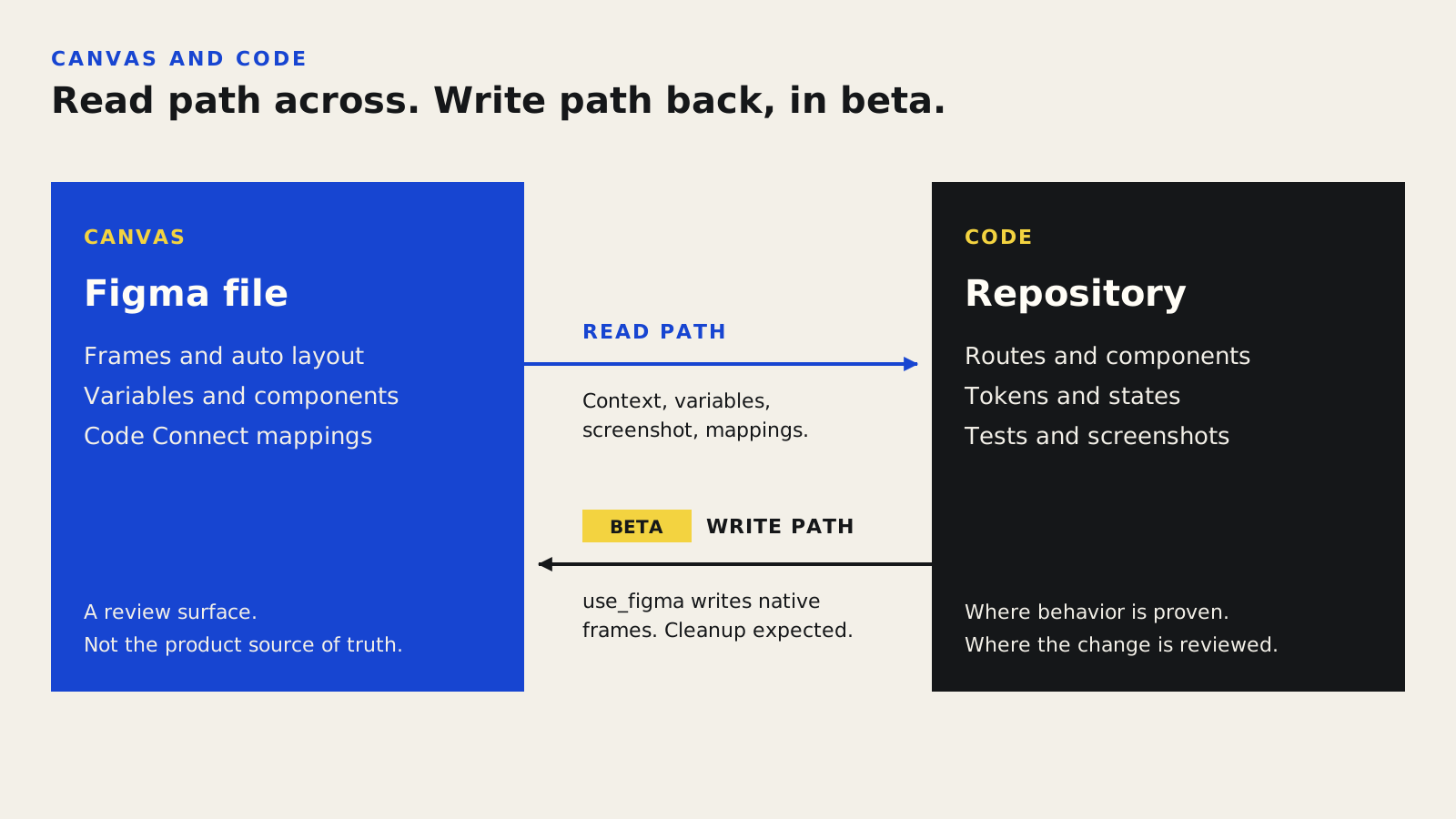
The read path brings canvas context, variables, a screenshot, and Code Connect mappings into code. The write path sends native frames back with use_figma and is still beta: expect cleanup.
Section 03
What exists in Figma and agent tooling today
Write-to-canvas is the capability that changed the conversation. Through the remote Figma MCP server's use_figma tool, an agent executes JavaScript in a Figma file via the Plugin API. That means real auto layout, variables, components, and variants — not a pasted screenshot of generated UI. Figma documents the limits honestly: beta-quality output, response size caps, limited asset and custom-font support, and the expectation of manual cleanup. Those limits are features of a review culture, not reasons to avoid the path.
Code Connect is the missing vocabulary layer. Without it, canvas→code agents recreate visuals with ad-hoc markup. With it, the agent receives the import path, props, and custom instructions for the mapped component. Make and local-code workflows matter for the other direction: when exploration already happened in code, or when you want the first draft inside the repo's component library rather than in a disposable export.
Skills such as figma-use, prototype-to-figma, and library-generation workflows are how vendors package multi-step procedures around the primitive tools. Load the skill before write actions. Inspect the file's existing structure before creating new nodes. Prefer published library components over freehand rectangles that will never map back to code.
- Remote MCP at mcp.figma.com is the broad feature path; desktop MCP remains for specific org cases.
- use_figma writes native structure; it does not replace design judgment or production review.
- Code Connect maps Figma nodes to real code so agents stop inventing parallel UI kits.
- Make→local code is useful when the repo, not a blank frame, should receive the first draft.
- Official Figma skills encode inspect-first and mapping-aware procedures around the primitives.
Projects to inspect
Section 04
Case study: settings page that started in code
A mid-size SaaS team needed a redesigned account settings page: profile, notification preferences, and billing summary. Engineering already had shadcn form primitives and a working /settings route with incomplete hierarchy. Design wanted a canvas review with product and support before committing to the denser layout.
They chose code→canvas for the first pass. The agent loaded the route, DESIGN.md, and Code Connect mappings, then used write-to-canvas to rebuild the page as auto-layout frames using the published library components rather than freehand boxes. Designers refined spacing and section order on canvas. A second pass ran canvas→code only for the approved hierarchy changes, constrained to the existing form components. Handoff was a review board: Figma selection links, local screenshots at 1280 and 390, Code Connect coverage notes, and three open product questions. No ticket said "implement the Figma." The ticket said "resolve these three questions and apply the approved delta."
What failed once is instructive. An early write-to-canvas run ignored the published Button and rebuilt a nearly identical control from rectangles and text. Visually fine; mapping dead. The fix was procedural: require library import by key before create, and fail review if new primitives appear without a mapping plan.
Figma: settings desktop frame with auto layout
Figma: mobile stacked frame
Local: /settings at 1280px
Local: /settings at 390px
Code Connect coverage: Button, Input, Card, Switch
Open questions: billing CTA ownership, notification default copy
A bidirectional review board pairs canvas and local evidence so drift is visible before either side is promoted.
Section 05
Choose a direction before you move pixels
Most wasted bidirectional sessions start with curiosity instead of a direction decision. The matrix below is intentionally small. If both directions seem equally good, prefer the surface where the next reviewer already works.
Prefer canvas ownership; sync approved structure to code later
Prefer code ownership; push structure to canvas for review
Either direction; require mapping coverage in the review packet
Stop. Map or document tokens first, or you will sync noise
Code only. Do not open a second surface mid-incident
Direction is a project choice for this change, not a permanent team religion.
Section 06
Project structure that keeps both surfaces honest
Bidirectional work needs files the agent can find without archaeology. Keep the design contract in the repo. Keep mapping status visible. Keep review evidence in a predictable folder so critique agents and humans look at the same packet.
You do not need a complex monorepo. You need boring paths and one owner for each artifact class.
repo/
  DESIGN.md
  AGENTS.md
  design/
    code-connect/
      button.figma.ts
      input.figma.ts
      card.figma.ts
    reviews/
      2026-08-04-settings/
        brief.md
        figma-links.md
        screenshots/
          canvas-desktop.png
          canvas-mobile.png
          local-1280.png
          local-390.png
        findings.md
  src/app/settings/
  src/components/ui/
Section 07
Good vs bad bidirectional prompts
Weak prompts ask the agent to "sync Figma and code." Strong prompts name direction, allowed tools, mapping rules, and what must not change.
Good: code→canvas for /settings using published library components only
Good: report spacing, hierarchy, and prop drift; do not edit until approved
Good: update section order and notification Switch row only
Good: stop and list unmapped nodes that need Code Connect
Specific direction and constraints beat vague sync language every time.
Section 08
Write-to-canvas prompt template
Use a template that forces inspect-first behavior. Agents that create before reading will duplicate your library under new names and call it progress.
Direction: code → canvas

Source of truth for this pass:
- src/app/settings/page.tsx
- DESIGN.md
- design/code-connect/*

Figma target:
- [file URL or selection link]

Rules:
1. Load the figma-use skill before any use_figma call.
2. Inspect existing pages, components, variables, and naming first.
3. Prefer importComponentByKeyAsync / published library components.
4. Do not create parallel Buttons, Inputs, or Cards if mappings exist.
5. Use auto layout. No absolute-positioned demo layouts.
6. After writing, return:
   - created/updated node IDs
   - components reused vs created
   - unmapped nodes
   - questions for human review

Do not edit local code in this pass.
Section 09
Make and local code without orphaning the canvas
Make→local code is useful when the team wants the first draft inside the repository's conventions. The failure mode is leaving Figma as a mood board while production evolves only in git. If Make lands code, schedule a canvas update or an explicit decision that the route is code-owned until the next exploration cycle.
When pulling canvas→code, constrain the agent to Code Connect components and existing routes. A pretty export that introduces a second card primitive is not acceleration; it is design-system debt with a short demo half-life. Pair every canvas→code PR with screenshots of both surfaces and a mapping coverage note.
- Make into a branch, not main, and run the same gates as any UI PR.
- Require Code Connect or an explicit new-component proposal for unmapped nodes.
- Update or deprecate the canvas frame after production diverges intentionally.
- Never treat a Make draft as production-ready because it compiled once.
Section 10
Risks, limits, and review gates
Write-to-canvas is beta-quality by vendor admission. Expect cleanup. Custom fonts and assets may not round-trip. Response size limits mean large libraries need staged writes. Code Connect only helps if components are published and mappings are maintained. Agents will happily invent near-duplicates when mappings are stale.
Organizational risk matters as much as tool risk. If design and engineering keep separate "final" files, bidirectional tooling becomes a faster way to disagree. Name an owner for the contract files. Put mapping freshness on a weekly checklist. Fail closed when review evidence is missing.
- Gate: no PR merge without local screenshots for changed routes.
- Gate: no canvas promotion without listing unmapped nodes.
- Gate: no new primitive without DESIGN.md and Code Connect plan.
- Gate: human approves product questions before the agent "finishes" the page.
- Limit: visual similarity is not behavioral parity — test states in code.
Section 11
Reusable bidirectional workflow
Run this workflow whenever a screen must stay coherent across Figma and the repository. It is slower than a single export demo and faster than weeks of silent drift.
1. Update the contract
   - DESIGN.md / tokens current?
   - Code Connect mappings published?

2. Choose direction for THIS change
   - code→canvas OR canvas→code
   - name the owner surface

3. Move structure
   - load required Figma skills
   - inspect before write
   - prefer mapped components

4. Capture evidence
   - canvas desktop + mobile
   - local desktop + mobile
   - mapping coverage note

5. Review
   - hierarchy, spacing, props, a11y states
   - approve delta only

6. Promote
   - apply approved changes to the non-owner surface
   - close or update the review packet
   - record open product questions separately
Sources
Sources & further reading
- Figma: write to canvas
Official use_figma documentation, client list, and beta limitations.
- Figma workflow lab: code to canvas
Official workflow lab covering code→canvas skills and design-system sync patterns.
- Agents, meet the Figma canvas
Figma announcement that MCP gained write access to native canvas structure.
- figma/mcp-server-guide skills
Public skill and pattern references for figma-use and related MCP workflows.
- Figma Code Connect
Product overview for mapping design-system components between Figma and code.


