Section 01
Afterward is too late
Most agentic design workflows still sequence accessibility as a final polish pass: generate the UI, make it look right, then "run axe." That order guarantees rework. Labels, focus order, heading structure, and contrast are cheaper to get right while components are being chosen than after a visual direction has already been praised in critique.
Accessibility in the loop means the same iteration cycle that captures screenshots also captures accessibility snapshots, axe results, and keyboard path notes — and treats serious findings as blockers before the agent moves on to styling trivia. It does not mean the agent replaces disabled testers or legal counsel. It means you stop discovering basic failures only in a pre-release crunch.
For teams selling into the European Union, the European Accessibility Act raised the stakes on whether products meet accessible practice expectations. WCAG remains the technical language most teams use to operationalize that pressure. Neither regulation nor a green axe report absolves you from human testing. Both make "we'll fix a11y later" a weak operating plan.
Section 02
The mental model: generate, evidence, gate, fix
Pair every generation pass with an evidence pass. The agent writes or edits UI, then immediately collects: rendered accessibility tree or snapshot, axe (or equivalent) output, and a short keyboard path for the primary user job. Findings are triaged before the next creative pass. Humans still own ambiguous name computation, cognitive load, and AT confirmation.
This is the same shape as visual QA, with a stricter honesty rule: automated tools catch a minority of accessibility issues. Your loop must leave explicit room for assistive-technology testing and must never claim WCAG conformance from axe alone.
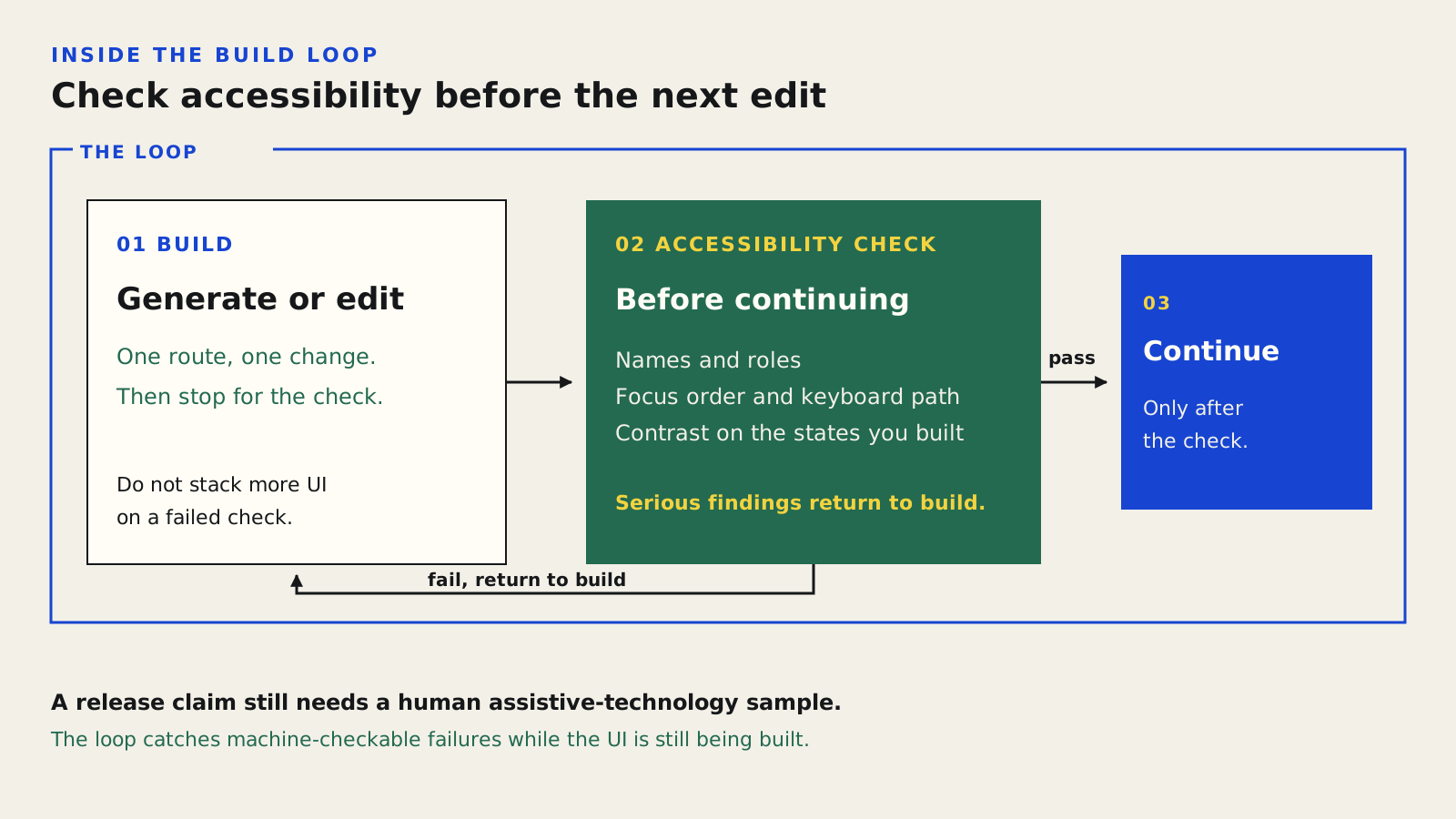
Names, focus, contrast, and keyboard are checked before the agent continues. Serious findings go back to the build. A release claim still needs a human assistive-technology sample.
Section 03
What agents can check while they build
Agents with browser MCP tools can read accessibility snapshots that expose roles, names, and hierarchy without burning tokens on full-page images. axe-core and related engines catch missing names, certain contrast issues, duplicate landmarks, and other machine-detectable failures. Playwright can drive Tab order scripts for critical paths.
Encode design-system rules that prevent common defects: semantic tokens with contrast-safe pairs, Button and Input primitives that already implement focus styles, dialogs that trap focus correctly. The harness does more for accessibility than a heroic prompt at the end of a branch.
- Prefer component primitives with built-in keyboard behavior over div soups.
- Require name + role + value clarity for every interactive control in the brief.
- Run axe on changed routes before asking for visual polish.
- Store a11y snapshots beside screenshots in the review packet.
- Fail the agent loop on serious/critical automated findings.
Section 04
Case study: filter drawer that looked fine
A marketplace team asked an agent to redesign collection filters as a mobile drawer. The first visual pass was tidy: clear chips, a primary Apply button, generous spacing. Screenshot critique almost approved it.
The in-loop a11y pass failed immediately. The drawer used a div with onClick and no dialog role. Focus stayed on the page behind the overlay. Filter checkboxes were styled spans without names. axe reported multiple serious issues; the accessibility snapshot showed no dialog and unlabeled checks. The agent fixed structure before any further visual iteration: Dialog primitive, initial focus on the first filter, Escape to close, labeled inputs, and a focus return to the trigger.
A human then tested with VoiceOver on iOS and found one remaining issue automation missed: the "Apply" button's name did not include the pending filter count, so the AT user lacked the same summary sighted users saw in a badge. That became a product decision, not an axe rule. The loop's value was sequencing — structural repairs happened before the team fell in love with the wrong component tree.
Closed: Filters trigger with focus ring
Open: dialog role + titled drawer
axe: serious unlabeled checkboxes (before)
a11y snapshot: checkbox names present (after)
Keyboard: Tab cycle trapped in drawer
AT note: Apply name should include pending count
Evidence boards should show interaction state, not only a static pretty frame.
Section 05
Automation coverage vs human AT testing
Be explicit about the split so stakeholders do not equate CI green with conformance.
Strong with axe + a11y snapshots
Partial — depends on computed styles and text in images
Partial — scriptable, still needs human sampling
Weak — requires VoiceOver, NVDA, JAWS, etc.
Human judgment
Process + evidence + experts — not an agent badge
Agents accelerate detection of machine-checkable issues; they do not complete accessibility assurance.
Section 06
Briefs that make accessibility actionable
If the brief never mentions the keyboard path, the agent will optimize for the screenshot. Add accessibility acceptance notes beside the visual ones.
User job:
Apply two filters on mobile and see an updated results count.

Visual acceptance:
- Filters open in a drawer
- Applied chips visible on the results header

Accessibility acceptance:
- Trigger button has a clear name including filter state
- Drawer uses a dialog pattern with Escape to close
- Focus moves into the drawer on open and returns on close
- Every filter control has a visible label and accessible name
- Apply announces pending change count to AT users
- No keyboard trap; background inert while open

Out of scope for the agent:
- Claiming WCAG conformance
- Replacing human AT test sessions
Section 07
In-loop agent prompt
Separate generation from accessibility triage only long enough to collect evidence. Do not allow polish commits while serious automated findings remain.
After each UI edit to the filter drawer:

1. Capture desktop and mobile screenshots.
2. Capture an accessibility snapshot of the open drawer.
3. Run axe on the route; save axe.json.
4. Attempt a keyboard-only path for the user job.
5. Return findings with severity blocker|important|polish.
6. Fix blockers and important a11y findings before any visual polish.
7. Do not claim WCAG pass/fail.
8. List questions that need human AT testing.

Evidence paths:
- evals/a11y/filters-open-mobile.png
- evals/a11y/filters-open-snapshot.json
- evals/a11y/axe.json
Section 08
Good vs bad a11y agent behavior
Teams teach agents what "done" means. If done means "looks good," accessibility stays optional.
Good: run axe after every generation pass on changed routes
Good: fix names, roles, focus, then contrast
Good: prefer visible labels; use ARIA as last resort
Good: report automated findings + schedule AT sampling
Good: reuse accessible Dialog primitive from the system
Done criteria determine whether accessibility survives contact with a deadline.
Section 09
Project files for a durable loop
Put accessibility expectations in the harness, not only in a one-off prompt. DESIGN.md should state focus-ring rules and contrast constraints. AGENTS.md should require a11y evidence before review. A small skill can encode the capture commands.
# AGENTS.md (excerpt)

## Accessibility
- After UI changes, run `npm run a11y:changed`.
- Do not mark work review-ready with axe serious/critical open.
- Prefer components/ui Dialog, Button, Input over custom interactive divs.
- Never claim WCAG conformance in commit messages or PR text.

# package.json (excerpt)
{
  "scripts": {
    "a11y:changed": "tsx scripts/a11y-changed.ts",
    "a11y:axe": "tsx scripts/run-axe.ts"
  }
}
Section 10
Risks, limits, and governance
False confidence is the main risk. Automated passes are necessary and insufficient. ARIA misuse can silence tools while harming AT users. Agents may "fix" contrast by lightening brand colors in ways marketing rejects — that is a human tradeoff, not a silent token edit.
EAA and procurement questionnaires will ask for process evidence: how you test, how you remediate, how users report issues. Keep review packets. Record AT sessions. Do not invent compliance theater with screenshots of axe alone.
Scope honestly. Some content (maps, complex visualizations, live media) needs specialist patterns. The loop still helps by forcing early identification of high-risk surfaces instead of discovering them in a lawsuit timeline.
Section 11
Reusable accessibility-in-the-loop workflow
Run this on every agent UI task that changes interactive behavior or structure.
1. Write accessibility acceptance into the brief
2. Generate with system primitives (Button, Input, Dialog, etc.)
3. Capture screenshots + a11y snapshot + axe
4. Triage blockers/important before polish
5. Fix and recapture
6. Human keyboard sample on the critical path
7. Human AT sample before release claims
8. File residual risks explicitly (do not hide them in green CI)
Sources
Sources & further reading
- WCAG 2 overview (W3C WAI)
Official entry point for WCAG standards and supporting documents.
- European Accessibility Act
EU Commission overview of EAA scope and policy context.
- axe-core
Automated accessibility testing engine for in-loop and CI checks.
- microsoft/playwright-mcp
Browser MCP server commonly used for screenshots and accessibility snapshots.
- WAI-ARIA Authoring Practices
Patterns for dialogs, disclosure, tabs, and other interactive widgets.


