Section 01
What the agent is allowed to say
When an agent generates an interface, the most useful question is not "how good is the model?" but "what is it allowed to say?" This week gave us a clean, concrete answer to that question. On 6 November 2026 Vercel announced that Chat SDK agents can stream generative UI using json-render. The pattern underneath it is one every designer working with agents can use today: give the agent a typed catalog of components, and make that catalog the contract.
Section 02
What Vercel actually shipped
According to the changelog, the agent works from a typed catalog of components and writes a JSON spec. json-render converts that spec into a Chat SDK card, and each platform adapter posts it in the platform's native format, such as Block Kit on Slack and Adaptive Cards on Teams. The catalog covers tables, charts, buttons and more, so there is no separate tool to build for each message shape.
Two details matter most for designers:
Validation is built in. The changelog says `toCard` checks every element's props against its component schema and throws a `CardSpecError` for an invalid spec. Each problem gets its own readable issue, so you can send the list back to the model for a corrected spec.
Platform limits can be enforced. Chat SDK adapters degrade content past a platform's caps (the Slack adapter, for example, turns a second table into a code block). Passing `limits` rejects those specs instead.
The underlying json-render project describes the same idea in its catalog documentation: the catalog defines what the AI can generate, and it is your guardrail. Components are defined with Zod schemas for their props, and the project's README says the AI can only use components in your catalog.
Projects to inspect
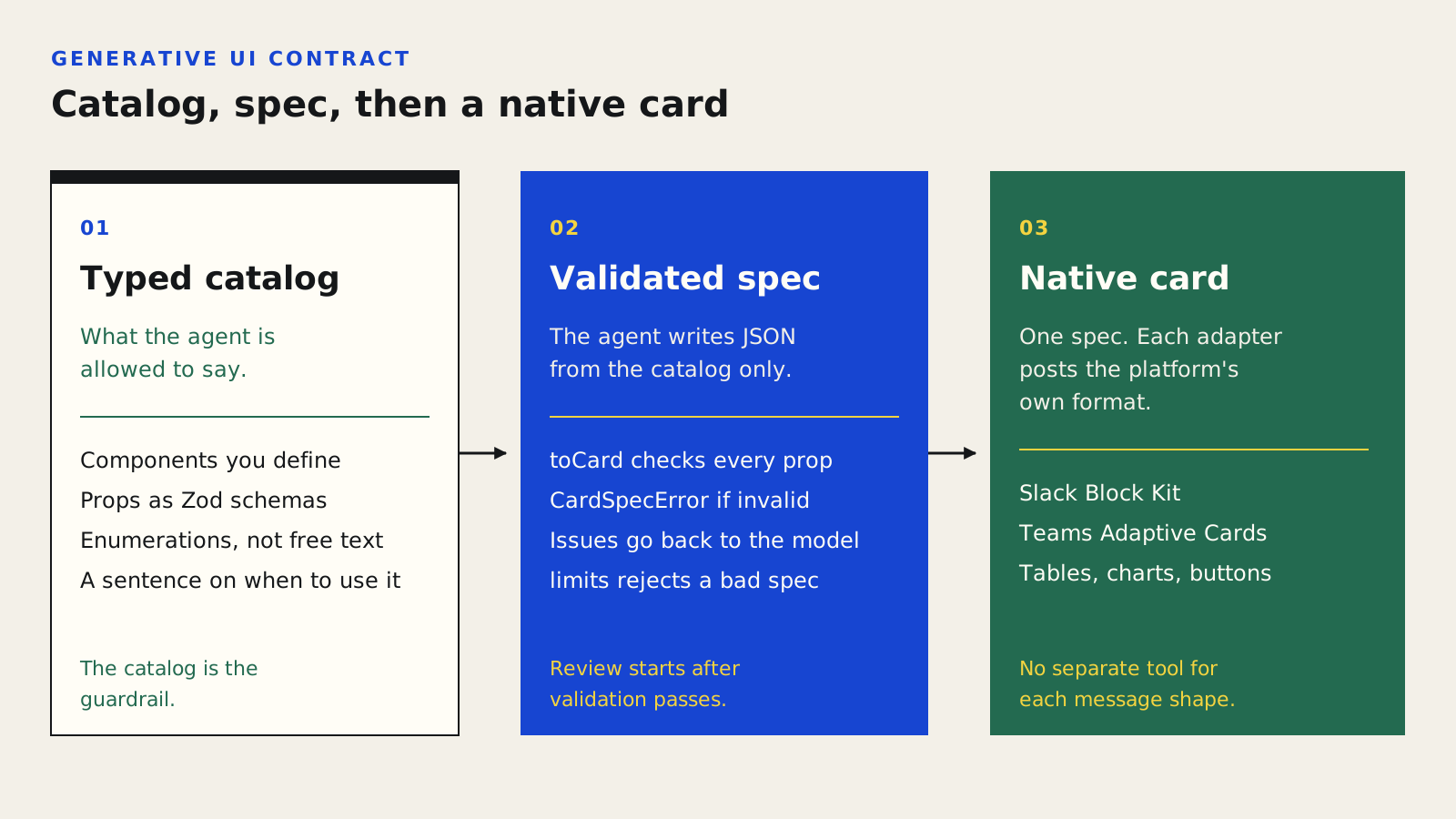
The catalog is the guardrail. The agent writes a JSON spec, toCard rejects an invalid spec, and a platform adapter posts the result in a native format.
Section 03
Why this is a design-system story
If you have built a design system, this should feel familiar. A component library already says which pieces exist, which props they accept and which values are legal. A catalog is that same knowledge written in a form a model can read and a validator can enforce.
That changes what you ask of an agent. Instead of "make something that looks on brand" and then reviewing pixels, you say "compose from these parts" and let the machine reject anything outside them. Review shifts from catching invented components to judging whether the composition solves the user's problem.
We have written before about design tokens as agent instructions. A catalog is the next layer up: tokens constrain values, and the catalog constrains structure.
Section 04
A practical way to try it
You do not need Vercel's stack to use the idea. Here is a small exercise you can do with whatever agent and codebase you already use.
- 1. List the ten components you actually want agents to use. Resist exporting your whole library. A small catalog is easier for a model to use well and easier for you to reason about.
- 2. Write each one as a schema. For every component, name its props, the allowed values (use enumerations instead of free text wherever you can) and a one-sentence description of when to use it. json-render's docs recommend a description so the model understands when a component applies; the same habit helps any agent.
- 3. Add the rules a human reviewer would add. json-render's `catalog.prompt()` accepts custom rules, with examples in its docs such as always using a Card as the root for forms. Write your own equivalents: which component leads a screen, how many primary buttons are allowed, when a table is better than a list.
- 4. Validate before you look. Run every generated spec through a validator and feed errors back to the agent. Only review the result visually once it has passed.
- 5. Keep a failure log. Each time the agent wants a component you have not defined, note it. Either the catalog is missing something real, or the agent is reaching for something it should not.
Section 05
Where it can go wrong
A catalog is a guardrail, not a design critic. It can guarantee that every element is a legal component with legal props. It cannot guarantee that the page is clear, accessible or kind to the person using it. A perfectly valid card full of the wrong information is still a bad card.
The Vercel announcement also describes cards, not full product screens, and platform limits are real. If your design depends on layout the target platform will quietly degrade, enforce limits up front so the failure is visible to the agent rather than to your users.
Finally, a catalog is only as good as the descriptions in it. Vague descriptions produce vague choices. Treat them as product copy that your most literal teammate will read.
Section 06
What to take from this
The lasting lesson is not a particular framework. It is that agent output gets safer and more reviewable when the agent works inside a vocabulary you control, and when invalid output is rejected automatically with messages the agent can act on. That is what good design systems have always aimed for. Agents simply make the contract executable.
Section 07
Go deeper
Design Systems for Agents covers how to express a design system so agents can use it, including the contract thinking in this post.
Agentic Design Fundamentals looks at the wider tool landscape, including design-as-code, where a catalog fits.
Sources
Sources & further reading
- Chat SDK agents can now stream generative UI with json-render
Vercel changelog, 6 November 2026.
- Catalog
json-render documentation.
- json-render on GitHub
vercel-labs.


