Section 01
Coding agents make it work
Coding agents are good at making a prototype work. They are less reliable at making it work the way the web platform now expects. Ask an agent for a dialog, an accordion or a dark-mode toggle and you will often get a pile of JavaScript doing something the browser can now do natively, with weaker keyboard support and more to maintain.
On 10 November 2026, Chrome released Modern Web Guidance 1.0 as stable. It is a set of agent skills that put web-platform guidance, best practices and browser-compatibility data directly into your coding agent. Chrome's announcement says Firefox and Edge are joining the project as well, so it is now a cross-browser effort rather than a single-vendor tool.
This article explains what it is, why it matters for designers who build with agents, and a practical workflow for using it on a prototype before handoff.
Section 02
Why designers should care
Chrome's announcement is direct about the gap: frontier models usually produce something that works, but an expert reviewer can almost always find ways to make it faster, more accessible or more secure. The areas it lists where models fall short read like a design QA checklist.
Most of these are things a designer specifies and then hopes survive implementation: the focus order, the motion that respects reduced-motion settings, the error state that appears after a user interacts and not before. When an agent writes the code, those details are exactly what slip. The announcement also makes a point worth repeating in any design review: bad ARIA can make a page less accessible than no ARIA at all.
For version 1.0, Chrome says every guide had human expert review, and the user-facing guides had a dedicated accessibility review, tested with real assistive technologies.
- Accessibility: keyboard focus and inert management, reduced-motion support and accessible form validation.
- User experience: swipe and touch gestures, dialog and popover transitions, and light/dark theme implementations.
- Performance: main-thread task scheduling, offscreen rendering and layout-shift prevention.
- Security: safe HTML sanitisation, strict Content Security Policies and passkey credential management.
Section 03
What is in the box
Modern Web Guidance has three parts you will use.
A guide library. Roughly 200 guides, each a focused, task-sized answer such as "Animate elements such as dialogs, popovers, and tooltips as they're entering/exiting the top layer." or "Toggle the visibility of a dialog or popover from a button without writing JavaScript." Each guide carries Baseline and browser-compatibility data, so recommendations can follow your project's browser support targets.
A skill your agent loads. Once installed, the agent can search and retrieve guides while it builds, so you do not have to know the right feature name yourself.
A modernization workflow. New in 1.0, `legacy-scan` scans existing HTML, CSS, JavaScript/TypeScript, framework components and package.json for known legacy patterns. Chrome says the scan runs locally with parsers and makes no model calls, and that it currently covers the roughly 20% of guides where legacy code can be detected deterministically.
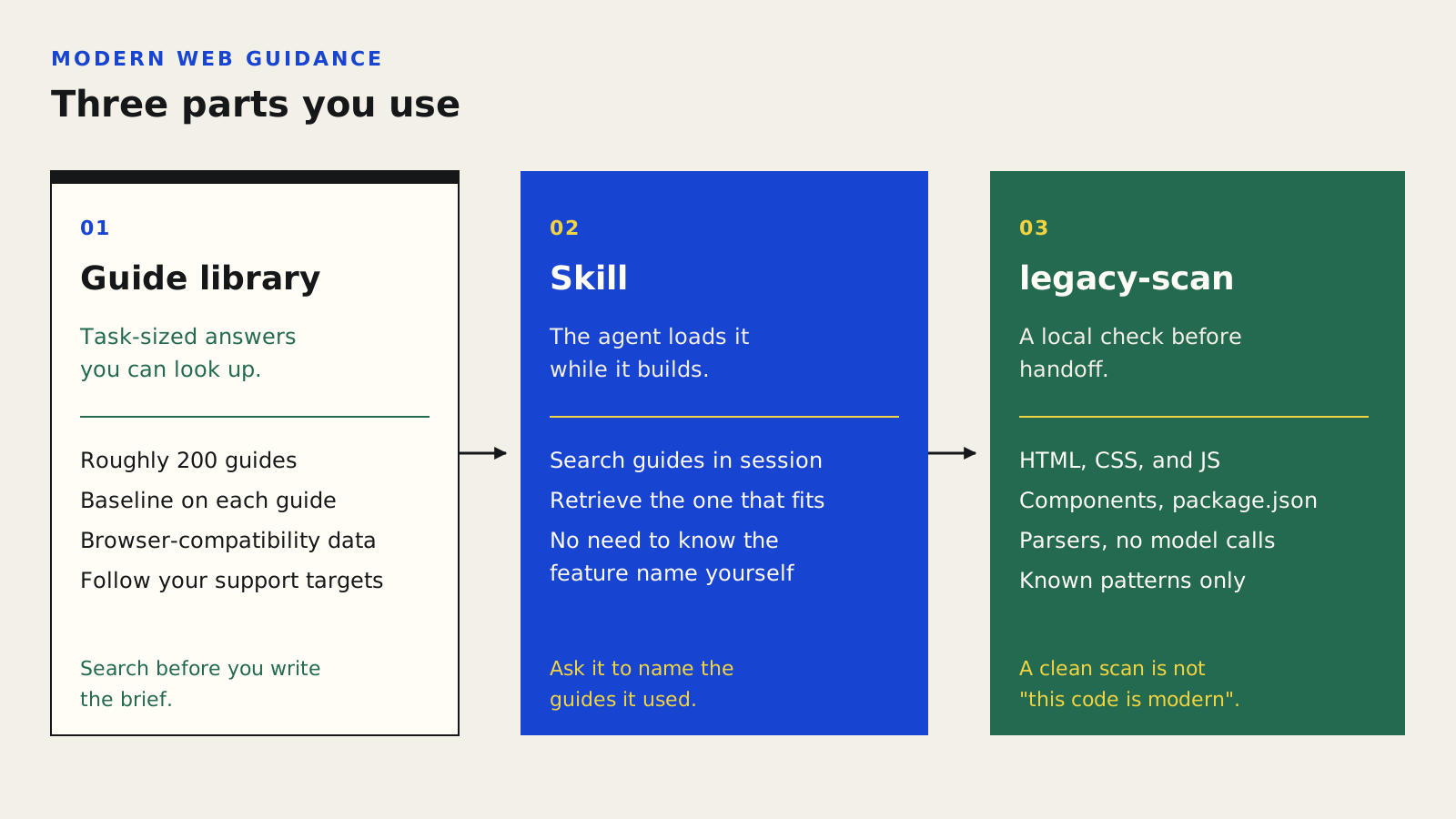
The library is what you can look up. The skill is what the agent loads while it builds. The scan is the local check before handoff.
Section 04
Step 1: Explore before you install
You can try the library without installing anything. From any terminal, search returns a short JSON list of matching guides with an id, a description and the platform features each one uses. Pick the one that matches your intent and retrieve it.
This is useful on its own. Before you write a component brief, search for the interaction you have in mind and skim the guide. You will learn what the platform already does natively, and you can name that feature in your brief rather than leaving the agent to guess.
npx modern-web-guidance@latest search "animate a dialog modal backdrop"

npx modern-web-guidance@latest retrieve "animate-to-from-top-layer"
Section 05
Step 2: Install it into your project
From your project directory, install the skill. The CLI is Chrome's recommended path because it keeps the skill updated. If you prefer your agent's plugin system, the documentation lists per-tool commands. For Claude Code, add the marketplace and install the plugin. The documentation also covers Codex, Gemini CLI, Antigravity, Copilot CLI and several others. If you installed an earlier preview, update to the latest release.
As with any skill, read what you are installing and keep it in version control so the team uses the same version. The Claude Code for Designers course covers how skills load and how to keep them reviewable.
Projects to inspect
npx modern-web-guidance@latest install

# Claude Code
claude plugin marketplace add GoogleChrome/modern-web-guidance
claude plugin install modern-web-guidance@googlechrome

# If you installed an earlier preview
npx modern-web-guidance@latest update
Section 06
Step 3: Put the guidance into your brief
A skill helps most when the brief gives it something to match. Compare a request that only names the drawer and the toggle with one that names the platform features, `prefers-reduced-motion`, focus order, and the guides to check before writing JavaScript.
The last sentence matters. Asking the agent to name the guides it used gives you a trail to review, and makes it obvious when it skipped the guidance.
Build a settings panel with a slide-in drawer and a dark-mode toggle.

Build a settings panel with a slide-in drawer and a dark-mode toggle. Use native platform features where they exist (dialog or popover for the drawer, light-dark() for theme colours). Respect prefers-reduced-motion. Keyboard focus must move into the drawer on open and return to the trigger on close. Check Modern Web Guidance for each interaction before writing JavaScript, and list which guides you used.
Section 07
Step 4: Scan the prototype before handoff
When a prototype is ready to hand to engineering, or when you inherit an older codebase, run the scanner. Or ask the agent in plain language. Chrome's documentation suggests a prompt along the lines of the one below.
Note the order: scan, verify, propose, then edit. Each rule match comes with rubrics that tell the agent when to keep or drop a finding, so intentional fallbacks or `@supports` guards should not be "fixed" away. You should still review the plan before approving changes.
Examples from Chrome's documentation of what the scanner catches are in the table. Several of these are design decisions in disguise. Showing an error before a user has touched a field is a UX problem, not just a code smell.
npx modern-web-guidance@latest legacy-scan .

Modernize this repository using Modern Web Guidance. Scan our frontend files for legacy patterns, verify the findings, and propose a modernization plan before making any code edits.
CSS field-sizing: content
:user-invalid and :user-valid
popover and popovertarget attributes
interpolate-size and calc-size()
CSS light-dark()
Examples from Chrome's documentation. Several are design decisions in disguise: an error shown before a user has touched a field is a UX problem, not just a code smell.
Section 08
Step 5: Verify, don't trust
Guidance improves what the agent writes. It does not prove the result works. Chrome itself recommends pairing Modern Web Guidance with Chrome DevTools for agents, which gives the agent runtime visibility: performance traces, screen recordings of animations and checks such as whether a component honours `prefers-reduced-motion`.
Whatever tools you use, keep the verification step human-owned. Tab through every interactive component and confirm the focus order matches your spec. Turn on reduced motion in your OS and recheck every transition. Compare the built screens against your design at each breakpoint and theme. Check the browser-support target before accepting a modern feature, and confirm a fallback exists where you need one.
The Agentic Prototyping course works through screenshot-to-implementation parity checks in detail, and the Visual QA With Agents article shows how to turn those checks into fix-ready review notes.
Section 09
Limits to keep in mind
Three limits are worth keeping next to the workflow.
- The scanner is deliberately narrow in 1.0. A clean scan means "none of the known patterns were found", not "this code is modern".
- Guidance is only as useful as your brief. If you never mention reduced motion or focus, the agent may not look for it.
- Modern features still have support ranges. The guides carry compatibility data, but your project's targets decide what is acceptable.
Section 10
The takeaway
Modern Web Guidance gives your agent a vetted second opinion on web-platform choices, the kind a senior front-end engineer would give in review. For designers, the practical use is simple: name the platform features in your briefs, ask the agent to cite the guides it used, scan before handoff, and verify the details you care about yourself.
Sources
Sources & further reading
- Modern Web Guidance 1.0
Chrome for Developers, 10 November 2026.
- Get started
Modern Web Guidance documentation.
- Modernization workflow
Modern Web Guidance documentation.
- GoogleChrome/modern-web-guidance
The project on GitHub.


